Critical Alert: Veeam Vulnerabilities (January 2026) & The 5 Steps IT Managers Must Take Now
If you use Veeam for your backups—and in Las Vegas, most enterprise and mid-market businesses do—you need to stop what you are doing and check your version number.
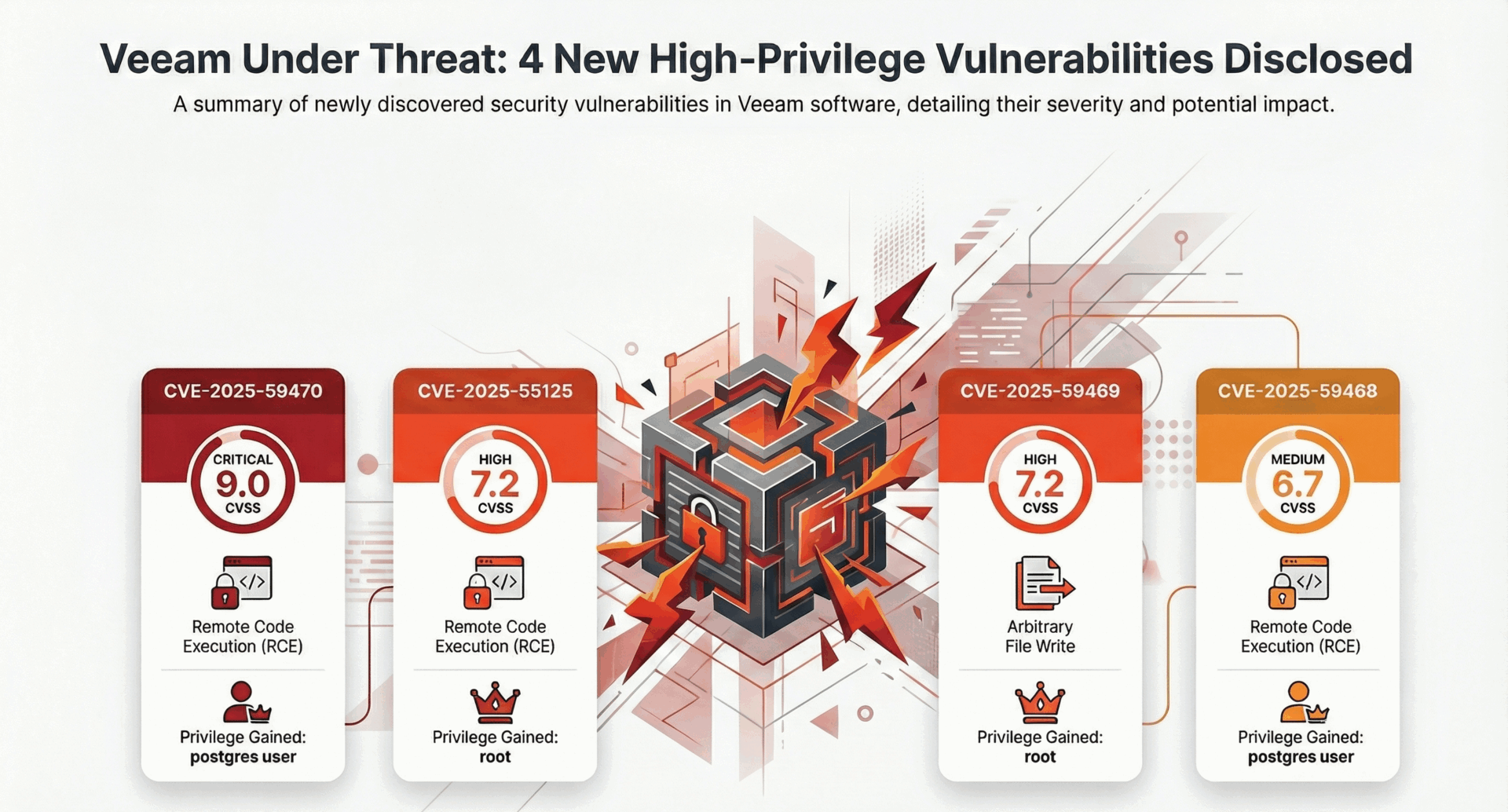
In January 2026, Veeam released critical patches (Version 13.0.1.1071) addressing multiple security flaws. The most severe, CVE-2025-59470, carries a CVSS score of nearly 9. It allows attackers with specific privileges to execute remote code on your backup server.
At CMIT Solutions, we have already patched our managed clients. But if you manage your own backup infrastructure, or if you rely on a vendor who is slow to patch, you are currently exposed. Here is the breakdown of the threat and the practical checklist to secure your data.
The Threat: Why Backup Servers are the New Target
In 2024 and 2025, we saw a shift in ransomware tactics (like the Akira and Fog groups). Hackers stopped just trying to encrypt your production servers. Instead, they started targeting the backup server first.
Why? Because if they control your Veeam server, they control your recovery. They can:
- Exfiltrate Data: Steal historical data before you even know they are there.
- Destroy Restores: Delete your restore points so you have to pay the ransom.
- Pivot: Use the backup server privileges to jump to other critical systems.
The Vulnerability Details (What We Know)
This latest patch addresses flaws in Veeam Backup & Replication 13.x (up to build 13.0.1.180). These aren’t minor bugs; they allow high-privileged roles (like Tape Operators) to:
- Execute code as root or postgres.
- Write arbitrary files inside the backup infrastructure.
- Gain Remote Code Execution (RCE) capabilities.
The IT Manager’s Checklist: 5 Steps to Take Today
You cannot treat your backup server as “set it and forget it.” It is a Tier-1 security asset. Here is your immediate action plan:
1. Patch Immediately
Update your Veeam Backup & Replication to version 13.0.1.1071 or later. Do not wait for your next scheduled maintenance window. Treat this as an emergency change control.
2. Audit Your “Backup Roles”
The CVE exploits specific roles like “Tape Operator” or “Backup Administrator.”
Action: Review who has these permissions. Does a junior tech need full Backup Admin rights? If not, remove them. Follow the Principle of Least Privilege.
3. Network Segmentation (Air-Gapping)
Your backup server should not be sitting on the same subnet as your user workstations. It should be isolated.
Action: Place your backup infrastructure in a restricted VLAN with tight firewall rules. Only specific management ports should be open.
4. Enable Immutable Backups
This is your “Get Out of Jail Free” card. Immutability means that even if a hacker (or a rogue admin) tries to delete your backups, the storage array literally will not let them.
Action: Ensure your Linux Hardened Repositories or Object Storage buckets have Object Lock enabled.
5. Test Your Restore (Not Just the Backup)
A green checkmark on a backup job means nothing if the file is corrupt.
Action: Run a “SureBackup” test today. Spin up a VM from your latest backup to verify it actually boots.
Don’t Face the Risk Alone
Backup management is becoming a full-time security job. If you are unsure if your environment is patched, or if you need help configuring Immutable storage, we can help.
Get a Backup Security Audit. We will review your Veeam configuration, check for the CVE-2025-59470 vulnerability, and verify your immutability settings.