
A managed IT services provider is ready for remote work only if it delivers secure remote access, monitored endpoint protection, and live support to employees outside the office, not just inside it. Many Winchester-area businesses shifted staff home quickly, and this is a good moment to check whether their IT support has kept pace.
Key Takeaways:
- A remote-ready managed IT services provider covers secure access, endpoint monitoring, and cloud infrastructure for Winchester-area businesses, not just in-office support
- Phishing drove over $12.5 billion in reported losses in 2023, according to the FBI’s Internet Crime Complaint Center
- VPN for remote employees should pair with multi-factor authentication, since a VPN alone does not verify who is connecting
- Endpoint security for remote devices must extend to every laptop, phone, and home router touching company data
- IT support pricing for remote teams is typically billed per user monthly, easier to budget than emergency break-fix calls
- Gallup research shows most remote-capable employees now expect hybrid flexibility, so office-only IT support is already outdated
Why Managed IT Services Must Evolve for Remote Teams
Traditional IT support was built for one office, one network, one firewall. That model falls apart the moment employees start connecting from home Wi-Fi, a coffee shop, or a second location out in the Shenandoah Valley.
Managed IT services built for a distributed team look different from a standard office contract, extending coverage to every device and connection point an employee uses. Businesses that added remote staff after 2020 often kept their old arrangement in place, and unmonitored home networks quietly became the weakest point in the business.
Read More About: Network Security Threats Hitting Virginia in 2026
Not Sure If Your IT Setup Covers Remote Staff?
We can help you find out. Get a free assessment of your remote access, device security, and support coverage from a local team that knows the Shenandoah Valley.
What Remote Workforce Security Risks Should Your Provider Address?
A remote-ready provider needs to address unmanaged home networks, unpatched devices, and phishing aimed straight at Winchester remote workers, entry points that never existed inside a monitored office.
Remote workforce security risks defined:
These are the extra exposure points that show up when employees connect from outside a monitored office, weak home Wi-Fi, unpatched devices, phishing aimed at remote workers.
According to the FBI’s Internet Crime Complaint Center, phishing stayed the most reported cybercrime in 2023, adding up to more than $12.5 billion in losses. CISA’s telework guidance calls out unmanaged home routers, weak points office-based support never had to worry about.
Biggest remote workforce security risk:
Unmanaged home networks and personal devices are the top entry point for attacks on remote employees, since they sit outside the monitoring and patching that protects an office network.
A capable remote IT support partner should tell you which devices are patched and which accounts lack multi-factor authentication.
What Does Secure Remote Access for Remote Employees Require?
Secure remote access means an encrypted VPN connection paired with multi-factor authentication. Getting Winchester employees online from home is only half the job; connecting them securely protects the business.
Secure remote access defined:
This is the practice of letting employees reach business applications and systems from outside the office in a way that verifies who they are and encrypts the connection, instead of opening a door and hoping the right person walks through it.
A properly configured VPN encrypts traffic between a home connection and the business network, so no one on public Wi-Fi can intercept data. But a VPN alone only confirms the connection is encrypted, not who’s using it, which is why multi-factor authentication needs to sit alongside it as a standard.
Read More About: Microsoft 365 Small Business Setup & Security Guide
Give Remote Employees Access Without the Risk
We set up secure VPN access and multi-factor authentication so your team can work from anywhere, without putting company data at risk.
Cloud-Based IT Infrastructure That Supports Hybrid Work
Remote and hybrid teams depend on systems that do not care where an employee is sitting. Cloud-based IT infrastructure gives every remote employee the same access to files and business systems whether they are in the Winchester office, working from home, or traveling for a client meeting.
Endpoint Security for Remote Devices
Every laptop, phone, and tablet your employees use is a potential entry point once it leaves the office firewall.
Endpoint security for remote devices defined:
This is protection installed directly on individual devices, watching for malicious activity and isolating a threat in real time, no matter the network. A device on an unprotected home network is still exposed to the same malware and phishing links as one in office.
According to Gallup research, most remote-capable employees now expect ongoing hybrid flexibility, making endpoint security a permanent requirement for Shenandoah Valley , Winchester businesses, not a temporary one.
How Much Does Managed IT Services Cost for Remote Support?
Managed IT services cost for remote support usually comes down to a predictable monthly fee per user or device, covering monitoring, help desk support, security tools, and patching, which makes budgeting easier than hourly break-fix rates.
Remote IT support for Winchester small business teams can even cut costs, since remote employees no longer need the same on-site hardware or office space. The real comparison is proactive support against the cost of downtime once a laptop becomes an entry point.
Average managed IT services cost for a small business: A predictable per-user monthly fee that bundles monitoring, help desk support, and security tools together, typically far lower than the cost of a single major security incident or extended outage.
Get a Clear, Predictable Price for Remote IT Support
No surprise bills, ever. Our managed IT services plans cover office and remote employees under one predictable monthly cost.
How to Evaluate an IT Provider for Remote Employees
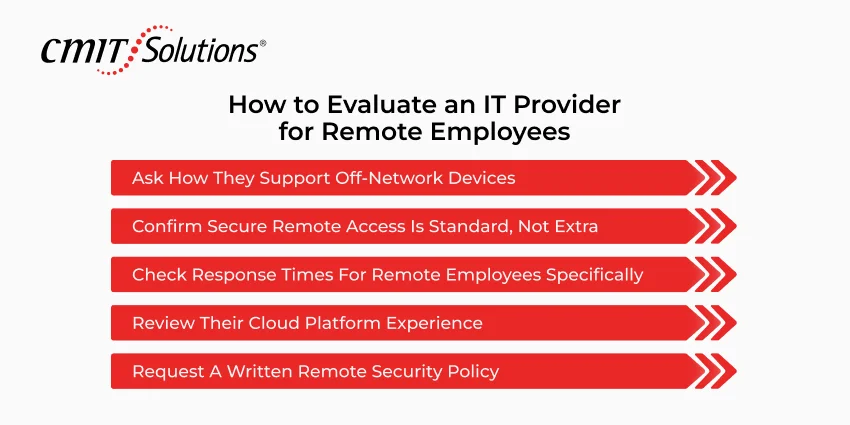
Winchester-area businesses evaluating a managed service provider for remote support should run through these five checkpoints before signing. Finding the right fit up front beats discovering the wrong one after employees are relying on it.
Step 1: Ask How They Support Off-Network Devices
Ask your provider how they monitor and patch devices that never touch the office network. An answer focused on office hardware signals a gap.
Step 2: Confirm Secure Remote Access Is Standard, Not Extra
Confirm VPN access and multi-factor authentication come standard, not as a paid add-on.
Step 3: Check Response Times for Remote Employees Specifically
Ask what happens when a remote employee hits a technical issue on a Monday morning. A provider without a clear process leaves them stuck.
Step 4: Review Their Cloud Platform Experience
Review the provider’s experience managing the cloud platforms your business relies on daily.
Step 5: Request a Written Remote Security Policy
Request a written policy covering endpoint requirements, access controls, and incident response. If a provider cannot produce one, they have not built remote work into their process.
Conclusion
Remote and hybrid work aren’t going away for most Winchester-area businesses, and IT support built for a single office doesn’t keep a distributed team protected anymore. Running a business without that gap on your mind is the whole point.
We get why this can’t be one more thing on your plate. CMIT Solutions Northern Shenandoah Valley provides managed IT services Winchester VA businesses can count on, for secure remote access, endpoint protection, and support wherever your team works.
If you’re not confident your current provider has your remote team covered, contact our Winchester team to schedule a free remote work readiness assessment. We can help you find the right fit, no pressure at all.
FAQs
What should a managed IT provider offer for remote workers?
A managed IT provider for remote workers should offer secure VPN access, multi-factor authentication, endpoint protection, cloud management, and a help desk built for remote employees.
How do I know if my IT company can support remote employees?
Ask your provider how they monitor off-network devices, whether secure remote access comes standard, and how fast a remote employee gets help when something breaks.
Is my remote team’s data secure with my current provider?
Your remote team’s data is probably at risk if your provider cannot confirm multi-factor authentication is active, devices are patched remotely, and home connections run through a managed VPN.
What questions should I ask my IT provider about remote work?
Ask how off-network devices get monitored, whether secure access tools are standard, what remote response times look like, and whether they have a written remote security policy.
How much does managed IT services cost for a remote or hybrid team?
Managed IT services cost is usually billed per user or device each month, covering monitoring, security tools, and support no matter where your team works, which most businesses find predictable.