
Construction has always been a race against time. Weather, labor shortages, supply chain hiccups, and permitting delays can throw even the best-planned project off schedule. But in 2026, a new factor is separating firms that hit their deadlines from those that don’t: technology.
Birmingham’s construction industry is booming, with commercial developments, infrastructure upgrades, and residential projects popping up across the metro. Firms that once relied on paper blueprints, radio check-ins, and manual spreadsheets are now turning to connected devices, cloud platforms, and automated monitoring tools to keep projects on track. The result is fewer surprises, faster decision-making, and measurably shorter timelines.
This shift isn’t just about buying gadgets. It’s about building a technology foundation that supports every phase of a project, from bidding to final walkthrough. Companies like CMIT Solutions of Birmingham work directly with construction firms to design that foundation, helping them avoid the costly delays that come from disconnected systems, unreliable networks, and reactive IT support.
Below, we break down exactly how smart technology is reshaping construction timelines, what tools are making the biggest difference, and how firms can start building a more resilient tech strategy.
Why Project Delays Are So Costly for Construction Firms
Before diving into solutions, it helps to understand the scope of the problem. Delays don’t just push back a completion date. They ripple through every part of a project.
- Labor costs continue accumulating even when work has stopped
- Equipment rental fees pile up during idle periods
- Subcontractor schedules get thrown off, creating a domino effect across trades
- Material costs can rise if a delay pushes procurement into a period of price volatility
- Client relationships suffer, especially on fixed-bid contracts with penalty clauses
- Bonding and insurance costs may increase for firms with a pattern of missed deadlines
Industry studies have consistently shown that a significant share of delays trace back to poor information flow rather than physical obstacles. When a foreman doesn’t have the latest drawing revision, when a project manager can’t reach the site superintendent, or when data about equipment usage lives in three different spreadsheets, decisions slow down. Smart technology closes those gaps.
The Core Technologies Driving Faster, Smoother Projects
Cloud-Based Project Management Platforms
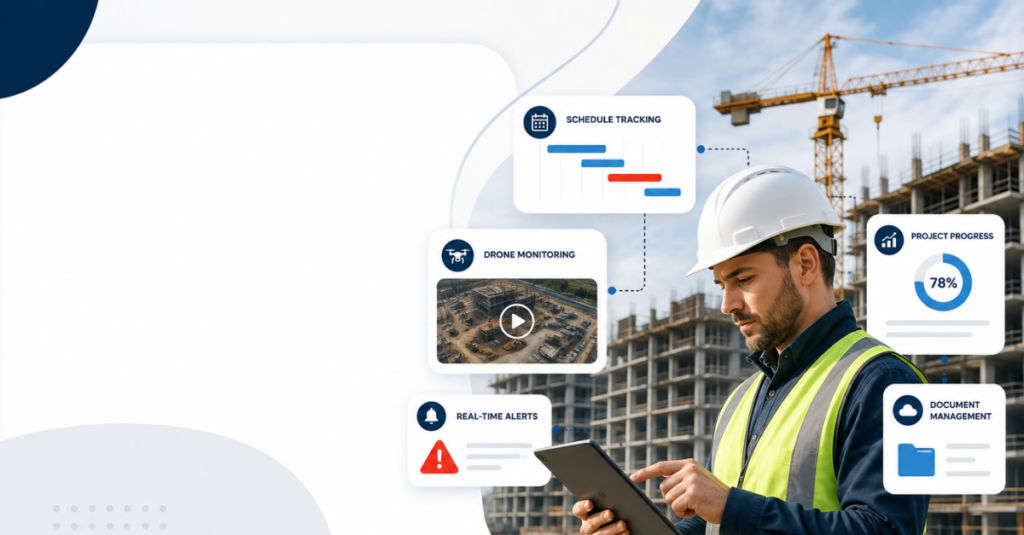
Paper plans and email threads are no longer fast enough for the pace of modern construction. Cloud platforms give every stakeholder, from the general contractor to the electrical subcontractor, access to the same real-time information.
With a properly configured cloud based solutions environment, teams can:
- Share updated drawings instantly instead of waiting for a printed set
- Track RFIs (requests for information) and get faster responses from architects
- Log daily progress reports directly from the field
- Centralize submittals, change orders, and inspection reports in one searchable location
The benefit isn’t just convenience. It’s speed. A change order that used to take three days to circulate can now be approved in hours because everyone is working from the same source of truth.
IoT Sensors and Equipment Tracking
Internet of Things (IoT) sensors have become one of the most practical tools on modern job sites. Small, affordable sensors can now be attached to heavy equipment, materials, and even structural elements to monitor conditions in real time.
Common applications include:
- Equipment utilization tracking to reduce idle machine time
- Concrete curing sensors that measure temperature and moisture to confirm strength before crews move to the next phase
- Fuel and fluid monitoring to catch maintenance issues before a breakdown halts work
- Geofencing alerts that flag when equipment leaves a designated site boundary
This kind of monitoring depends on a stable, secure connection between devices and the platforms analyzing their data. That’s why firms need dependable network management services built specifically to handle the volume of connected devices found on active job sites.
Mobile Connectivity and Field Access
A superintendent standing in an unfinished building shouldn’t have to drive back to a trailer to pull up a drawing. Mobile access to project data has become one of the simplest but most impactful upgrades a construction firm can make.
With the right setup, field teams can:
- Pull updated plans and specs directly on a tablet or phone
- Submit daily logs, safety checklists, and photos from the site
- Communicate with the office in real time instead of relying on end-of-day calls
- Flag issues immediately with photo documentation, cutting down on miscommunication
This only works reliably when the underlying technology is dependable. Firms that invest in business technology support designed for mobile and field-heavy operations see far fewer communication breakdowns than those relying on consumer-grade tools.
AI-Powered Scheduling and Predictive Analytics
Artificial intelligence has moved beyond hype and into practical scheduling tools that construction firms use every day. Predictive analytics platforms can analyze weather patterns, subcontractor performance history, and material lead times to flag potential delays before they happen.
Some of the ways firms are using this:
- Forecasting weather-related downtime and adjusting sequencing in advance
- Identifying subcontractors with a pattern of late starts before they’re assigned to critical-path tasks
- Predicting material delivery delays based on supplier performance data
- Automatically re-sequencing tasks when a delay is detected upstream
These tools require a stable data infrastructure and consistent predictive network monitoring to function properly. Without reliable connectivity, even the smartest scheduling software can’t deliver accurate, real-time recommendations.
Drones and Remote Site Monitoring
Drones have quickly become a standard tool for site inspections, progress documentation, and safety monitoring. A single drone flight can capture data that would otherwise take a crew hours to gather manually.
Practical uses include:
- Weekly progress flights compared against the project timeline
- Topographic surveys that reduce the need for manual land surveying
- Safety audits that identify hazards without putting a person at risk
- Volumetric measurements for earthwork and material stockpiles
The footage and data these drones capture need somewhere secure to live, which is where dependable reliable data backup systems come into play. Losing months of progress documentation because of a hardware failure can set a project back just as much as a physical delay.
Job Site Connectivity: The Overlooked Bottleneck
Many construction firms invest heavily in software and hardware but overlook the network infrastructure that everything else depends on. A job site with spotty Wi-Fi or an overloaded cellular connection can undo the benefits of even the best project management platform.
This is a particularly common issue for firms working across multiple active sites at once, where connectivity conditions vary from location to location. Slow or unreliable networks translate directly into lost productivity, as detailed in this breakdown of field team connectivity issues affecting construction crews.
Firms addressing this typically invest in:
- Temporary site network setups that can scale up or down as a project progresses
- Redundant connectivity options in case a primary connection fails
- Prioritized bandwidth for critical applications like video calls and file transfers
- Regular performance monitoring to catch degradation before it causes delays
A well-planned network security solutions strategy ensures that as more devices connect to job site networks, those connections remain both fast and protected from outside threats.
Cybersecurity: A Growing Risk for Construction Firms
Construction companies handle a surprising amount of sensitive data, including client financial information, project bids, employee records, and building schematics. As firms adopt more connected technology, they also become more attractive targets for cybercriminals.
Ransomware attacks against construction and infrastructure firms have risen sharply in recent years, partly because these companies often operate with fewer dedicated IT security resources than other industries. A successful attack can freeze project management systems, lock access to critical drawings, and halt payroll, all of which directly cause project delays.
Modern attackers are also getting more sophisticated. Reviewing the modern ransomware tactics currently targeting small and mid-sized businesses can help firms understand what they’re up against and where their defenses might be weak.
Steps construction firms should take include:
- Implementing multi-factor authentication across all project management platforms
- Segmenting job site networks from core business systems
- Training field and office staff to recognize phishing attempts
- Establishing an incident response plan before an attack happens, not after
Firms working with a partner that offers dedicated cybersecurity protection services are far better positioned to prevent an attack from turning into a project-halting emergency. And if the worst happens, having strong ransomware protection strategies already in place can mean the difference between a minor disruption and weeks of lost time.
Data Protection and Disaster Recovery on Active Job Sites
Construction data is more vulnerable than many firms realize. Between drone footage, drawings, inspection reports, and financial records, a single hardware failure or ransomware attack can wipe out months of work if there isn’t a solid backup strategy in place.
Consider how much project data actually exists across a typical job:
- Architectural drawings and revision history
- Permit documentation and inspection reports
- Subcontractor contracts and change orders
- Equipment logs and maintenance records
- Photo and video documentation of progress
Losing any of this can cause real delays, and losses often happen quietly, as explored in this look at silent data loss risks that many firms don’t notice until it’s too late. A proactive approach to protecting project data, discussed further in this piece on protecting project data, starts with a clear backup and recovery plan.
A strong disaster recovery plan should include:
- Automated, encrypted backups of all project data
- A tested recovery process, not just a backup that’s never been verified
- Redundant storage locations so a single point of failure doesn’t wipe everything out
- Clear recovery time objectives so the team knows how quickly systems can be restored
Firms building this kind of resilience often turn to structured disaster recovery planning to make sure a technology failure never becomes a project failure.
Compliance and Documentation Automation
Construction firms face a growing list of regulatory requirements, from OSHA safety documentation to environmental compliance and municipal permitting rules. Manually tracking all of this creates room for error and, ultimately, delay.
Smart technology is helping automate much of this burden:
- Digital safety checklists that flag incomplete items in real time
- Automated document retention that meets regulatory timelines
- Centralized audit trails that make inspections faster and less stressful
- Alerts for upcoming permit renewals or required certifications
A firm with strong regulatory compliance support can avoid the kind of last-minute scramble that stalls a project when an inspector shows up and documentation isn’t ready.
The Real Cost of Ignoring Technology Upgrades
Some firms hesitate to invest in new technology because the upfront cost feels hard to justify against a tight project budget. But the cost of standing still is often higher than the cost of upgrading.
Downtime caused by outdated systems, whether it’s a crashed server, a network outage, or a lost file, adds up quickly. One detailed analysis of the cost of downtime found that even short outages can translate into thousands of dollars in lost productivity, missed deadlines, and frustrated clients.
Firms that delay technology investments often run into:
- Software that no longer integrates with modern project management tools
- Hardware that fails at the worst possible moment, mid-project
- Security vulnerabilities that go unnoticed until an attack occurs
- Staff frustration and turnover caused by clunky, outdated systems
Building a Long-Term Technology Strategy
The firms seeing the biggest reductions in project delays aren’t just buying individual tools. They’re building a coordinated technology strategy that ties everything together, from job site connectivity to office systems to long-term data protection.
This kind of planning is best approached proactively rather than reactively. A firm that waits until a system fails to think about IT strategy is already behind. Building a long term technology planning approach means:
- Reviewing technology needs annually against project growth
- Budgeting for upgrades before systems become obsolete
- Standardizing tools across projects so training and support stay simple
- Working with a technology partner that understands construction workflows specifically
A comprehensive strategic technology consulting relationship gives construction firms a roadmap instead of a series of one-off fixes. This is especially valuable for firms managing multiple active projects at once, where inconsistent technology across sites creates confusion and slows communication.
Cloud Sprawl and System Visibility
As firms adopt more cloud tools, from project management software to accounting platforms to communication apps, it’s easy to lose track of what’s actually being used and who has access to it. This is sometimes called cloud sprawl, and it creates both security risks and inefficiency.
Without a clear picture of every system in use, project managers can struggle to get accurate, unified reporting. This lack of clarity is covered in more detail in this discussion of system visibility challenges many growing businesses face.
Getting ahead of this requires:
- Auditing all cloud subscriptions and platforms currently in use
- Consolidating redundant tools where possible
- Setting clear access permissions tied to project roles
- Reviewing cloud sprawl management practices regularly as new tools get added
Firms that get this right end up with fewer dashboards to check and a much clearer picture of project status at any given moment.

Choosing the Right IT Partner for Construction
Construction technology has unique demands. Job sites are temporary, connectivity is inconsistent, teams are mobile, and the stakes for downtime are high. A generic IT provider that primarily serves office-based businesses may not understand these challenges.
When evaluating a technology partner, construction firms should look for:
- Experience supporting field-based and multi-site operations
- A proven track record with managed IT solutions tailored to project-based work
- Responsive support that understands job sites can’t afford long outages
- A proactive approach rather than a break-fix model
Firms offering proactive technology management catch small issues before they become expensive problems. This is a very different experience from a provider that only shows up after something has already gone wrong.
It’s also worth asking whether a provider offers modern IT solutions built around today’s mobile, cloud-first construction environment, rather than legacy systems designed for static office settings.
Business Continuity Planning for Multi-Site Operations
Construction firms rarely operate out of a single location. Between the main office, active job sites, and equipment yards, technology needs to work consistently across every location a firm touches.
A solid business continuity planning approach ensures that if one location experiences an outage, whether from a storm, a power failure, or a cyber incident, the rest of the business can keep operating. This matters enormously for construction firms juggling multiple deadlines at once.
Key elements of a strong continuity plan include:
- Clear failover procedures for critical systems
- Backup internet connections for both office and field locations
- Defined communication protocols during an outage
- Regular testing to confirm the plan actually works under pressure
Outsourcing IT vs. Building an In-House Team
Many mid-sized construction firms face a decision: hire an internal IT team or work with an outside provider. Both paths can work, but outsourcing has become increasingly popular because it gives firms access to a broader range of expertise without the overhead of full-time salaries and benefits.
Benefits of outsourced technology support include:
- Access to specialists in networking, cybersecurity, and cloud infrastructure without hiring separately for each
- Predictable monthly costs instead of unpredictable emergency repair bills
- Faster response times backed by a full team rather than a single in-house employee
- Scalability as the firm takes on more projects or opens new locations
For firms that want the reliability of a dedicated partner, dependable IT services built around construction workflows offer much of the benefit of an in-house team without the staffing challenges.
Managed Cybersecurity as a Competitive Advantage
Clients, especially on large commercial and government-adjacent projects, increasingly want assurance that their contractors take data security seriously. Firms that can demonstrate strong protections are winning more bids, particularly on projects involving sensitive infrastructure.
Investing in managed cybersecurity services isn’t just about avoiding an attack. It’s becoming a differentiator during the bidding process itself, as more clients add cybersecurity questionnaires to their vendor selection criteria.
Training Field Crews on New Tools
Even the best technology fails if the people using it don’t trust it or understand how it works. Construction crews are often juggling tight deadlines and physical demands on top of learning new software, so rollout matters just as much as the tool itself.
Firms that see the smoothest adoption tend to:
- Introduce one new tool at a time instead of overwhelming crews with multiple changes at once
- Assign a point person on each crew who can answer quick questions in the field
- Keep training sessions short and hands-on rather than long classroom-style meetings
- Gather feedback after the first few weeks and adjust before rolling out to additional sites
A provider offering responsive IT support can also help bridge the gap during rollout, fielding questions from crews directly instead of routing everything through a busy project manager.
Hidden Inefficiencies That Quietly Slow Projects Down
Not every source of delay is obvious. Some of the biggest time losses come from small inefficiencies that build up over weeks or months without anyone noticing until a deadline is already at risk.
Common culprits include:
- Duplicate data entry across disconnected systems
- Staff spending time searching for files instead of working
- Outdated hardware that slows down basic tasks like opening drawings
- Manual processes that could easily be automated, such as approval routing
These issues are explored further in this breakdown of hidden efficiency drains that affect growing companies across industries, including construction. Identifying and fixing these small friction points often has a bigger cumulative impact on project timelines than any single piece of new technology.
Practical Steps to Start Reducing Delays Today
Firms don’t need to overhaul everything overnight. A phased approach tends to work best:
- Start with a technology audit to understand current gaps and risks
- Prioritize network reliability at active job sites before adding new software
- Standardize a single project management platform across all teams
- Put a tested backup and recovery plan in place
- Train field staff on new tools before rolling them out fully
- Review and adjust based on what’s actually improving timelines
Firms following structured technology roadmap planning tend to see faster, more measurable results than those trying to adopt everything at once.
Final Thoughts
Project delays will never disappear entirely from construction. Weather, permitting, and supply chains are largely out of anyone’s control. But the delays caused by poor communication, unreliable systems, and reactive technology decisions are entirely preventable.
Firms that invest in connected job sites, reliable networks, strong data protection, and a proactive technology strategy are consistently finishing projects closer to schedule and with fewer costly surprises. CMIT Solutions of Birmingham works with construction firms across the metro to build exactly this kind of technology foundation, one that supports crews in the field just as well as it supports the office.
If your firm is ready to talk through where technology gaps might be creating delays, schedule a consultation to start the conversation.
Frequently Asked Questions



