Multi-factor authentication works on a simple principle: combining something you know (like a password) with something you have (like your phone) or something you are (like a fingerprint). This layered approach means that even if a hacker steals your password, they still can’t access your account without the second factor.
With phishing scams, credential stuffing, and brute-force attacks on the rise, implementing MFA is one of the most effective security measures you can take. It’s a foundational element of a modern cybersecurity strategy for both individuals and businesses.
RANKING MFA TOOLS: FROM STRONGEST TO WEAKEST
When it comes to protecting your digital identity, not all MFA methods offer the same level of security. Here’s a breakdown of the most common MFA approaches, ranked from most robust to least reliable, along with explanations, advantages, drawbacks, and why each is ranked where it is.
This chart outlines the relative effectiveness of various MFA methods in securing your digital accounts, providing insights into their strengths, vulnerabilities, and usability.
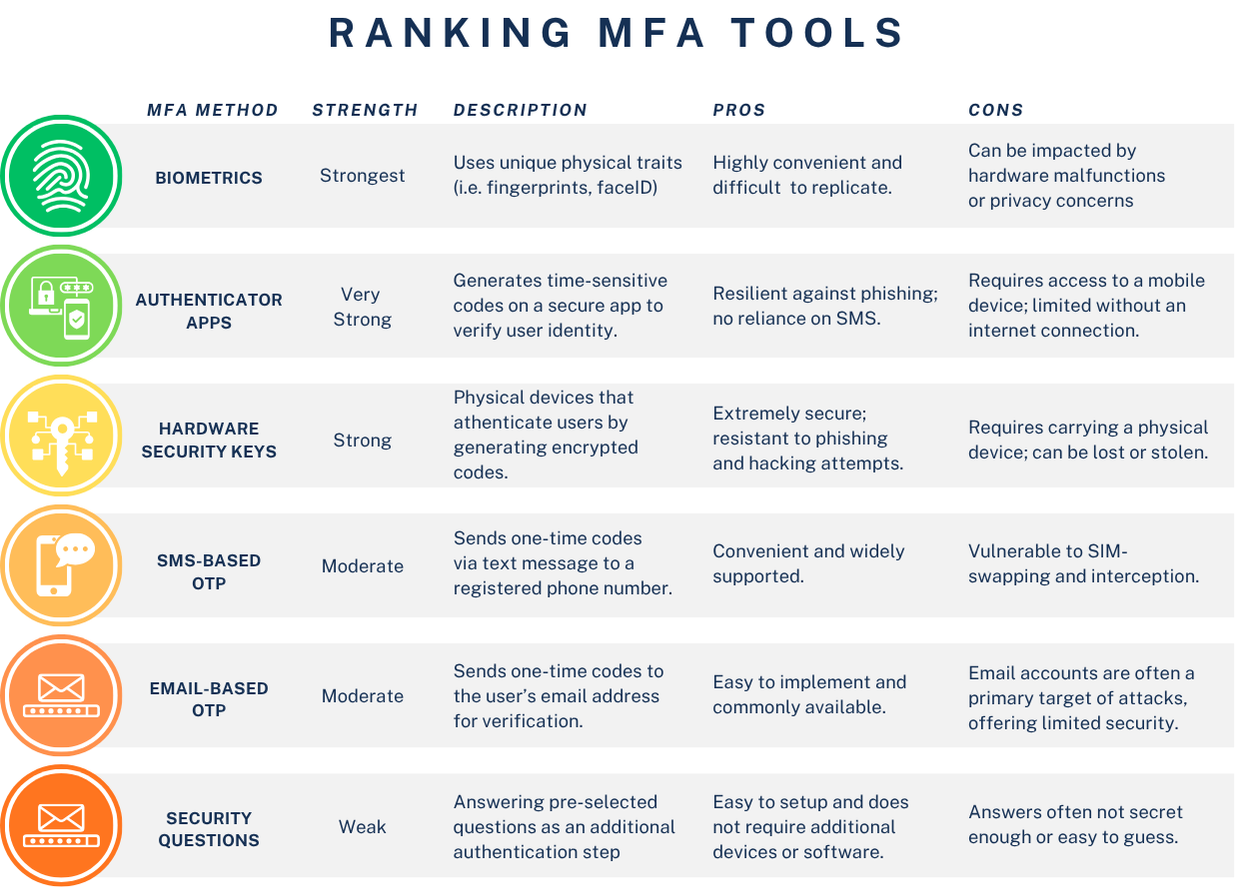
BIOMETRICS & AUTHENTICATOR APPS
Biometrics
Biometric authentication uses your unique biological traits—like facial ID features or fingerprints—to verify your identity. Biometric authentication offers a highly secure and convenient way to verify identity, as it utilizes unique traits that are difficult to replicate or steal. Additionally, it eliminates the need to remember passwords or carry physical tokens. However, it comes with some drawbacks, including potential privacy concerns and vulnerability to data breaches if biometric data is stolen. This method also relies on hardware compatibility, which may not be universally available.
Authenticator App
Standalone MFA apps like Google Authenticator, Microsoft Authenticator, and Duo, are app-based authenticators that provide a high level of security by generating time-based one-time passcodes (TOTP) that change every 30 seconds, minimizing the risk of interception. They are reliable, accessible offline, and compatible with various platforms, offering flexibility to users. However, their effectiveness relies on device security; if the smartphone or device hosting the app is compromised, the codes can also be at risk. Additionally, losing access to the device may lead to challenges in account recovery, making proper backup methods essential.
Why they rank highest: Biometrics provide a physical factor that is unique to individuals and nearly impossible for attackers to replicate, making them the gold standard in MFA security. Authenticator apps provide robust, encrypted codes that cannot be intercepted remotely. They strike an excellent balance between security and usability.
Hardware MFA Devices
These physical devices must be inserted into or tapped against your computer or phone as a second authentication step. Hardware MFA devices, such as YubiKeys, offer unmatched security as they are resistant to phishing and remote attacks, ensuring that only someone with physical access to the device can authenticate. They are straightforward to use once set up and do not rely on internet connectivity or battery life. However, these devices can be costly compared to other MFA methods and may pose challenges if lost, stolen, or damaged, as account recovery processes can be cumbersome. Nonetheless, for individuals and organizations requiring the highest level of security, they remain an excellent choice.
Why it ranks well: Hardware tokens are powerful protection against remote attacks, but the potential for physical theft or misplacement keeps them just below app-based solutions.
SMS and Email-Based Codes
This form of security sends a code by text or email, which you must enter to log in. While text message (SMS) and email-based codes provide convenience and accessibility, allowing users to authenticate without additional hardware or software, they are less secure compared to other methods. These codes can be intercepted through SIM swapping, phishing attacks, or email account breaches, making them susceptible to exploitation. Their simplicity and widespread usability, however, make them a popular choice for basic, low-risk scenarios.
Why it ranks acceptable: While still better than a single password, SMS and email methods are much weaker due to interception risks and social engineering attacks.
Security Questions
The traditional old school form of MFA, also known as, security questions. Here you answer a set of personal questions as an additional authentication step. Security questions offer an additional authentication step by requiring answers to personal questions. On the positive side, they are easy to set up and do not require additional devices or software, making them accessible to most users. However, they are considered weak on security since answers can often be guessed, obtained through social engineering, or researched online, especially if the questions are generic or the answers are tied to publicly available information.
Why it ranks average: Security questions should never be relied upon as a primary form of MFA. The answers are often not secret or unique enough to offer real protection.
No MFA
Relying only on a password offers no additional layer of security beyond the password itself, making accounts highly vulnerable to breaches. If the password is weak, reused across multiple accounts, or compromised in any way, the entire account is left exposed to unauthorized access. Additionally, this method fails to meet modern security standards, leaving users at significant risk in an increasingly sophisticated threat landscape.
Why it ranks the worst: Using only a password provides the least security and does not qualify as multi-factor authentication. This method is outdated and not suitable for protecting sensitive information.
HOW SECURE IS YOUR MFA?
Implementing MFA is no longer a “nice-to-have”—it’s an essential defense against modern cyber threats. The tools ranked here—biometrics, app-based authenticators, hardware security keys, SMS or Email-based OTPs—all offer powerful ways to protect your digital assets. By adding a second layer of verification, you make it more difficult for attackers to compromise your accounts.
The best tool for you will align with your organization’s infrastructure, user needs, and security goals. By taking the time to choose and implement the right MFA solution, you are taking a powerful step toward a more secure future.
Written by: Chris Zambuto | Chief Information Security Officer @CMITBostonCambridge