
Construction has changed more in the last decade than in the previous fifty years combined. Job sites once ran on paper blueprints, walkie talkies, and a single trailer computer are now filled with connected cameras, GPS enabled equipment, drones, tablets, sensors tracking concrete curing, and cloud based project management platforms accessible from anywhere. This shift has made crews faster, safer, and better coordinated. It has also quietly turned every job site into a network that needs to be protected like one.
Most construction companies still think about security in physical terms: fencing, locked gates, badge access to the trailer. Fewer think about the fact that a single unsecured Wi-Fi router sitting in a job site trailer can be an open door into bid pricing, client contracts, payroll data, and equipment control systems. As connected devices multiply across active sites, so does the attack surface, and most construction firms have not caught up.
CMIT Solutions of Plano & Garland works with contractors, subcontractors, and construction firms across the region who are discovering that modern job sites need modern protection. This guide breaks down where the real risks live, why construction specifically has become an attractive target, and what a practical security approach looks like for a busy, multi site operation.
Why Construction Has Become a Target
Construction sits in an unusual spot from a security standpoint. It moves large amounts of money through invoices and wire transfers, handles sensitive client and design data, and operates across constantly changing physical locations with rotating crews, subcontractors, and vendors. That combination is exactly what makes the industry attractive to attackers.
A few factors make construction specifically vulnerable:
- Job sites are temporary by nature, so security is often treated as an afterthought compared to a permanent office
- Multiple subcontractors and vendors regularly need network or system access
- Equipment and devices move between sites constantly, increasing the chance of loss or theft
- Payment processes involve large invoices, making the industry a common target for wire fraud
- Many firms still rely on outdated software for estimating, scheduling, or accounting
Attackers have taken notice. Business email compromise scams targeting construction companies, where a fraudulent invoice or wire instruction is sent from a spoofed or compromised email account, have become one of the most common and costly incidents in the industry.
The Expanding List of Connected Devices on Modern Job Sites
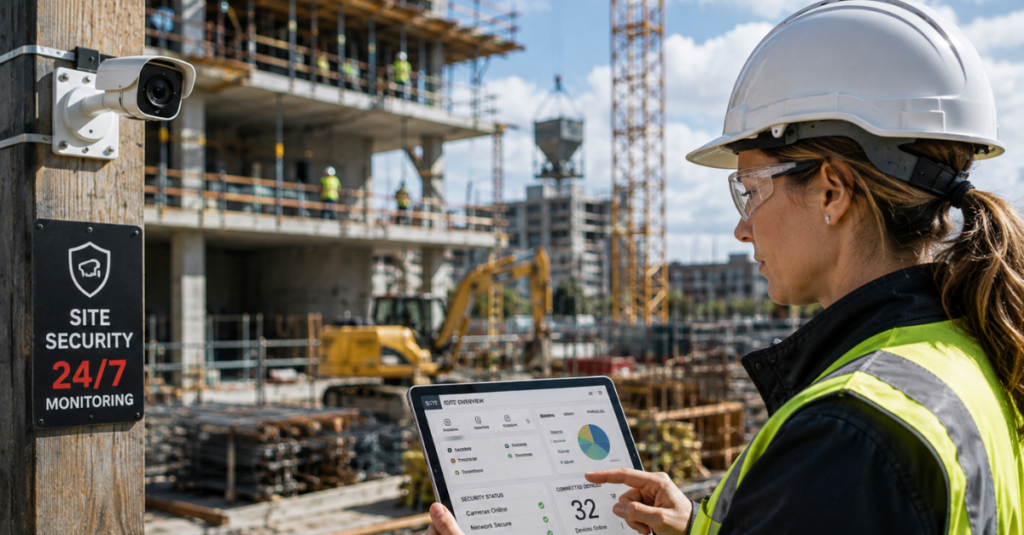
A decade ago, the only connected device on a job site might have been a single office computer. Today, a mid sized project can involve dozens of connected devices, each one a potential entry point if left unsecured.
Common connected devices now found on active job sites include:
- Security cameras and remote monitoring systems
- GPS trackers on vehicles and heavy equipment
- Drones used for site surveys and progress documentation
- Environmental sensors tracking temperature, moisture, or structural data
- Tablets and mobile devices used for daily reporting and plan access
- Wi-Fi routers and hotspots set up temporarily in trailers
- Time clock and badge access systems
- Building automation controls installed as part of the project itself
Each of these devices typically ships with default settings that prioritize ease of setup over security. Left unchanged, default passwords and open configurations turn convenience into risk almost immediately. A structured approach through wireless network management ensures devices are configured correctly from the start rather than left running on factory defaults for the life of the project.
What’s Actually at Risk
It’s easy to assume that a job site breach mainly threatens equipment control, but the more common and costly risk is data exposure. Construction companies hold a surprising amount of sensitive information that attackers can monetize or exploit.
Data That Attracts Attackers
- Detailed project blueprints and design specifications
- Bid pricing and competitive proposal information
- Client contracts and payment terms
- Employee personal information, including payroll and tax data
- Vendor and subcontractor banking details
- Insurance and bonding documentation
Operational Systems at Risk
- Building automation systems installed mid project
- Equipment telematics and fleet tracking platforms
- Site security camera feeds and access control systems
- Scheduling and project management software
A breach affecting any of these areas doesn’t just cause embarrassment. It can delay a project, damage a client relationship, or expose the company to legal liability, particularly when subcontractor or employee data is involved. Reviewing new attack methods regularly helps construction leadership understand which of these systems are currently being targeted most aggressively.
The Real Cost of a Job Site Security Incident
Construction margins are often thin, and project timelines are unforgiving. A security incident doesn’t need to be catastrophic to cause serious financial damage.
Direct Costs
- Wire fraud losses from business email compromise scams
- Ransom payments if project files or systems are locked
- Legal and notification costs if personal data is exposed
- Equipment downtime if telematics or control systems are affected
Indirect Costs
- Delayed milestones triggering contract penalties
- Client trust erosion, especially on repeat business relationships
- Increased insurance premiums following an incident
- Time spent recovering data and rebuilding lost documentation
A single successful wire fraud attempt can cost a mid sized contractor a full project’s profit margin in one transaction. This is why layered access controls, which limit what any single compromised account or device can actually reach, have become a standard recommendation rather than an optional upgrade for firms handling significant payment volume.

Network Security Fundamentals for Active Job Sites
Securing a permanent office is relatively straightforward compared to securing a job site that exists for months and then disappears. A practical approach requires planning for temporary infrastructure the same way a permanent one would be treated.
Segmenting the Job Site Network
One of the most effective and often overlooked practices is network segmentation, separating equipment control systems, guest or visitor Wi-Fi, and core business systems onto different network segments. This way, a compromised device on the guest network, or a factory default router, cannot reach payroll systems or client data.
Key segmentation practices include:
- Separate Wi-Fi networks for staff, guests, and equipment control
- Restricted access so subcontractors only reach systems relevant to their scope
- Firewalls configured specifically for job site traffic patterns
- Regular audits of what devices are actually connected to each segment
Firms working with a dedicated technology partner typically have this segmentation built into every new site setup as a standard step, rather than reconstructed manually each time a project begins.
Managing Mobile and Field Devices
Tablets and mobile devices used for daily reporting, plan access, and time tracking are frequently the least protected devices on a job site, largely because they’re treated as disposable tools rather than access points into company systems.
Strong mobile device management should include:
- Remote wipe capability if a device is lost or stolen
- Enforced screen locks and multi factor authentication
- Restricted app installation to prevent unauthorized software
- Automatic security updates rather than relying on manual installation
Field productivity tools only deliver their intended value when the devices running them are properly secured. An unsecured tablet with saved login credentials sitting in an unlocked truck is a much easier target than most firms realize.
Cloud Collaboration Brings Convenience and Risk
Modern construction projects rely heavily on cloud based platforms for document sharing, scheduling, and communication between owners, architects, contractors, and subcontractors. This collaboration is a major efficiency gain, but it also means sensitive project data is being accessed by dozens of different accounts across multiple organizations.
Common cloud related risks include:
- Shared login credentials used across multiple team members
- Former employees or subcontractors retaining access after a project ends
- Files shared through personal, unsecured cloud accounts instead of approved platforms
- No consistent policy for which documents can be shared externally
Faster project scaling through cloud tools only stays a benefit if access permissions are actively managed throughout the life of a project, not just set up once at the start and forgotten. A quarterly access review, removing anyone no longer working on a project, closes one of the most common and easily fixed gaps in construction cybersecurity.
Protecting Project Data From Loss
Beyond intentional attacks, construction firms regularly lose data through simpler failures: a laptop stolen from a truck, a corrupted file with no recent backup, or a hard drive failure on a site trailer computer with no cloud sync in place.
What Needs Reliable Backup Coverage
- Current project blueprints and change orders
- Daily site reports and inspection records
- Financial and billing records tied to active projects
- Photos and video documentation used for progress verification and disputes
Reliable recovery systems that automatically back up this data offsite, rather than relying on a single local drive, prevent a lost laptop or a failed hard drive from turning into a lost week of project documentation. Project data protection should be treated as a non negotiable requirement for any active site, not an optional add on considered only after a loss has already occurred.
Compliance Considerations Specific to Construction
Construction companies increasingly face compliance requirements tied to data handling, particularly when working with government contracts, larger developers, or clients in regulated industries like healthcare or education construction.
Common compliance pressure points include:
- Contractual data security requirements from general contractors or developers
- Employee data protection obligations tied to payroll and personal information
- Documentation retention requirements for safety and inspection records
- Cybersecurity requirements increasingly attached to public sector bids
Industry compliance standards are shifting quickly, and firms that can clearly demonstrate their security posture during a bid process increasingly have a competitive advantage over those that cannot produce documentation quickly. This is becoming as important to winning larger contracts as pricing and schedule reliability.
Vendor and Subcontractor Access Management
Multi trade job sites regularly involve dozens of different companies needing some level of network or system access. Managing this access carefully is one of the most important and most neglected parts of job site security.
Best practices include:
- Granting subcontractors access only to the specific systems or areas they need
- Setting automatic expiration dates on temporary access credentials
- Requiring vendors to follow the same password and device policies as internal staff
- Removing access immediately once a subcontractor’s scope of work is complete
Without these controls, a single subcontractor’s compromised laptop can become an entry point into the general contractor’s broader systems, a scenario that has caused real financial damage across the industry in recent years.
Building a Practical Security Roadmap
Securing connected job sites doesn’t require an enterprise level security team. It requires a structured, repeatable process applied consistently across every project.
A workable roadmap typically includes:
- An infrastructure risk review conducted before major projects begin
- Standardized network setup procedures for every new job site
- Mobile device policies applied consistently across all field staff
- Scheduled access reviews for vendors, subcontractors, and cloud platforms
- A tested backup and recovery plan covering all active project data
- Ongoing monitoring rather than a one time setup and walk away approach
Technology planning advice from a provider familiar with construction specific workflows makes this process considerably easier than attempting to build it internally, especially for firms without a dedicated IT department. Scalable support plans also allow a construction company to apply consistent security standards whether they’re running two active sites or twenty.
The Growing Role of Automation and Smart Monitoring
Automated threat detection tools are increasingly used to monitor job site networks around the clock, flagging unusual device behavior or unauthorized access attempts far faster than a manual review ever could. Combined with smart automation tools for scheduling and reporting, construction firms are finding that the same technology improving efficiency can also strengthen security when implemented correctly.
A technology readiness review is a useful starting point for firms unsure whether their current systems and staff are prepared to adopt these tools effectively, particularly before committing budget to new platforms.
Why the Network Itself Deserves More Attention
It’s easy to think of the network as invisible infrastructure that simply works in the background. On an active job site, the network is closer to a critical network backbone, connecting scheduling software, safety systems, communication tools, and financial platforms all at once. When that backbone fails or gets compromised, everything running on top of it stops working simultaneously.
Mobile communication systems used for coordinating between the office, the site trailer, and field crews depend entirely on that same network staying reliable and secure. Treating network planning as a core part of every project setup, rather than an afterthought handled by whoever happens to be available, prevents a surprising number of the incidents construction firms deal with each year.
Practical Steps to Take This Quarter
Construction leadership looking to make immediate progress can start with a short list of high impact actions:
- Change default passwords on every camera, router, and connected device currently on active sites
- Review who currently has access to cloud project files and remove anyone no longer involved
- Confirm that project data backups are actually running and can be restored successfully
- Require multi factor authentication on all email accounts, especially those tied to payment approval
- Walk through your current wire transfer approval process and add a verification step for any changes to payment instructions
Downloadable industry guides and live training sessions covering these exact topics can give office staff and site supervisors a shared, practical understanding of what to watch for, without needing a technical background to follow along.
Choosing the Right Local Support
Area construction firms benefit significantly from working with a provider who understands the specific rhythm of the industry: temporary sites, rotating crews, tight schedules, and the mix of physical and digital risk unique to construction work. A generic, one size fits all IT provider often misses the practical realities of setting up and securing a brand new job site every few months.
Real world project results and a trusted vendor network matter here, since the right combination of hardware, software, and support depends on established relationships rather than one off purchases made under time pressure. Company experience overview and budgeting planning tools can help a firm get a realistic picture of what a properly secured technology setup costs across a typical project cycle, rather than guessing based on a single vendor quote.
Conclusion
Connected job sites have made construction faster, safer, and more efficient, but they have also introduced a level of digital risk the industry has been slow to address. From unsecured cameras to unmanaged subcontractor access to wire fraud targeting payment processes, the vulnerabilities are real and increasingly expensive when ignored.
CMIT Solutions of Plano & Garland helps construction companies build practical, repeatable security processes that fit the way job sites actually operate, without slowing down the pace of a project. If your current job site setup hasn’t had a real security review, now is the time. Schedule a consultation to get a clear picture of where your sites stand today.
Frequently Asked Questions

