
You sign the lease for a new office in Orange County and the opening date is six weeks out. The construction permits are filed, your furniture has been ordered, and you have even scheduled the Internet with the carrier.
Yet, nobody has thought about cybersecurity yet.
This is the most common pattern we see when Orange County businesses expand. Expansion is treated as a real estate, hiring, and operations decision. Cybersecurity gets handled at the last minute, usually after the doors are open.
A new location is also a new attack surface. New network, new endpoints, new employees, new vendor access, new data flow. Without a proper cybersecurity checklist for new business location planning, businesses often find themselves operating from day one with gaps that can take months or years to close.
This guide is the cybersecurity checklist for businesses planning expansion in Orange County, focused on what leadership teams need to handle before, during, and after opening a new office.
Why Opening a New Location Is a Cybersecurity Decision
A new office expands more than your business footprint. It expands:
- Your network surface area
- Your endpoint inventory
- Your identity and access requirements
- Your data flow and storage points
- Your vendor and third-party connections
- Your compliance exposure
- Your physical security perimeter
For industries like healthcare, legal, finance, manufacturing, construction, and professional services, each new location adds compliance complexity. HIPAA compliance, new location requirements, CMMC requirements for defense contractors, PCI requirements for businesses handling payment cards, and California-specific privacy laws all need to be addressed before opening day.
The businesses that handle this well treat cybersecurity planning business expansion as part of the lease and buildout process, not a tail-end IT task. Business expansion cybersecurity belongs in the first planning meeting, alongside real estate, hiring, and operations.
The Risks of Opening Without a Plan
When cybersecurity is handled last, the risks compound quickly. The most common gaps you should know about include:
- Consumer-grade Wi-Fi installed by the ISP during setup
- No segmentation between guest, employee, and operational networks
- Unmanaged endpoints joining the network on day one
- New employees onboarded without proper identity controls
- Vendor access set up informally and never reviewed
- Missing endpoint detection and response on new devices
- Backup and recovery never extended to the new location
- Surveillance and access control systems on flat, unsecured networks
- No documentation of the new infrastructure
Any one of these creates risk, but when combined, they create the kind of exposure that shows up in cyber insurance claims and compliance audits.
The Cybersecurity Checklist for Opening a New Business Location
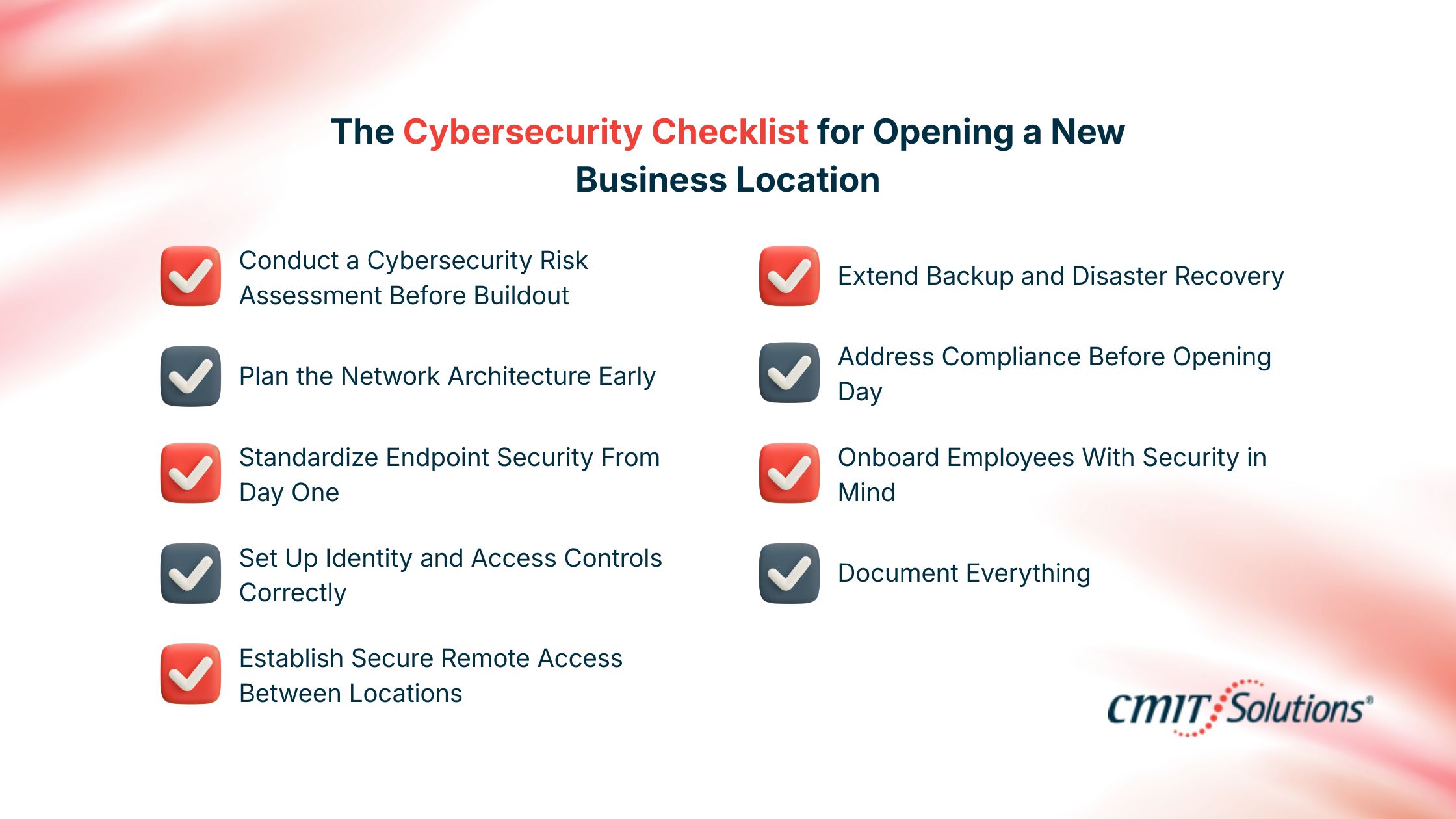
Let us now look at an IT security checklist for new office leadership that covers the cybersecurity steps before opening a new location that most teams overlook, along with the new office IT infrastructure checklist items that should be approved before signing equipment orders.
1. Conduct a Cybersecurity Risk Assessment Before Buildout
Before any cabling is run or any equipment is ordered, complete a cybersecurity risk assessment for the new office opening. This should cover:
- Data types the new location will handle
- Compliance frameworks that apply
- Network and connectivity needs
- Endpoint and device count projections
- Vendor and third-party access requirements
- Physical security and surveillance needs
A risk assessment shapes every decision that follows.
2. Plan the Network Architecture Early
Network security decisions in new business locations are easier to make before walls go up. A clean network security checklist small business new location operators should follow includes:
- Business-grade firewall sized for the location
- Network segmentation between corporate, guest, IoT, and operational systems
- Industrial-grade or business-grade Wi-Fi with full coverage testing
- Wired infrastructure planned around actual workflows
- VLAN configuration for sensitive data zones
- Redundant internet circuits where uptime matters
Many businesses inherit network problems from rushed openings. Design first, then build.
3. Standardize Endpoint Security From Day One
Every laptop, desktop, tablet, and mobile device joining the new location should be onboarded with the same baseline controls already used across the business.
A clean endpoint baseline includes:
- Endpoint detection and response
- Disk encryption
- Centralized device management
- Patch management
- Application allowlisting where appropriate
- Asset tagging and documentation
4. Set Up Identity and Access Controls Correctly
New locations create new users, new groups, new access requirements, and new exception requests. Identity is one of the most common areas where expansion creates risk.
A clean identity setup includes:
- Single sign-on across business systems
- Multi-factor authentication on every account
- Role-based access tied to job function
- Conditional access policies for high-risk scenarios
- Standardized onboarding and offboarding workflows
- Documented privileged access controls
5. Establish Secure Remote Access Between Locations
If employees will move between offices or work remotely, plan how to set up secure remote access for multiple locations before opening day.
This typically includes:
- VPN or zero trust network access
- Conditional access tied to device posture
- Endpoint compliance checks
- Logging and monitoring of remote sessions
6. Extend Backup and Disaster Recovery
Backups and disaster recovery should cover the new location from the moment it opens. This includes:
- Local server and data backups where applicable
- Cloud workload backups
- Recovery testing for the new environment
- Documentation updates reflecting the new infrastructure
A new location should never operate without verified recovery capability.
7. Address Compliance Before Opening Day
Compliance does not wait for operational stability. From day one, the new location should meet whatever framework applies to the business:
- HIPAA compliance new location requirements for healthcare practices and dental offices
- CMMC compliance checklist new facility Orange County defense contractors and suppliers should follow
- PCI requirements for businesses handling payment cards
- SOC 2 controls for SaaS and service businesses
- California-specific privacy laws including CCPA and CPRA
Many Orange County businesses overlook that expansion to a new facility can trigger new compliance obligations.
8. Onboard Employees With Security in Mind
How new employees are onboarded sets the security culture at the new location. A clean onboarding workflow includes:
- Identity provisioning before day one
- Issued devices preconfigured with security controls
- Security awareness training during week one
- Documented access requests and approvals
- Phishing simulation and ongoing reinforcement
Security culture is much easier to set on day one than to retrofit six months later.
9. Document Everything
Documentation is the difference between clean infrastructure and a mess that builds up within a year. Capture:
- Network diagrams
- Device inventories
- Vendor and circuit details
- Account ownership records
- Configuration baselines
- Recovery procedures
When an MSP, auditor, or new IT lead needs to understand the new location, documentation is the first thing they will ask for.
Why Timing Matters: Bring in Cybersecurity Before Construction
The most common mistake we see is bringing in cybersecurity expertise after construction is done and employees are about to move in.
By that point, decisions have already been made about cabling, internet circuits, surveillance systems, point-of-sale hardware, Wi-Fi placement, and access control. Reversing those decisions is expensive.
Engaging managed IT services for businesses opening new locations early lets cybersecurity planning shape the buildout, not the other way around. The same applies when evaluating managed cybersecurity services Orange County operators rely on for ongoing protection.
Final Thoughts
Opening a new location is not only one of the most exciting moments in a business cycle, but also one of the most vulnerable.
A new office means a new attack surface, new compliance exposure, and new operational dependencies. Treating cybersecurity as part of the expansion plan, not an afterthought, is what separates businesses that scale cleanly from those that absorb risk every time they grow.
At CMIT Solutions Anaheim & Orange County, we work with growing businesses across healthcare, legal, manufacturing, financial, construction, and professional services to deliver cybersecurity solutions Orange County leadership teams trust during expansion. From cybersecurity risk assessments and network design to compliance support, endpoint security, and managed security services new location teams need on day one, we help businesses open the right way.
FAQs
What cybersecurity do I need before opening a new business location?
At minimum: a cybersecurity risk assessment, a planned network with segmentation and a business-grade firewall, endpoint detection and response on all devices, multi-factor authentication, secure Wi-Fi design, backup and recovery coverage, identity and access controls, and a compliance review based on industry.
How much does it cost to set up cybersecurity for a new office in Orange County?
Cost varies based on size, industry, compliance requirements, and existing infrastructure. Smaller offices typically range from a few thousand dollars in initial setup to recurring managed security costs. The bigger driver is whether the business is starting clean or remediating gaps later.
What is the first cybersecurity step when opening a second office?
A cybersecurity risk assessment. Before any equipment is ordered, you should understand the data, compliance, network, and access requirements of the new location.
Do I need a separate firewall for each business location?
Yes. Each location needs its own properly sized business-grade firewall, ideally centrally managed across all sites for consistent visibility, policy enforcement, and incident response.
How do I secure Wi-Fi for a new office?
Use business-grade access points, separate networks for employees, guests, and operational systems, enable WPA3 or WPA2 Enterprise authentication, hide internal SSIDs from public broadcast where appropriate, and monitor wireless traffic for anomalies.
What compliance rules apply when expanding to a new location in Orange County?
Compliance depends on the industry. Healthcare practices need HIPAA. Defense contractors and suppliers may need CMMC. Businesses handling payment cards need PCI. SaaS and service providers often need SOC 2. California also enforces its own data privacy laws including CCPA and CPRA.
Should I hire an MSP before or after opening the new location?
Before. Engaging an MSP during planning lets cybersecurity shape the buildout instead of patching gaps after the fact. The earlier the conversation, the cleaner the result.
How long does it take to set up cybersecurity at a new business location?
Six to twelve weeks is typical for a clean setup. Smaller locations can move faster. Highly regulated environments take longer because of compliance documentation requirements.
What are the biggest cybersecurity risks when opening a new office?
Unsegmented networks, consumer-grade Wi-Fi, unmanaged endpoints, missing endpoint protection, weak identity controls, undocumented vendor access, and compliance gaps that get missed during the rush of opening.
How do I onboard new employees securely at a new location?
Provision identity before day one, ship preconfigured devices with security controls already installed, complete security awareness training in the first week, document access provisioning, and run ongoing phishing simulation and reinforcement.


