
Your MSP renewal comes across your desk with a familiar question: Do we just sign it again? If the relationship has been working, it is tempting to review the monthly fee, glance at the service terms, and move on. But your MSP may have access to employee accounts, business email, backups, cloud applications, servers, network equipment, and other systems your company depends on every day. That makes the renewal more than a pricing discussion. It is a chance to find out whether your provider is still giving your business the level of IT and security support you actually need. For an MSP contract renewal, the important questions go beyond ticket response times and uptime. You should know what security services are included, which controls your MSP manages, how incidents are handled, what happens after hours, and what your provider expects your business to handle. If you are an SMB in Anaheim, Orange County, or Long Beach, these 10 questions can help you have a much more useful renewal conversation.
1. What cybersecurity services are actually included in our contract?
Ask your MSP to explain exactly what “cybersecurity” means in your agreement. One provider may include antivirus software and basic monitoring. Another may include endpoint protection, email security, MFA, vulnerability management, backup monitoring, employee training, and incident response. Those are very different levels of service.
Review the contract and ask your provider to identify which of these are included:
- Endpoint protection
- Email security
- Multi-factor authentication
- Security monitoring
- Patch management
- Vulnerability management
- Backup monitoring
- Security awareness training
- Incident response
- Security assessments
- Credential or dark web monitoring, if offered
This should be the starting point for your MSP security checklist for small businesses. If a security service matters to your business, you should know whether it is included, available as an add-on, or not provided at all.
2. Who is actually monitoring our security alerts?
Security software can generate an alert when something suspicious happens. That does not mean someone is investigating it. Ask who receives your alerts, when they are reviewed, and what happens after a potential threat is identified. For example, if an employee’s laptop begins showing suspicious activity at 2 a.m., does your MSP have an after-hours process? Does someone investigate immediately? Is the device isolated automatically? Or does the issue wait until the next business day?
Ask your MSP to explain:
- Which systems are monitored
- Who reviews security alerts
- When monitoring takes place
- What qualifies as a security incident
- How incidents are escalated
- Whether after-hours monitoring is included
This is a basic part of managed service provider security. You are paying for management of your IT environment, so you should understand what happens when the systems designed to protect that environment raise an alert.
3. Which security controls are protecting our employees and devices?
Your employees may work from an office in Anaheim, a home in Orange County, a client site in Long Beach, or somewhere else entirely. Their devices still connect to company systems and data. Ask your MSP what protection is installed and managed on company laptops, desktops, servers, and other devices. At a minimum, discuss endpoint protection, security updates, device encryption where appropriate, firewall protection, remote access security, and MFA. Also ask how the MSP handles devices that are lost, stolen, replaced, or no longer used. This gives you a clearer understanding of the MSP cybersecurity services you are actually receiving instead of relying on a broad label such as “managed security.” It also gives you a useful way to compare your current coverage with what your business needs now. Your IT environment may look very different from when you originally signed the agreement.
4. How often do you review cybersecurity risks?
Your security needs change when your business changes. You may have added employees, opened another location, introduced a cloud application, changed accounting systems, started allowing more remote work, or given a vendor access to company systems. Ask your MSP how often it reviews those changes and whether the review results in a written report. A useful MSP security assessment should tell you what was reviewed, what risks were identified, which issues need attention, and who is responsible for addressing them.
Ask:
- How often is our environment reviewed?
- What systems and accounts are checked?
- Are administrator privileges reviewed?
- Are outdated or unsupported systems identified?
- Are vulnerabilities prioritized?
- Do we receive recommendations in writing?
- Who follows up on unresolved issues?
For an SMB, the assessment does not need to be a technical report that nobody outside the IT department can understand. Your provider should be able to explain the findings in plain business terms.
Schedule an MSP Security Assessment
5. What happens if we are hit by ransomware?
This question should produce a specific answer, not “We’ll handle it.” If ransomware affects an employee’s computer on a Tuesday morning, who gets called? Who isolates the affected device? Who checks whether other systems have been compromised? Who protects the backups? Who contacts your cyber insurance carrier? Your MSP should be able to explain its role before you need that help.
Ask about:
- Initial response
- Device isolation
- Investigation
- Backup protection
- System restoration
- Communication with your leadership team
- Coordination with your cyber insurance carrier
- After-hours response
Ransomware protection should have a defined place within your managed service provider cybersecurity checklist. The same applies to other serious incidents, including compromised email accounts, stolen credentials, malware, and unauthorized access. If the contract does not explain who handles these situations, ask for clarification before renewing.
6. How are our backups monitored, and has recovery actually been tested?
“You’re backed up” is not a complete answer. Ask what is being backed up, how often it happens, whether failures are monitored, who can modify or delete backups, and when the last recovery test took place. A business can have a backup system running every night and still discover that an important application, database, or group of files was never included.
Your MSP should be able to explain:
- What data is backed up
- How frequently backups run
- How failed backups are identified
- Who has access to backups
- How backups are protected against ransomware
- How often recovery is tested
- Which systems would be restored first
- What recovery time you should expect
If your MSP is responsible for backups, those responsibilities should be clearly stated in the agreement.
7. What response time applies when the problem is a security incident?
Most MSP contracts have some form of service-level agreement, or SLA. But an ordinary IT problem and a suspected cyberattack should not necessarily receive the same response. A broken printer can usually wait. A compromised administrator account may require immediate attention. Ask whether the contract distinguishes between general support requests, major outages, suspected security incidents, and confirmed security incidents. Then ask what each response time actually means. Does “15-minute response” mean someone acknowledges your ticket? Or does it mean a technician begins investigating the incident within 15 minutes? That distinction matters. Your MSP security checklist should therefore include response expectations, escalation procedures, and after-hours coverage.
8. What security reporting will we receive?
You should not have to call your MSP every few months to find out whether your security controls are working. Ask what reporting is included in your agreement and how often you receive it.
Depending on your business, useful reporting may cover:
- Security alerts
- Endpoint protection
- Patch status
- Backup status
- User accounts
- Security incidents
- Vulnerability findings
- Employee security training
- Open security recommendations
The report should be understandable to someone running the business. If your MSP gives you a dashboard full of technical information but never explains what needs attention, ask for a management-level summary. A good report should help you understand what has been done, what remains open, and where your business has security exposure.
9. Which cybersecurity responsibilities belong to us, and which belong to the MSP?
Security responsibilities are shared. Your MSP may manage MFA, endpoint protection, backups, and security monitoring. Your business may be responsible for approving access, reporting suspicious activity, training employees, or making decisions during an incident. Those responsibilities should be clear.
Ask who handles:
- New employee accounts
- Former employee access
- MFA
- Security updates
- Backup monitoring
- Security awareness training
- Email security
- Incident response
- Cyber insurance questionnaires
- Security assessments
- Firewall and network management
This is one of the most important MSP contract security requirements for SMBs because unclear responsibility creates gaps. If everyone assumes the other party is handling something, nobody may actually be handling it. Put important responsibilities in the contract rather than relying on conversations between an account manager and your office manager.
10. What has changed since our last contract?
This is a useful way to end the renewal conversation because it forces both sides to look at the previous year. Ask your MSP what changed in your IT environment, what security problems were identified, which recommendations were completed, and which ones remain open. Then ask what your provider recommends for the next contract period. This is also the point where you can conduct a managed IT provider evaluation.
Look at more than ticket volume and response times. Has your MSP helped you address recurring IT problems? Are security recommendations being followed through? Are backups being tested? Are employee accounts being reviewed? Does your provider explain problems in terms your management team can understand? If your company has grown significantly but your IT plan has stayed the same, ask what your MSP thinks should change.
Your MSP Contract Renewal Checklist
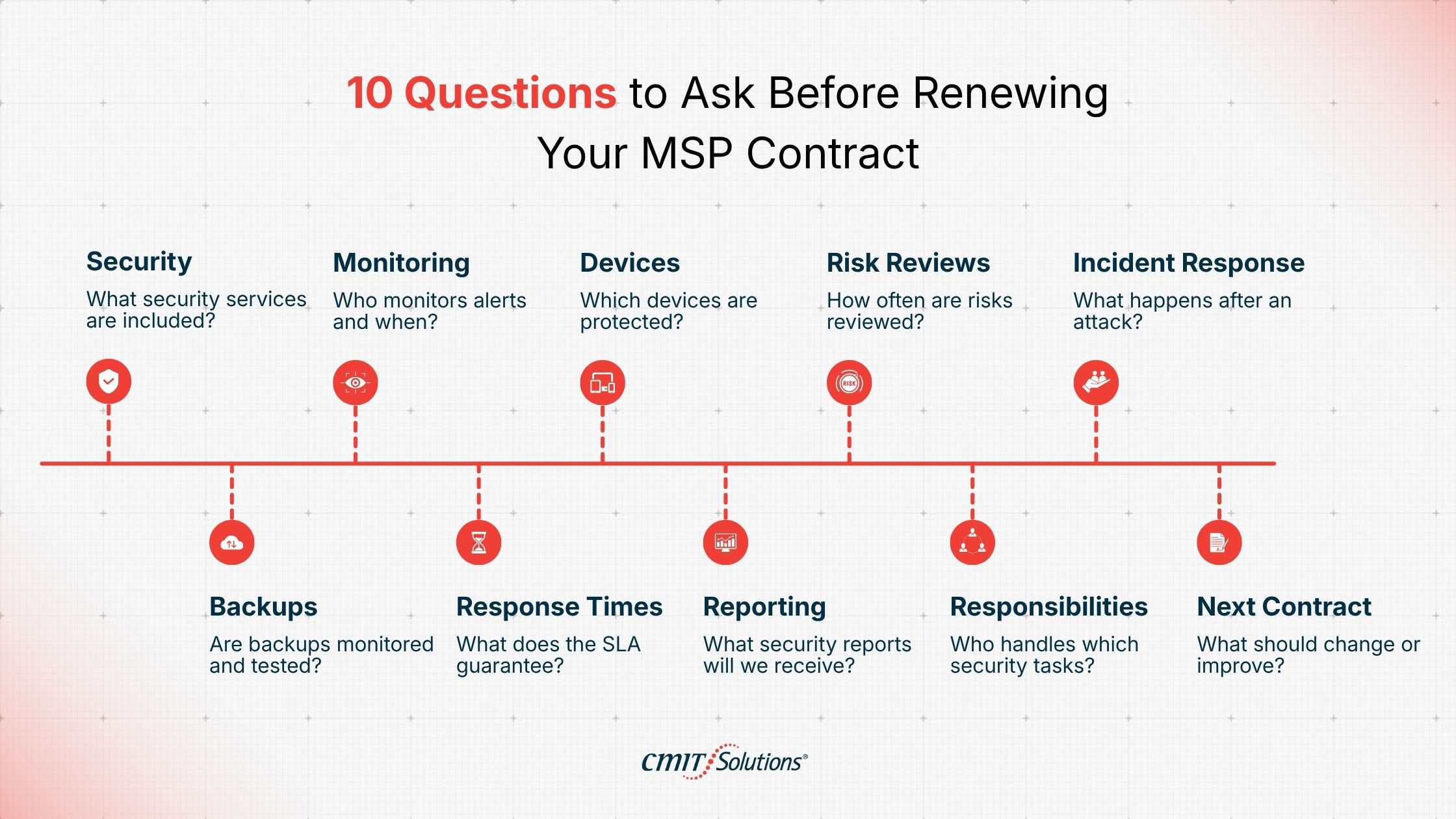
These 10 questions can serve as an MSP contract renewal checklist for small businesses when you sit down with your provider.
| Area | Question to ask |
|---|---|
| Security services | What cybersecurity services are included in our agreement? |
| Monitoring | Who monitors our security alerts, and when? |
| Devices | Which employee devices and systems are protected? |
| Risk reviews | How often is our cybersecurity reviewed? |
| Incident response | What happens if we experience ransomware or another serious incident? |
| Backups | Are backups monitored and recovery tests performed? |
| SLA | What response time applies to a security incident? |
| Reporting | What security reports will we receive? |
| Responsibility | Which security tasks belong to the MSP and which belong to us? |
| Renewal planning | What should change during the next contract period? |
Use the same questions if you are comparing providers. They give you a practical cybersecurity checklist for MSP contract renewal and make it easier to compare what different MSPs actually provide.
What Should Be in an MSP Contract?
A good MSP agreement should make the relationship easy to understand. It should explain the services being provided, the systems being managed, security responsibilities, response expectations, backup responsibilities, escalation procedures, and any services that cost extra. Pay particular attention to cybersecurity. If endpoint protection is included, the agreement should make that clear. If incident response is billed separately, you should know that before an incident occurs. If after-hours security monitoring is not included, that should also be clear. The more important the responsibility, the less you should rely on assumptions. This is particularly useful when comparing managed IT services Orange County providers. Two MSPs may offer similar monthly pricing while providing very different levels of security coverage. The same applies when comparing managed IT services Long Beach providers. Ask each provider the same questions and compare the actual services, responsibilities, response times, and reporting.
When Should an SMB Consider Replacing Its MSP?
A single frustrating interaction does not necessarily mean you need a new provider. Patterns are more useful. Consider reviewing other options if your MSP repeatedly leaves security recommendations unresolved, cannot clearly explain what security services you are paying for, provides little useful reporting, does not test backups, or cannot give you a clear answer about incident response. You should also take a closer look if your business has changed significantly and your MSP has not adjusted its approach. For example, perhaps you have doubled your employee count, opened another office, moved important systems to the cloud, or started handling more sensitive customer information. Your IT requirements may have changed even if your monthly MSP invoice has not. The question is whether your provider is still meeting those requirements.
How Can an SMB Evaluate Its MSP’s Cybersecurity?
Start with the agreement. List the security services you believe are included. Then ask your MSP to confirm what is actually being provided and how those services are monitored. Next, ask for evidence. Can your MSP show that backups are working? Can it show which devices are protected? Can it explain unresolved vulnerabilities? Can it provide security reports? Can it tell you when the last risk review happened?
For businesses looking at MSP security assessment for small businesses, this type of review can provide a much clearer picture than simply asking whether the MSP “handles cybersecurity.” If you are considering cybersecurity services in Orange County or Long Beach, ask prospective providers these same questions before signing. A provider should be able to explain its security responsibilities without requiring you to understand every technical term. Businesses evaluating cybersecurity services should take the same approach. Compare the actual work being performed, not just the list of products included in the proposal.
Before You Renew, Review Your MSP
Before you sign your next MSP contract renewal, get a clear picture of what your provider is covering and where your business may still be exposed. Schedule an MSP security assessment with CMIT Solutions Anaheim. We’ll review your current IT and cybersecurity coverage, identify gaps, and help you determine what needs to change before you renew.
Schedule an MSP Security Assessment
Frequently Asked Questions
What should an SMB review before renewing an MSP contract?
Review the services included, security responsibilities, response times, backup practices, monitoring, reporting, pricing, and contract terms. Confirm that the agreement reflects your current systems and business needs.
What security controls should an MSP provide?
Depending on the agreement, an MSP may provide endpoint protection, MFA, email security, patch management, backup monitoring, vulnerability management, security monitoring, employee training, and incident response. The contract should clearly identify which services are included.
How often should an MSP conduct a cybersecurity risk assessment?
There is no single schedule for every business. A risk review should happen regularly and after major changes to employees, locations, applications, systems, or remote access. Ask your MSP what review schedule is appropriate for your environment.
Should an MSP provide incident response and ransomware protection?
If cybersecurity is included in the MSP agreement, incident response and ransomware protection should be clearly addressed. The contract should explain what the MSP handles, what the business handles, and what response times apply.
What cybersecurity responsibilities should be included in an MSP contract?
The agreement should define responsibilities for security monitoring, endpoint protection, MFA, patching, backups, account management, incident response, reporting, and other agreed security services.
How can an SMB evaluate whether its MSP is providing adequate cybersecurity?
Ask what systems are protected, what is monitored, how incidents are handled, whether backups are tested, what security reports you receive, and which recommendations remain unresolved. Compare those answers with the services promised in your contract.
What should an SMB look for in an MSP security SLA?
Look for clear definitions of security incidents, response times, escalation procedures, after-hours support, and what the stated response time actually means. Acknowledging a ticket is different from beginning an investigation.
What are the signs that an SMB should replace its MSP?
Repeated unresolved security issues, unclear responsibilities, weak communication during incidents, unreliable backups, poor reporting, or an inability to explain the security services being provided can all justify reviewing other providers.
What should an SMB ask an MSP about cybersecurity before renewing?
Ask what security services are included, who monitors alerts, how often risks are reviewed, how ransomware incidents are handled, how backups are tested, what security SLAs apply, what reports you receive, and which responsibilities belong to your business.


