Your business hasn’t stood still since January and your systems haven’t either.
You’ve added people to the team, adopted new tools and made fast calls to keep things moving. Every one of those decisions made sense in the moment. Nobody sits down in March and decides to create a security gap on purpose. Gaps like that build up quietly, one reasonable decision at a time, until six months later nobody can say for certain how the pieces actually fit together anymore.
What’s hard to keep track of is the trail those decisions leave behind, including who still has access to systems they no longer need, where your data ended up and who’s responsible for what. None of that shows up on a dashboard by default. It has to be checked, and checking it is exactly the kind of task that gets pushed to “next week” indefinitely because nothing feels urgent about it until the day it suddenly is.
By July, most businesses are running on assumptions about how their systems work. Here are four things to examine before those assumptions become expensive, and why a proper midyear review, paired with the right IT guidance, is worth the hour it takes.
Access Was Expanded. Was It Ever Revisited?
New hires came in and needed to get on systems quickly. Other employees moved into new roles and picked up permissions along the way. Temporary access was granted to keep a project moving or cover for someone who was out. Each of those approvals took thirty seconds to grant and probably felt harmless at the time.
But access almost never gets revisited after it’s needed, which means the picture inside most businesses looks like this:
- People have more privileges than their current role requires
- Former employees likely still carry active permissions
- You don’t have a clean view of who can reach what
- Temporary access granted “just for now” has quietly become permanent
It’s time to ask the question: do the right people have the correct access today? This is not a one-time cleanup, either. It is an ongoing discipline, because every new hire, promotion, and offboarding creates the same kind of drift all over again if nobody is watching for it.
Do you know who can see what inside your business right now? If that answer takes longer than a few seconds, our managed IT security services can help you get that visibility fast. A proper access review also touches on compliance, since regulators in healthcare, finance, and legal services increasingly expect businesses to demonstrate that access is reviewed on a regular cadence, not granted once and forgotten. Strong network management practices make this kind of review far easier, because you cannot audit access to systems you have not fully mapped in the first place.
Consider running this exercise quarterly rather than once a year. A quarterly cadence catches drift while it is still small and easy to correct. An annual cadence means you are sometimes cleaning up eighteen months of accumulated permissions in one sitting, which is a much bigger and more disruptive project than it needed to be.
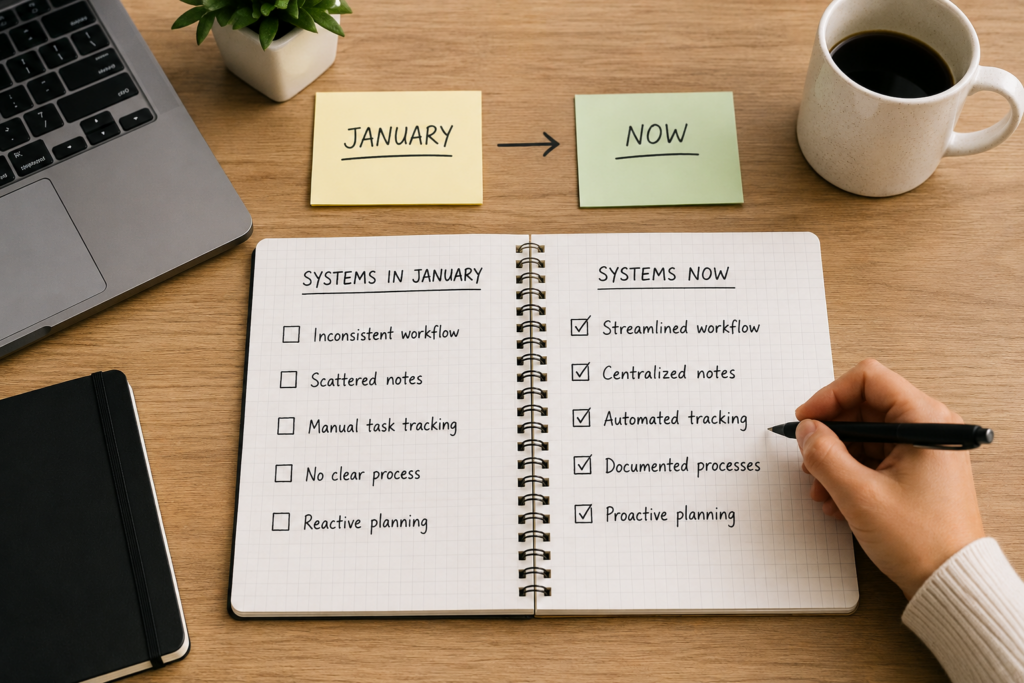
Your Tools Solved Problems While Creating New Ones
Your sales team needed a better way to track conversations, so a CRM was added. Marketing brought on a platform to run campaigns faster. Finance adopted an application to simplify billing. Operations signed up for a project tool that seemed lightweight at the time. HR picked up a scheduling app to manage time-off requests without the back-and-forth emails.
Every one of those was a reasonable decision. Collectively, they created something messier.
Data now lives in more places, integrations were set up quickly and may not be working as intended, and visibility across systems has fragmented. Nobody set out to build a sprawling, disconnected technology stack. It happened one useful tool at a time, and that is exactly what makes it hard to notice until it is already a problem.
When systems coexist without anyone owning the full picture, the risk doesn’t announce itself. It shows up later in slower decisions, inconsistent reporting and gaps that belong to nobody. A sales number in the CRM does not match the number finance is working from. A campaign performance report references leads that never made it into the pipeline properly because an integration silently failed weeks ago. Nobody notices right away, because each department is looking at its own tool and assuming the numbers are accurate.
The right business cloud computing services can bring those fragmented systems back under one roof. Do your systems work together or is your team quietly working around them? By the time that question becomes urgent, it’s been a problem for a while.
This is also where thoughtful IT procurement pays for itself. Every new tool should be evaluated for how it fits with what you already have, not just for what it does in isolation. A tool that looks great in a demo but does not integrate cleanly with your unified communications platform or your existing productivity applications can end up costing more in workarounds than it ever saved in efficiency. And as more of this software moves off local servers and into the cloud, having a real strategy around
cloud technology solutions matters more than ever, because that is where most of these disconnected tools now actually live.
A simple exercise worth running today: list every application each department uses, note which ones talk to each other, and note which ones were supposed to talk to each other but don’t. That list alone usually reveals more than most businesses expect.
Your Backup and Recovery Confidence Is Probably Assumed
Most businesses have backups in place and operate under a false sense of security, believing they’re protected. Recovery is rarely tested, the timeline to restore operations is unclear, and ownership of the process often isn’t defined.
When something goes wrong, whether it’s ransomware, a server failure or an accidental deletion, the conversation starts with “wait, who handles this?” That is the worst possible moment to be asking that question, and yet it is exactly when most businesses ask it for the first time.
Having backups is not the same as being able to recover. The difference between them only becomes clear at the worst possible time. A tested business data backup solution ensures you know exactly what happens next, not after the fact.
If something went down tomorrow, would you know exactly what happens next? Or would you be figuring it out on the spot?
A backup that has never been tested is really just a hope. It might work perfectly. It might also fail at the exact moment you need it most, because a setting changed, a job silently stopped running months ago, or the recovery process was never actually documented anywhere. The only way to know which scenario you are in is to test it, on a schedule, and treat that test as seriously as the systems it protects. This is part of why so many businesses pair their backup strategy with broader cybersecurity planning rather than treating backup as a separate, standalone checkbox. Recovery and prevention are two sides of the same conversation, and a resilient setup through something like cmit anywhere secure AI tools and monitoring can flag the kind of unusual activity that precedes a disaster, giving your team a head start before recovery is even necessary.
Ask yourself three questions right now. How long would it take to restore your most critical system if it went down today? Who on your team actually knows how to execute that restoration? And when was the last time anyone actually tried it, rather than simply assumed it would work?
Responsibility Has Blurred As Your Business Has Grown
Remember back when who owned what was clear?
Your internal team handled certain systems, vendors handled others and responsibilities were roughly defined, even if nobody had documented them. In a small operation, that informal arrangement works fine, because everyone can just ask the one person who knows.
Then systems expanded, new vendors came in, internal roles shifted and somewhere in the middle of all that growth, ownership got blurry. The one person who used to know everything either left, got busier, or simply lost track as the environment grew more complex than any single person could hold in their head.
That’s exactly the gap that proactive managed IT support is designed to close: defined ownership, clear escalation paths, and no more guessing. When something alarming happens in your systems, do you know who is responsible for resolving it? Or do you figure it out at the moment?
This matters just as much outside business hours as during them. A server issue that surfaces at 9 p.m. on a Friday should not turn into a scramble to figure out who to call. That is precisely why 24/7 IT support services and 24/7 business IT support exist: so the answer to “who handles this” is already known, documented, and staffed, no matter what time the problem shows up. When issues do come up, having access to fast IT support and advanced IT support means the resolution does not depend on finding the right person by trial and error.
Clear ownership also extends to vendor relationships. If you work with multiple outside providers for different pieces of your technology stack, someone internally needs to own the relationship with each one, know what that vendor is responsible for, and know what happens if that vendor is slow to respond during an incident. Without that clarity, an outage can turn into finger-pointing between vendors while your business sits offline waiting for someone to take charge.
Running Your Own Midyear Systems Check
You do not need a massive project plan to get started. A midyear check works best as a short, focused exercise rather than an open-ended audit that drags on for months. Here is a simple way to approach it:
- Pull a current user access list. Compare it against your actual headcount and current roles. Flag anything that looks off.
- List every application in active use across departments, including the ones nobody officially approved.
- Confirm your last successful backup test date. If you cannot find one, that is your answer right there.
- Write down who owns each major system, internally and with any outside vendor, along with how to reach them in an emergency.
- Set a date for the next review. A check that happens once and is never repeated is not much better than not checking at all.None of this requires specialized tools to start. It requires blocking out the time and being honest about what you find. Where it gets harder is fixing what the review turns up, which is usually where a partner offering IT consulting and support or expert outsourced IT solutions earns its keep, because closing gaps takes more than identifying them.If your business has also been experimenting with AI tools this year, it is worth folding that into the same review. New AI integrations bring their own access and data questions, and an AI readiness assessment alongside dedicated AI services support can make sure those tools get the same scrutiny as everything else on your list, rather than slipping through as a side project nobody formally reviewed.

Why Midyear Is the Right Time For This
There is nothing magic about the month of July, but there is something useful about doing this check at the halfway point of the year rather than waiting for December. By midyear, you have enough fresh history to spot patterns: the new hires from the spring, the tool that finance adopted in April, the vendor relationship that started in February and was never fully documented. Wait until year-end and some of that context has faded, along with people’s memory of exactly why a given decision was made in the first place.
Midyear is also far enough from your next budget cycle that findings can actually influence planning, rather than showing up too late to matter. If the review reveals that your cybersecurity posture has gaps around access control, or that your data backup process needs a real recovery test rather than another assumption, you still have time to act on it this year instead of carrying the risk into the next one.
There is a practical benefit here too. Businesses that build this kind of review into a regular rhythm, working alongside managed IT support, tend to spend less time reacting to emergencies over the following six months. The review itself does not eliminate every problem, but it shrinks the number of surprises, and a business with fewer surprises makes better decisions on everything else.
What Happens If You Skip It
Skipping a midyear check does not usually cause an immediate problem. That is exactly what makes it easy to skip. The consequences show up later, and by the time they do, they tend to be more expensive and more disruptive than they would have been if caught early.
An access issue that goes unnoticed for six more months is six more months of unnecessary exposure. A backup that has never been tested might quietly develop a failure that nobody would discover until the day recovery actually matters. A vendor relationship with no clear owner might be fine for months, right up until an outage happens and everyone realizes nobody knows who to call first. None of these problems are dramatic while they sit unaddressed. They only become dramatic the moment something forces the issue, and that timing is never convenient.
This is why proactive oversight, through consistent managed IT security services and reliable IT support, tends to pay for itself. The cost of catching a problem in July is almost always smaller than the cost of discovering it in December, or worse, discovering it during an actual incident.
Most Risk Doesn’t Come From What’s Broken
It comes from what’s changed without being revisited.
Businesses that stay ahead of this aren’t doing anything complicated. They have a clear view of who has access to what, they know their backups work, and they know who owns what when something goes wrong.
That clarity lets them move fast without things falling through the cracks. It also tends to show up in less obvious ways: fewer surprises during audits, faster onboarding for new hires because access templates are already clean, and calmer conversations when something does go wrong, because the plan already exists instead of needing to be invented under pressure. Businesses that treat this as a routine part of running the company, supported by consistent business technology services and reliable IT support, spend far less time firefighting than the ones that only look at their systems when something has already gone wrong.
That’s what we’re here to help you achieve. A discovery call takes 10 minutes and will help give you a straight answer on where your systems stand today and what needs attention.
Call us at (617) 657-1075 or visit our contact us page at https://cmitsolutions.com/boston-ma-1020/ to schedule yours. You can also reach our team directly through the same contact us page if you would rather start with a quick question than a full review.
Frequently Asked Questions
- Why is a midyear IT review important for businesses?
A midyear IT review helps businesses identify security gaps, outdated permissions, backup issues, and technology inefficiencies before they become costly problems later in the year. - What should be included in a midyear IT assessment?
A comprehensive review should include user access permissions, software inventory, backup testing, cybersecurity controls, vendor management, cloud services, and network health. - How can businesses identify outdated user permissions?
Compare current employee roles with existing access rights, remove unnecessary permissions, disable inactive accounts, and review privileged accounts regularly. - What are the risks of not reviewing employee access?
Excessive or outdated permissions can increase the risk of insider threats, unauthorized access, compliance violations, and data breaches. - How often should software and applications be audited?
Most businesses should review their software inventory at least every quarter to identify unused applications, duplicate tools, and potential security risks. - Why is application sprawl a cybersecurity concern?
Using too many disconnected applications can create security gaps, increase management complexity, and make it difficult to monitor sensitive business data. - How do cloud applications affect IT management?
Cloud applications improve flexibility but require proper access management, security monitoring, backup strategies, and integration oversight to remain secure. - What is the purpose of regular backup testing?
Backup testing verifies that business data can be successfully restored after ransomware, hardware failures, accidental deletion, or other unexpected incidents. - How often should disaster recovery plans be tested?
Disaster recovery plans should be tested at least once or twice a year and after significant changes to business systems or infrastructure. - What is access drift?
Access drift occurs when employees gradually accumulate permissions they no longer need due to promotions, department changes, or temporary projects. - Can unmanaged vendors create cybersecurity risks?
Yes. Third-party vendors with access to business systems can introduce security vulnerabilities if their permissions, contracts, or security practices are not regularly reviewed. - Why should businesses document IT responsibilities?
Clearly documented responsibilities ensure everyone knows who manages systems, responds to incidents, handles vendors, and maintains cybersecurity controls. - How can businesses simplify their technology environment?
Regular IT reviews help eliminate redundant software, consolidate platforms, improve integrations, and reduce unnecessary operational complexity. - Should AI tools be included in a midyear IT review?
Yes. AI applications should be evaluated for security, permissions, compliance, data privacy, and integration risks alongside all other business technologies. - How does proactive IT management reduce business risk?
Proactive IT management identifies issues early, minimizes downtime, strengthens cybersecurity, improves system reliability, and reduces unexpected repair costs. - What role does continuous monitoring play in IT management?
Continuous monitoring helps detect suspicious activity, system failures, security threats, and performance issues before they impact business operations. - Can small businesses benefit from regular IT audits?
Absolutely. Small businesses often have limited IT resources, making routine reviews essential for maintaining security, productivity, and regulatory compliance. - How do regular IT reviews support business growth?
Routine assessments ensure technology keeps pace with organizational growth, employee expansion, new software adoption, and evolving cybersecurity requirements. - What signs indicate it’s time for an IT infrastructure review?
Frequent downtime, slow systems, security alerts, outdated hardware, software compatibility issues, and rapid business growth are common indicators. - How can CMIT Solutions of Boston, Newton & Waltham help with a midyear IT review?
CMIT Solutions of Boston, Newton & Waltham provides comprehensive IT assessments, cybersecurity evaluations, backup testing, access reviews, cloud optimization, and proactive managed IT services to help businesses operate securely and efficiently throughout the year.
- Why is a midyear IT review important for businesses?