
Artificial intelligence has moved from an experimental buzzword to a daily working tool inside many CPA firms. Data entry that once took hours now happens in minutes. Tax research that required digging through pages of code now surfaces relevant guidance in seconds. None of this means the accountant is becoming optional. It means the repetitive, mechanical parts of the job are finally being handled by software built for exactly that purpose, freeing staff to spend more time on judgment, advisory work, and client relationships.
For CPA firms in Bothell and Renton, the question is no longer whether to use AI. It is how to use it responsibly, securely, and in a way that actually improves the client experience rather than introducing new risk. Firms that treat this as a genuine strategic decision, rather than simply adopting whatever tool a staff member downloaded on their own, tend to see far better and more consistent results.
This article walks through where AI is genuinely making a difference in accounting practices today, where the real risks sit, and why the accountant remains firmly at the center of the process, no matter how capable the underlying technology becomes.
What Is Actually Changing Inside CPA Firms
AI adoption inside accounting practices tends to fall into a handful of practical categories rather than one sweeping transformation. Firms are seeing measurable gains in areas such as:
- Automated data extraction from receipts, invoices, and bank statements
- Faster reconciliation between bookkeeping platforms and source documents
- AI-assisted research tools that summarize relevant tax code sections
- Predictive analytics that flag unusual transactions before month-end close
- Natural language assistants that draft routine client communications
This kind of change is already reshaping how professional service firms operate day to day, a shift covered in detail in this look at transforming daily operations for small and mid-sized businesses. The pattern across most of these use cases is consistent: AI handles volume and repetition, while the accountant still reviews, interprets, and signs off on anything that actually matters to a client’s financial position.
Automating Repetitive Data Entry and Reconciliation
Manual data entry has long been one of the least valuable uses of a CPA’s time, yet it consumed a significant share of hours during busy season. Optical character recognition combined with machine learning now allows software to read a scanned receipt or invoice, categorize the expense, and route it into the correct ledger account without a human typing a single number.
Common efficiency gains firms report after adopting these tools include:
- Reduced time spent reconciling bank feeds against general ledger entries
- Fewer transcription errors compared to manual entry
- Faster turnaround on monthly close for bookkeeping clients
- More consistent categorization across multiple client accounts
The broader shift toward automation benefits and risks in the workplace explains why this kind of automation tends to succeed when it targets narrow, repetitive tasks rather than attempting to replace judgment-based work entirely. A well-configured system flags exceptions for human review rather than making silent decisions on ambiguous transactions, which keeps a trained accountant in the loop exactly where it matters.
AI-Assisted Tax Research and Document Review
Tax code changes constantly, and staying current used to mean hours of manual research across multiple resources. AI-powered research assistants can now summarize relevant sections, surface recent rulings, and highlight how a specific provision might apply to a client’s situation, dramatically cutting the time spent hunting for the right citation.
This does not eliminate the need for a qualified preparer to interpret the findings. If anything, it raises the bar, since staff need to understand enough about the underlying rules to catch an AI summary that oversimplifies a nuanced situation. Professional services firms outside accounting have faced a similar balancing act, explored in this piece on professional services AI adoption, which shows how firms handling sensitive client information are learning to use generative tools for drafting and research while keeping final review firmly in human hands.
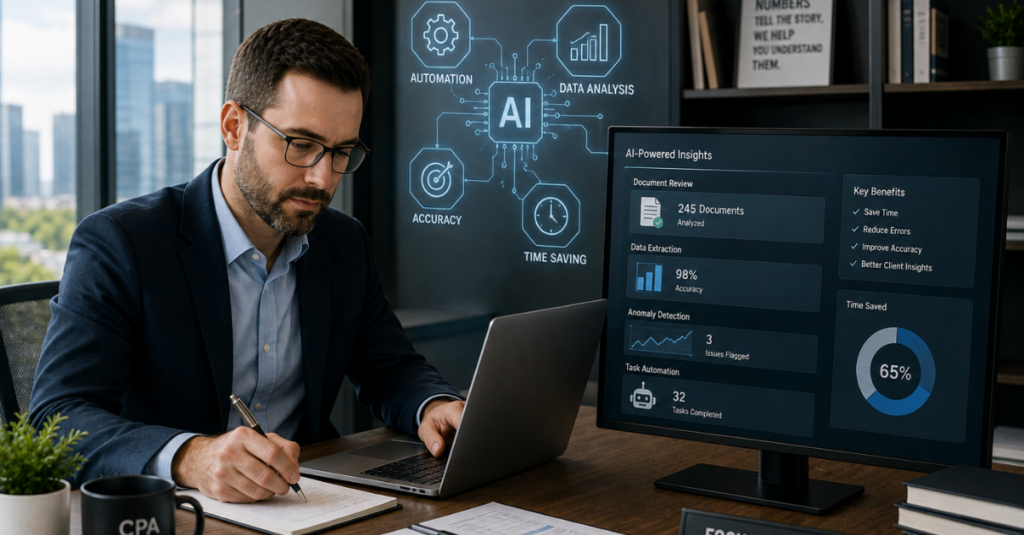
Document review is following a similar pattern. AI tools can scan hundreds of pages of contracts, prior returns, or financial statements and flag inconsistencies for an accountant to examine, turning what used to be a multi-hour manual review into a focused check of specific flagged items.
Predictive Insights for Cash Flow and Client Advisory
Beyond compliance work, AI is opening up new advisory opportunities. Predictive models can analyze a client’s historical transaction data and flag likely cash flow gaps, seasonal revenue dips, or unusual spending patterns weeks before they would show up in a traditional monthly report.
This kind of forward-looking insight lets a CPA move from simply reporting what already happened to advising on what is likely to happen next, which is a meaningful shift in the value a firm provides. Firms adopting productivity tools built specifically for this kind of analysis are seeing real gains, a trend outlined in this review of finance department productivity tools that are being adopted across finance teams of every size.
Predictive maintenance concepts from the IT world apply here too. Just as predictive downtime prevention uses monitoring data to catch a failing server before it crashes, predictive financial models use transaction patterns to catch a cash flow problem before a client feels the impact.
AI Powered Support Behind the Scenes
Much of the AI improving CPA firm efficiency is not client-facing at all. It is running quietly inside the IT systems that keep the firm operational. Help desk tools now use AI to triage support tickets, resolving simple password resets or software glitches automatically while routing complex issues straight to a technician.
This shift is covered in detail in this look at faster help desk resolutions, which explains how automation handles routine requests without removing the human technician from more complicated cases. For a CPA firm during tax season, that difference matters enormously. A staff member locked out of a tax platform at 7 a.m. needs a fast resolution, not a ticket sitting in a queue for hours.
Broader IT operations are shifting in a similar direction. This overview of changing IT operations explains how monitoring, patching, and basic troubleshooting increasingly happen through automated systems working around the clock, catching issues long before a human would notice a problem during business hours. The next generation automation tools driving this shift are becoming a standard part of how managed IT providers support accounting clients specifically because those firms cannot afford unplanned downtime during filing deadlines.
Security and Governance Risks That Come With AI Adoption
None of these efficiency gains are free of risk. Every AI tool that touches client financial data introduces a new question: where does that data actually go, and who else might have access to it once it leaves the firm’s own systems.
Firms need to think carefully about tools like Microsoft Copilot and similar generative assistants before rolling them out firm-wide. This detailed look at Copilot security considerations covers both the genuine productivity benefits and the data governance questions firms need to answer first, including how permissions are configured and what data the assistant can actually see.
Key governance questions every CPA firm should be asking include:
- Does this tool store or train on client data submitted through it?
- Can access be restricted so junior staff only see what their role requires?
- Is there an audit trail showing what the AI tool accessed and when?
- Has the vendor undergone any independent security review?
Attackers are also using AI themselves, which raises the stakes on the defensive side. This examination of sophisticated phishing tactics shows how generative tools now let criminals write flawless, personalized emails impersonating partners or clients, while rising AI generated threats covers how these tactics are evolving faster than many firms’ existing training programs can keep pace with.
Data Privacy and Compliance Considerations
CPA firms already operate under strict rules around how client financial data must be stored and protected. Adding AI tools into that environment does not remove those obligations. If anything, it adds a new layer of due diligence before any tool touching tax records or financial statements gets approved for firm-wide use.
Firms should confirm any AI vendor meets baseline expectations around encryption, access logging, and data residency before granting it access to client files. This lines up with the broader compliance obligations already covered in guidance on avoiding regulatory penalties, since a data exposure through a poorly vetted AI tool carries the same regulatory consequences as any other kind of breach.
Firms handling sensitive client records more broadly should also review this guidance on safeguarding sensitive records, which applies just as much to data flowing through a new AI platform as it does to a traditional file server. A readiness assessment process is often the most efficient way to get a clear picture of where a firm’s current data handling practices stand before any new tool gets approved.
AI and Fraud Detection
One of the more promising applications of AI in accounting is fraud and anomaly detection. Machine learning models trained on a client’s historical transaction patterns can flag entries that deviate from normal behavior, whether that is an unusual vendor payment, a duplicate invoice, or a transaction posted at an odd time of day.
This kind of pattern recognition mirrors what is already happening in cybersecurity, where smarter threat detection systems flag suspicious network behavior long before a human analyst would catch it manually. Applied to financial data, the same underlying approach helps firms catch potential fraud earlier, giving accountants a head start on investigation rather than discovering an issue months later during a routine audit.
That said, an AI flag is a starting point, not a conclusion. A qualified accountant still needs to investigate the flagged transaction, understand the context, and determine whether it represents a genuine problem or a legitimate but unusual business event. The technology narrows down where to look. It does not replace the judgment required to interpret what it finds.

Why Accountants Are Not Being Replaced
Every technology shift in accounting, from spreadsheets to cloud platforms, has sparked the same fear: that the tool will eliminate the need for the professional using it. AI is following the same pattern, and the same conclusion is likely to hold. The tools change how the work gets done. They do not change who is accountable for the result.
A few reasons this holds true for AI specifically:
- Clients hire a CPA for judgment, advice, and accountability, not raw data processing
- AI tools regularly need correction, meaning someone with real expertise must catch their mistakes
- Regulatory and ethical responsibility for a filed return rests with the licensed preparer, not the software
- Complex, nuanced client situations still require human interpretation that generalized AI models cannot reliably provide
Firms that frame AI as a tool for eliminating drudgery, rather than eliminating headcount, tend to see the best results. Staff freed from repetitive data entry can spend more time on the advisory conversations that actually build long-term client relationships and revenue, which is a far better use of a trained accountant’s time than manually re-keying invoice totals.
Building an AI Governance Policy for Your Firm
Firms that roll out AI tools without a clear policy tend to end up with staff using inconsistent, unapproved tools on an ad hoc basis, which creates exactly the kind of data exposure risk described earlier. A simple, written governance policy solves most of this before it becomes a problem.
An effective policy generally addresses:
- Which AI tools are approved for use with client data, and which are prohibited
- What categories of information can never be entered into a public AI tool
- Who is responsible for reviewing new tools before they are approved
- How staff should document AI-assisted work for audit purposes
Firms that already operate under an identity based access controls model find it easier to extend those same principles to AI tools, since permissions can be scoped by role rather than granted broadly to every staff member. Pairing that with a zero trust security model ensures that even an approved AI tool only accesses what a specific user’s role actually requires, rather than the entire client database by default.
Choosing the Right Technology Partner for AI Adoption
Rolling out AI responsibly is rarely something a firm should attempt entirely on its own, particularly if there is no dedicated internal IT staff to vet tools, configure permissions, and monitor for issues after deployment. This is where a managed IT partner familiar with financial services compliance becomes valuable.
Firms should look for a partner who can speak to:
- Experience supporting accounting or financial services clients specifically
- A track record with endpoint monitoring tools and other security fundamentals that protect data regardless of which AI platform is in use
- Familiarity with evolving insurance requirements tied to how new technology is deployed and documented
- A clear process for vetting new software before it touches client data
Firms already working with a provider offering dependable local technicians or broader network protection plans often find it easier to extend that relationship into AI governance rather than bringing in a separate specialist, since the existing provider already understands the firm’s infrastructure and compliance obligations.
Firms operating across a wider footprint, including Renton technology partners or offices spread further across the state through Washington business technology support, benefit from consistent AI governance standards applied across every location rather than each office making its own ad hoc decisions about which tools to allow.
Practical Steps to Start Using AI Responsibly
Firms considering their first real AI rollout do not need to attempt everything at once. A measured, staged approach tends to produce better results than an abrupt, firm-wide launch.
A reasonable starting sequence looks like this:
- Identify one narrow, repetitive task, such as receipt categorization, as a pilot use case
- Vet the specific tool’s data handling and security practices before granting any access
- Run the pilot with a small group of staff and document the actual time savings
- Expand gradually to additional tasks once governance and training are in place
- Review outcomes quarterly and adjust the policy as new tools or risks emerge
Firms unsure of where their current infrastructure stands relative to this kind of rollout often benefit from a broader look at legacy system expenses first, since outdated servers or unsupported software can quietly limit which modern AI tools will even function properly within the existing environment. Addressing that foundation first tends to make every subsequent AI rollout smoother.
Firms with limited internal IT capacity may also benefit from scaling internal teams through a co-managed arrangement, which adds specialized oversight for exactly this kind of technology evaluation without requiring a full-time hire dedicated solely to AI governance.
AI and Client Communication
Client-facing communication is another area quietly benefiting from AI, even when clients never notice the technology behind it. Drafting routine engagement letters, summarizing meeting notes, and generating first-pass responses to common client questions can now happen in seconds rather than the ten or fifteen minutes each of these tasks used to take.
This matters more than it might first appear. Multiplied across dozens of clients and hundreds of routine emails each month, small time savings on communication tasks add up to meaningful hours that staff can redirect toward actual advisory conversations. The risk, however, is the same one that applies everywhere else AI touches client data: a poorly configured tool drafting a client email based on financial details could just as easily expose that information if permissions are not properly scoped.
Firms should be particularly cautious about a specific type of scam that has grown alongside AI adoption. Criminals now use AI to craft convincing messages impersonating a partner or client requesting an urgent payment change, a tactic covered in this analysis of impersonation payment fraud. Ironically, the same AI-assisted drafting tools that save staff time on legitimate communication are making these fraudulent messages harder to spot, since the grammatical and tonal red flags staff were once trained to notice have largely disappeared.
Measuring the Return on AI Investment
Firms considering a broader AI rollout often want to know whether the investment actually pays off, and the honest answer is that it depends heavily on which tasks are automated and how well the rollout is managed. A poorly implemented tool that requires constant correction can end up costing more staff time than it saves.
A few practical ways firms measure real return on AI investment include:
- Comparing time spent on data entry and reconciliation before and after adoption
- Tracking error rates in categorization or transcription over a defined period
- Measuring how many support tickets get resolved automatically versus requiring a technician
- Surveying staff on whether the tool reduced or added friction to their daily workflow
Firms that skip this measurement step often keep paying for tools that never delivered the promised efficiency gains, or worse, quietly abandon genuinely useful tools because nobody tracked the early wins. Tying AI adoption to the same kind of disciplined tracking already applied to reducing operational downtime costs elsewhere in the firm’s technology stack tends to produce a much clearer picture of whether a given tool is actually worth keeping.
Bringing It All Together
AI is already reshaping how CPA firms handle data entry, research, forecasting, and internal support, and the pace of that change shows no sign of slowing. Used well, it removes the tedious, repetitive parts of the job and gives accountants more time for the advisory work clients actually value most. Used carelessly, it introduces new data exposure risks that carry the same regulatory consequences as any other kind of breach.
CMIT Solutions of Bothell and Renton helps CPA firms evaluate, secure, and responsibly roll out the AI tools already reshaping the profession, from initial governance planning through the cloud platform specialists needed to support modern accounting software, along with the broader secure compliance solutions required to keep client data protected throughout the process. Firms ready to talk through where to start can book a consultation call to review their current technology environment and build a practical AI adoption plan around it.
Frequently Asked Questions



