
For less than $12 a day, a criminal could rent a kit built to steal Microsoft 365 passwords. The kit sent emails that looked like they came from Microsoft. Each one led to a fake sign-in page. Whatever the victim typed went straight to the attacker. Microsoft and a healthcare security group shut the service down in 2025 and seized 338 websites. By then, it had taken at least 5,000 Microsoft 365 logins, including logins from at least 20 US healthcare organizations. If your practice runs on Microsoft 365, then Outlook, Teams and OneDrive hold patient information every day. The software can be set up to meet HIPAA. It does not arrive that way. This article walks through eight settings that decide Microsoft 365 HIPAA compliance for medical practices in Springfield, VA. Each one comes with a plain question to ask whoever looks after your IT.
Microsoft Says It Plainly
Microsoft’s own compliance page asks whether using its services makes a customer HIPAA compliant. Its answer begins with “No.” In Microsoft’s words, “using Microsoft services doesn’t on its own achieve HIPAA compliance.” The customer is responsible for how the services are set up and used. What Microsoft does provide is the signed agreement HIPAA requires, along with the tools. Switching the tools on is the practice’s job. Microsoft 365 HIPAA compliance for medical practices therefore depends on settings, and several of them can be off or loose unless someone changes them. The Microsoft 365 security settings for medical practices that matter most are covered below. First, the evidence that they matter.
What the Breach Data Shows
An email security company reviewed 170 email-related healthcare breaches reported to federal regulators in 2025. In 53% of them, the organization used Microsoft 365 as its main email system. The year before, the figure was 43%. Part of that reflects how many practices use Microsoft 365. It also shows where attackers are aiming. One case shows what a single mailbox can cost. In September 2026, a genetic testing company agreed to pay $700,000 to federal regulators. One employee email account had been phished in January 2020, and the information of more than 225,000 people was exposed. Regulators found no thorough risk assessment, no process for cutting off access when staff left, and no individual user IDs. Each of those failures maps to one of the Microsoft 365 security controls for healthcare organizations described below. “Controls” is the IT word for the settings and habits that keep information safe.
8 Settings Worth Reviewing
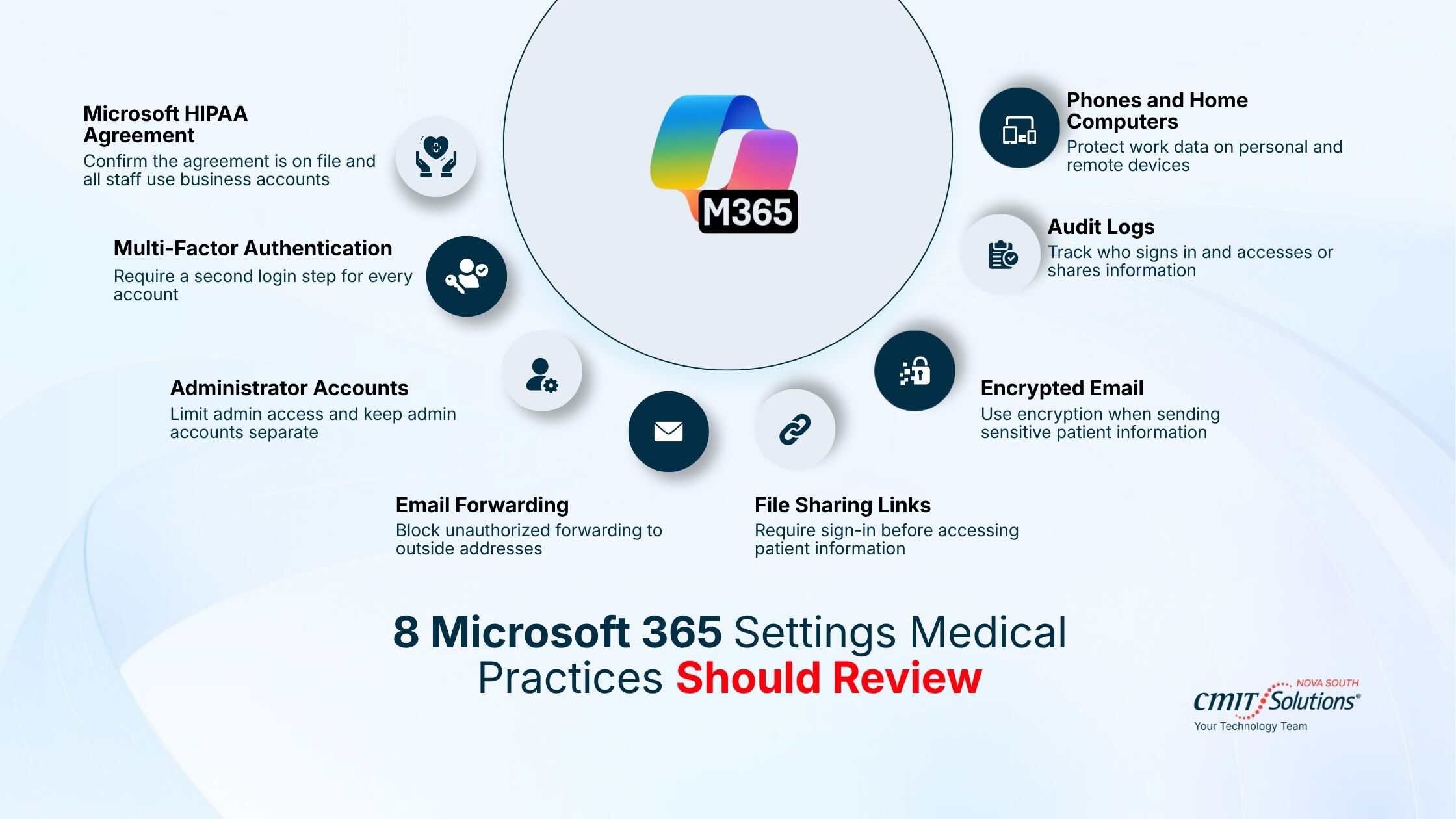
Treat this as a Microsoft 365 HIPAA compliance checklist for healthcare providers. You do not need a technical background to ask any of these questions.
1. The signed agreement with Microsoft
HIPAA requires a signed agreement, called a business associate agreement, with any company that holds patient information for you. Microsoft says its agreement is available by default to customers that HIPAA covers. Keep a copy with your HIPAA paperwork. Check that every staff mailbox sits on your business account, since a personal email account is outside that agreement.
Ask: Do we have Microsoft’s agreement on file, and is every mailbox on our business account?
2. A second login step for every account
This is called multi-factor authentication. Staff enter a password and then confirm on their phone. Microsoft says it blocks more than 99.2% of account attacks. Microsoft now forces it for administrator tools, but that rule does not cover ordinary staff signing in to Outlook or Teams. Microsoft 365 accounts set up before October 2019 may not have it switched on at all. No lock is perfect. The kit described above was built to get around some forms of the second step. An approval in an authenticator app is harder to fool than a code sent by text.
Ask: Is the second login step required for every account, with no exceptions?
3. Administrator accounts
An administrator account is the master key. It can read any mailbox and change any setting. Keep the number small. Give each administrator a separate account for that work, so their everyday email login is not the master key. Under Microsoft’s free baseline settings, administrators confirm on their phone at every sign-in.
Ask: Who has administrator rights, and do they use a separate account for it?
4. Automatic email forwarding
An attacker who gets into a mailbox can add a rule that quietly forwards every message to an outside address. Microsoft’s documentation says the default differs between organizations, and older accounts may still allow it. Microsoft recommends setting it to on or off explicitly.
Ask: Is automatic forwarding to outside addresses turned off, and has anyone checked the rules already in our mailboxes?
5. Sharing links
OneDrive, SharePoint and Teams let staff share a file by sending a link. One type of link, labeled “Anyone,” opens the file without any sign-in. Whoever receives the link can pass it on, and a link sent to the wrong address keeps working until someone turns it off. For folders that hold patient information, sharing should require the recipient to sign in.
Ask: Can our staff create links that work for anyone, without signing in?
6. Encrypted email
Encryption scrambles a message so only the intended reader can open it. Microsoft 365 can do this, depending on your plan. One detail catches people out. Subject lines are not encrypted, so a patient’s name should never go there.
Ask: How does a staff member send an encrypted email, and does our plan include it?
7. The activity log
Microsoft calls this the audit log. It records who signed in and what they opened or shared. HIPAA requires a practice to be able to record and examine activity in systems that hold patient information. Microsoft’s documentation says the log is not on by default for its Business Basic, Business Standard and Business Premium plans. Those are Microsoft’s small-business plans. Once switched on, records are kept for 180 days.
Ask: Is our audit log turned on, and who looks at it?
8. Phones and home computers
Staff read work email on their own phones. A lost phone with no screen lock is an open inbox. Depending on your plan, Microsoft 365 can require a PIN on any phone that holds work email. It can also erase the work data remotely.
Ask: If a phone with work email is lost tonight, what can we do about it?
Who Should Check, and How Often
Hand the eight questions to whoever manages your Microsoft 365 and ask for the answers in writing. A HIPAA compliant Microsoft 365 setup for medical practices has all eight in place and written down. The paper trail matters. For Microsoft 365 HIPAA compliance, Springfield VA practices can show a regulator that the settings have to be recorded as well as switched on. They are one part of the HIPAA compliance that medical practices in Springfield, VA have to maintain, and your risk assessment should list them. Then check again. Microsoft 365 security configuration for medical practices drifts over time. Staff join and leave. Someone turns a setting off to fix a problem and forgets to turn it back on. Regular security reviews can help reduce risks, but medical practices should also understand their recovery options if an attack occurs. Learn more about ransomware recovery for medical practices in Springfield and how to prepare for a ransomware incident. Microsoft’s own defaults have changed over the years, which is why two practices on the same plan can have different settings. Reviewing the list twice a year is one of the simplest Microsoft 365 cybersecurity best practices for medical practices.
What a Microsoft 365 Review With CMIT Solutions of NOVA South Covers
CMIT Solutions of NOVA South handles Microsoft 365 compliance and security for medical practices in Springfield, VA and across Northern Virginia. The Microsoft 365 security services Springfield, VA practices get from us include turning on the second login step, locking down sharing and forwarding, and switching on the audit log. Somu Valliappan, our Managing Partner, spent more than ten years working on healthcare data systems for CMS and NIH, where HIPAA compliance was part of the work. Microsoft 365 is one piece. It sits alongside the wider cybersecurity services Springfield, VA practices need, such as staff phishing training and protection for each computer. Day-to-day help with new accounts and departing staff is part of our managed IT services Springfield offices use every week. Take the eight questions to the person who manages your Microsoft 365. If clear answers come back in writing, you are in good shape. If they do not, let us run the review for you.
Frequently Asked Questions
Is Microsoft 365 HIPAA compliant for medical practices?
It can be. Microsoft signs the business associate agreement HIPAA requires, and its services can be set up to protect patient information. Microsoft also states that using its services does not, on its own, achieve HIPAA compliance. The practice has to configure them and use them properly.
What Microsoft 365 security settings should medical practices review for HIPAA compliance?
Eight: the agreement with Microsoft, the second login step, administrator accounts, automatic forwarding, sharing links, encrypted email, the audit log, and rules for phones. Start with the second login step and the audit log. Both can be off without anyone noticing.
Does using Microsoft 365 automatically make a medical practice HIPAA compliant?
No, and Microsoft says so directly. HIPAA compliance rests on your own risk assessment, policies, staff training and settings. Microsoft 365 is one system inside that picture. Setting it up correctly is the kind of work the HIPAA cybersecurity services Springfield practices hire are meant to cover.
Which Microsoft 365 security features help protect ePHI?
ePHI means electronic patient information. The features that protect it are the second login step, message encryption, sharing limits, the audit log, and device rules that can erase work data from a lost phone. Microsoft 365 can also warn staff before a message containing a Social Security number leaves the practice. What you have depends on your plan.
Does a medical practice need MFA for Microsoft 365 to meet HIPAA requirements?
The current HIPAA rule does not name MFA. It requires a practice to verify that anyone opening patient information is who they claim to be. A stricter rule proposed in January 2025 would require MFA, and the final decision has been pushed to 2027. Since Microsoft counts it as blocking more than 99.2% of account attacks, there is little reason to wait.
How often should a medical practice review its Microsoft 365 security settings?
At least twice a year. Review again when an administrator leaves or when you change plans. Microsoft’s defaults have shifted over time, so a setting that was fine when your account was created may not match today’s guidance. Put the review on the calendar. Most of the medical practice cybersecurity Springfield, VA offices need is routine checks like this one.
What should a Springfield medical practice check before using Microsoft 365 for patient information?
Check that you are on a business plan and that Microsoft’s agreement applies. Give every staff member their own account. Turn on the second login step and the audit log. Then decide where patient information is allowed to live. If nobody on staff can answer these, the Microsoft 365 support for medical practices Springfield, VA offices can call on is the practical route.


