
Choosing the right productivity suite is one of the most consequential decisions a decision-maker in a small and mid-sized business (SMB) can face.
For SMBs, there are two primary solutions that keep daily operations running smoothly:
- Microsoft 365
- Google Workspace
At its core, the Microsoft 365 vs. Google Workspace decision isn’t just about Word versus Docs — it’s about aligning cloud-native simplicity with your team’s workflow / integrating powerful desktop applications into your existing processes.
Are you an organization looking for dependable application support in Franklin Township, New Jersey? CMIT Solutions offers expert support that directly impacts productivity, security, and long-term scalability.
This guide compares Microsoft 365 and Google Workspace platforms across core applications, collaboration features, storage options, and security frameworks — helping you determine the best strategic fit for your business.
Comparing Microsoft 365 and Google Workspace
Let’s break down how Microsoft 365 and Google Workspace differ across key business operations.
Core Applications, Workflow Models, and Platform Capabilities
Design Philosophy
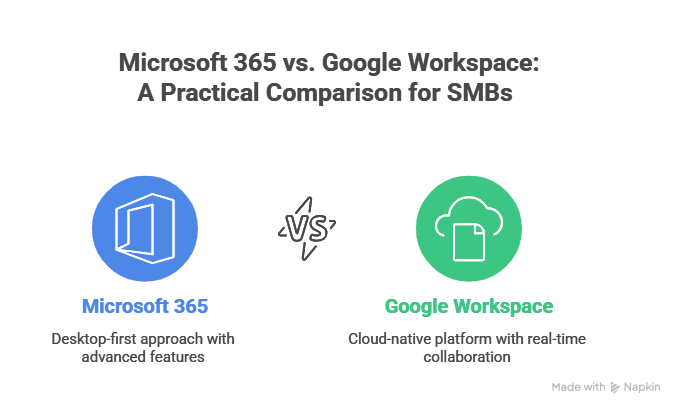
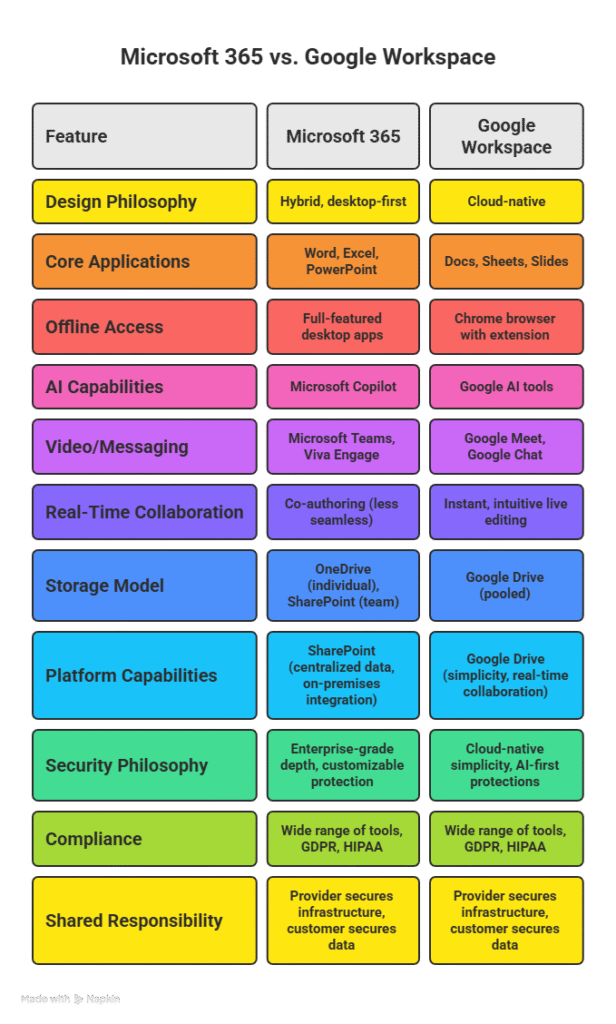
- Microsoft 365: Offers a hybrid, desktop-first approach with full-featured desktop applications alongside their web versions.
- Google Workspace: A cloud-native platform built from the ground up for the browser to ensure a consistent experience on any device.
Also Read: Why Do You Need Enterprise-Level Support for Strategic Resilience?
Core Applications and Use Cases
- Microsoft 365: Its philosophy translates directly to its powerful desktop applications — Word, Excel, and PowerPoint. These tools are the preferred choice for teams that depend on extensive offline functionality and advanced features for complex tasks.
For example, you might rely on Excel for intricate financial modeling or use PowerPoint to create highly detailed professional presentations.
- Google Workspace: Provides its own set of applications — Docs, Sheets, and Slides. These are built for a different kind of workflow, one that prioritizes seamless real-time collaboration and simplicity — making them ideal for agile / remote-first teams.
A key practical concern is file compatibility, but with Google Workspace, you can open, edit, and save native Microsoft files — like .docx and .xlsx — directly within its applications.
Offline Access and AI Capabilities
Regarding offline work, a common assumption is that only Microsoft’s desktop apps are capable. However, Google Workspace also supports offline access for its tools. This functionality isn’t a standalone desktop app — it requires the Chrome web browser and a specific extension to be installed.
Furthermore, both suites are evolving with artificial intelligence (AI) — integrating features like Microsoft Copilot for workflow assistance and Google’s AI tools across Workspace (Docs, Meet, and Gemini).
Therefore, your choice ultimately hinges on selecting either a desktop-first or a cloud-native workflow for your team’s daily tasks.
Collaboration and Communication Tools for Modern Teams
Video and Messaging Platforms
- Microsoft 365: Includes Microsoft Teams — a unified platform that consolidates chat, video meetings, and file sharing into a single, powerful hub. For larger-scale communication, Teams supports up to 1,000 participants and includes robust webinar and large-event tools. Additionally, Microsoft offers Viva Engage — a dedicated solution for internal social networking to foster community and employee engagement.
Relies heavily on the Teams hub, which, while powerful for managing complex projects, can introduce a steeper learning curve and administrative complexity for teams primarily focused on streamlined communication.
- Google Workspace: Provides Google Meet for video conferencing and Google Chat for instant messaging — essential tools that help teams connect and collaborate in real-time. For larger-scale communication, Google Meet features a simple interface and supports up to 500 participants on higher-tier plans.
Offers a cleaner, more consolidated experience by using Gmail as your central communications hub, where messages and meeting invites flow seamlessly together.
Real-Time Collaboration
- Microsoft 365: Supports co-authoring, though the experience can vary depending on whether files are stored locally or in OneDrive/SharePoint. Co-authoring is reliable but can be less
- seamless than cloud-native solutions.
Google Workspace: Excels at real-time collaboration. Its web-based applications — Docs, Sheets, and Slides — enable instant, intuitive live editing, where multiple users can simultaneously make changes without syncing delays / conflicts — making it ideal for remote and hybrid teams.
Therefore, your decision between these platforms hinges on a key strategic choice: Does your team prioritize a fluid, cloud-native workflow built for real-time co-editing? / Do you need a deeply integrated, all-in-one communication and project hub?
Cloud Storage and File Management Models
Storage Models
- Microsoft 365: Provides two solutions: OneDrive for individual files and SharePoint for team collaboration. Uses a per-user storage model, typically giving each user 1 TB of storage depending on license — a straightforward allocation that makes individual capacity predictable.
- Google Workspace: Relies on Google Drive. Employs a pooled storage model, where the total storage is shared across all users. This model offers more flexibility and cost efficiency for teams with varying storage needs. For example, if your team includes a few designers who require substantial space, the pooled model ensures that their heavy usage doesn’t force you to upgrade every user’s plan because it shares the total capacity.
Platform Capabilities
- Microsoft 365: Beyond individual files, SharePoint serves as a platform for centralized data storage — offering structured team sites with advanced permissions and workflow automation. For your business to leverage existing infrastructure, SharePoint’s on-premises integration capability is a crucial advantage — allowing you to create a hybrid environment that bridges cloud and local servers.
- Google Workspace: Google Drive prioritizes simplicity and ease of use, with a cloud-native design that excels at real-time collaboration and streamlined file sharing.
Therefore, your choice ultimately hinges on selecting a per-user / pooled storage model that best supports your team’s file management and collaboration needs.
Security, Compliance, and Risk Management
Security Philosophy
- Microsoft 365: Built on enterprise-grade depth, Microsoft 365 offers customizable protection through tools like Microsoft Defender and Data Loss Prevention (DLP). This approach offers more granular, enterprise-grade control — but maximizing its security requires more advanced IT knowledge and administrative effort.
- Google Workspace: Focuses on cloud-native simplicity, with AI-first, built-in protections. This makes it generally easier to secure and manage out of the box — an excellent choice for lean SMBs.
Compliance and Standards
Both Microsoft 365 and Google Workspace offer a wide range of security and compliance tools to protect your data, ensure regulatory compliance, and prevent unauthorized access. They comply with major global security standards, such as GDPR and HIPAA — making them suitable for regulated industries.
Shared Responsibility Model
Regardless of the platform, IT administrators must understand the Shared Responsibility Model — a conceptual framework that defines the specific security obligations of both the cloud provider and the customer.
In a SaaS context, the provider secures the platform infrastructure, but data-level risks remain the customer’s responsibility. To bridge this gap, customers often implement robust backup strategies — including third-party SaaS backup solutions — to protect against data loss.
Therefore, your choice hinges on the platform whose security, compliance, and management best align with your company’s IT strategy.
Choosing the Productivity Suite That Fits Your Business
There is no single “winner” in the Microsoft 365 vs. Google Workspace debate: the best choice depends on how your team works and the tools they use daily.
For SMBs, this foundational choice is a strategic one — impacting daily workflows and security. At CMIT Solutions — a leading IT services provider in Franklin Township, NJ — we provide expert guidance and support to help you select the platform that best fits your business needs.
Connect with us today for a comprehensive IT assessment!