
As employees move between office networks, home Wi-Fi, and public hotspots, your business is exposed to more cyber risks than ever. A Virtual Private Network (VPN) is one of the simplest ways to secure that hybrid environment by encrypting traffic and controlling remote access.
Below, we break down what a VPN is, how it works, and how to choose the right one for your business.
What a Is a VPN?
A VPN creates a secure, encrypted tunnel between a device and your business systems. When someone connects through a VPN:
- Their traffic is encrypted end-to-end
- Their device appears as if it’s inside your business network
- Sensitive files, email, and logins stay protected—even on public Wi-Fi
In everyday terms: A VPN keeps employee traffic private and ensures only trusted users access your network.
Why it’s important for SMBs:
- Protects data on public Wi-Fi like hotels, cafés, and airports
- Secures remote access to files, servers, and business apps
- Supports compliance for industries that require encrypted transmission
- Reduces account takeovers by adding another authentication layer
- Keeps network details private so attackers can’t map your system
If you have remote, hybrid, or traveling employees, a VPN isn’t optional—it’s baseline security.
How a VPN Works (Simple Breakdown)
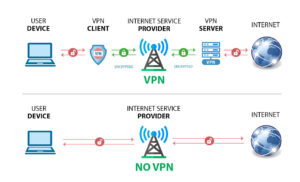
With a VPN, your connection is protected before it ever reaches your internet provider. The VPN client on your device encrypts your traffic, sends it through a secure tunnel, and routes it to a trusted VPN server before it reaches the internet.
In the diagram above:
- User device → VPN client: Your data is encrypted immediately.
- VPN client → ISP: Your internet provider only sees encrypted traffic, not what you’re accessing.
- ISP → VPN server: The encrypted data travels through a secure tunnel.
- VPN server → Internet: The VPN server decrypts and forwards the request, keeping your identity and activity private.
Without a VPN, your device sends unencrypted traffic straight through your ISP to the internet — making it easier for attackers or networks to see what you’re doing.
A VPN keeps your connection private on home Wi-Fi, public hotspots, and while traveling, ensuring only the right people can access your business systems.
Choosing the Right VPN for Your Business
Not all VPNs are created equal. The right setup depends on how your team works.
Common VPN Types
- Remote-Access VPN: Best for SMBs with hybrid or remote workers
- Site-to-Site VPN: Connects multiple office locations into one secure network
- Cloud VPN: Ideal for organizations using Microsoft 365, Azure, and other SaaS apps
What to look for in a business-grade VPN
- Strong security (AES-256 encryption, MFA, firewall integration, DNS filtering)
- Performance (high throughput, low latency)
- Ease of use (simple login, automatic connection)
- Scalability as you add more employees or devices
- Centralized management so your IT provider can monitor access and spot suspicious activity
Even if you use Microsoft 365 or cloud apps, you still need a VPN—cloud apps encrypt data inside the app, but the VPN encrypts the connection itself, closing a major gap for remote users.
Need Help Choosing or Setting Up a VPN?
Every business in the Hudson Valley works a little differently—some rely on cloud tools, others still use on-prem systems, and many use a mix of both.
CMIT Solutions helps design, deploy, and manage the right VPN for your business. Schedule a free consultation today or call us at (203) 443-1646