

Running a business in South Florida hits a little differently. Between hurricane season preparedness, nonstop growth in Broward, Miami-Dade and Palm Beach, and the constant balancing act of supporting both in-office and remote workers, technology isn’t just important. It represents the backbone that keeps your operation stable.
And when something goes wrong, you feel it immediately.
Email goes down, your line-of-business software freezes, or your Wi-Fi starts acting like it’s allergic to productivity. Suddenly your team is stuck, clients are waiting, and the day is slipping through your fingers.
That’s why choosing an IT provider here isn’t a simple checkbox. It is a relationship. It is knowing that when the heat is on, your provider won’t leave you stranded.
Many business owners have told us they “didn’t know what to ask” when choosing their previous IT partner, and they paid for it later. So this guide is designed to help you feel informed, confident, and in control.
Let’s break it down. Here are the 10 questions every South Florida small business should ask before choosing an IT provider.
- “How do you structure your response times and prioritization?”
Many providers operate on a “first-come, first-served” basis. The problem with that model is that a quick 5-minute fix (like a password reset) often gets stuck in line behind a complex, 4-hour server issue. This makes you wait unnecessarily.
We take a more intelligent approach using Service Level Expectations (SLEs) based on industry best practices.
We use a Triage System to categorize every ticket into clear levels: Low, Normal, Critical, and Emergency.
- The Benefit to You: This creates a “Fast Lane” for quick fixes and an “Escalation Lane” for major issues. It ensures that your quick requests are handled rapidly by our Service Desk, while complex emergencies are immediately routed to senior engineers.
We don’t make empty marketing promises. We track our Initial Response Time (the time it takes for a human to acknowledge your issue and begin working on it) to ensure your team is never left wondering if anyone received your ticket.
- ✔️ Good Sign: “We use a structured SLE system to ensure simple issues don’t get stuck behind complex ones. We track our Initial Response metrics to ensure every ticket, big or small, is acknowledged and routed to the right technician immediately.”
- ❌ Warning Sign: “We treat every ticket exactly the same.” (This usually means a simple request will take days if they are busy with another client’s project.)
- “Do you offer EDR or MDR? (And can you explain the difference?)”
South Florida businesses, especially professional services, medical offices, real estate, and hospitality, are prime targets for cyberattacks. If a provider hands you a quote that only lists “Antivirus,” they are selling you 2010 security for a 2025 threat landscape.
We offer both EDR (Endpoint Detection and Response) and MDR (Managed Detection and Response) because different businesses have different risk profiles. Here is the difference:
- EDR is like a Security Camera: It records suspicious activity and alerts you if a window is broken (ransomware attack). But if no one is watching the camera feed at 2:00 AM, the thieves still get in.
- MDR is like a 24/7 Security Guard: It uses the cameras (EDR), but a team of human experts is watching the feed live. If they see a threat, they intervene immediately to stop it.
- ✔️ Good Sign: They offer Cybersecurity & Compliance options that fit your budget, explaining the difference between software (EDR) and active monitoring (MDR).
- ❌ Warning Sign: They say, “Macs don’t get viruses” or “Basic antivirus is fine.”
- “What’s included in your monthly support… and what costs extra?”
In South Florida’s competitive market, it’s easy to get lured in by a low sticker price, only to be surprised later by add-ons for every little thing. A true Managed Service Provider (MSP) acts as your partner. This means they have a financial incentive to keep your systems running perfectly so you don’t have to call them.
The Difference Between “The IT Guy” and a Managed Partner:
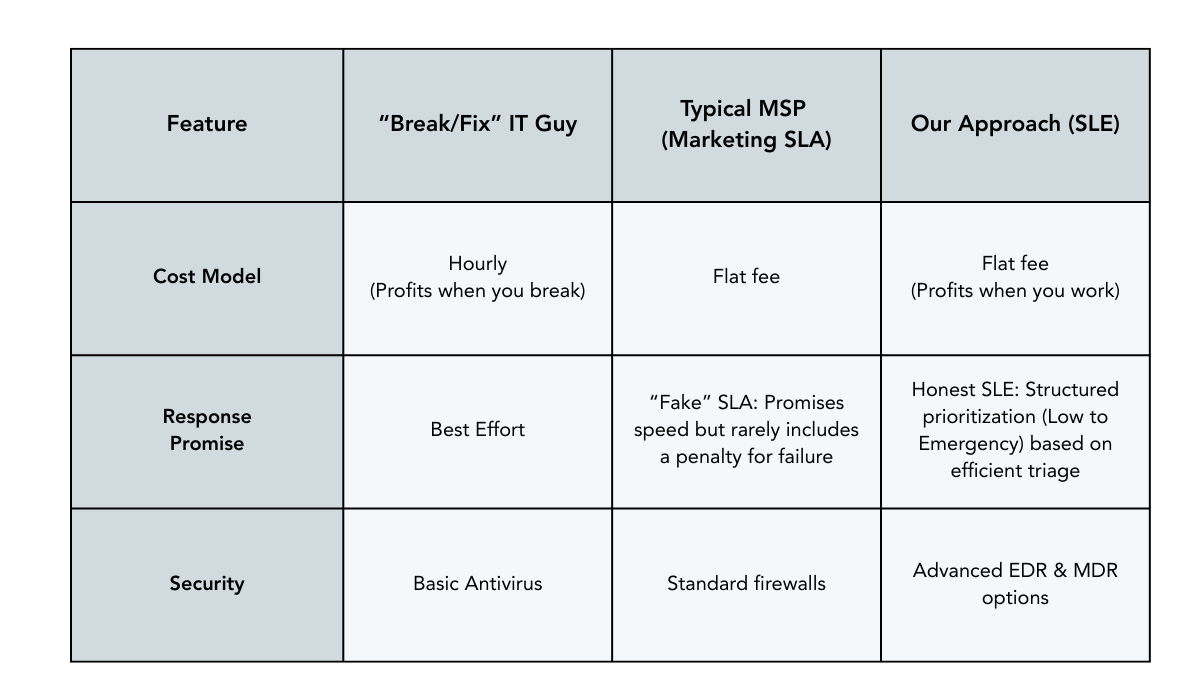
- “How do you onboard new clients?”
A smooth onboarding matters, especially if you’re transitioning away from a provider who hasn’t kept up with your growth.
- ✔️ Good Sign: They have a documented, step-by-step onboarding process and a clear timeline. They handle the awkward conversation with your old IT person to get your documentation back.
- ❌ Warning Sign: They get nervous when you ask for a project plan.
- “Can you support my industry and its specific needs?”
A Fort Lauderdale law firm doesn’t run like a Coral Springs medical office. A boutique hospitality group near Las Olas doesn’t operate like a contractor in Pompano. Your provider needs to understand your specific software, compliance requirements, and daily pressures.
- ✔️ Good Sign: They ask to speak with your software vendors (like EMR or Legal Practice Management support) directly to handle updates and glitches for you.
- ❌ Warning Sign: “We figure it out as we go.”
- “How do you help my business use technology strategically, not just fix things?”
You don’t want someone who only shows up when something breaks. You want a partner who helps you grow, scale, and make smart tech decisions as South Florida evolves.
- ✔️ Good Sign: They schedule Quarterly Business Reviews (QBRs) to discuss your budget, your roadmap, and cost-saving opportunities.
- ❌ Warning Sign: You only hear from them when they send an invoice.
- “Do you use AI and automation to improve response times?”
Between hybrid work, remote access, and cloud dependencies, your business relies heavily on fast detection and resolution of issues. Modern IT providers use AI-enhanced cybersecurity and automated ticket routing to solve problems faster.
- ✔️ Good Sign: They use Automation & AI Services to reduce manual data entry and streamline your workflows.
- ❌ Warning Sign: They are still doing everything manually, meaning you pay for their inefficiency.
- “Do you provide regular reporting so I know what I’m paying for?”
Business owners want visibility, especially in a region where unexpected downtime can hit at the worst possible moment, like in the middle of a busy season or right before a major deadline.
- ✔️ Good Sign: You receive monthly executive summaries showing system health scores, security status updates, and ticket summaries.
- ❌ Warning Sign: “Trust us, everything is running fine.”
- “What happens if I’m not satisfied?”
Long-term contracts without flexibility are a huge warning sign. A confident provider won’t trap you with handcuffs; they keep you with great service.
- ✔️ Good Sign: A clean, simple offboarding process with a promise to hand over all passwords and documentation within 30 days.
- ❌ Warning Sign: Long-term lock-ins with no exit clause.
- “Do you have proof—testimonials, case studies, or client references?”
Any provider can claim they’re great. Only a reliable one can back it up. The South Florida business community is tight-knit, so good providers aren’t shy about their track record.
- ✔️ Good Sign: Written testimonials, video case studies, and phone numbers of local clients you can actually call.
- ❌ Warning Sign: “We can’t provide references due to client privacy.”
(While privacy is important, every reputable IT firm has at least a few ‘raving fan’ clients who are happy to vouch for them.)
Frequently Asked Questions (FAQ)
Common questions about hiring IT support in South Florida.
Why is it important to have a local IT provider in South Florida?
While remote support is useful, local providers in Broward, Miami-Dade and Palm Beach understand the specific regional challenges businesses face, from hurricane preparedness to local internet infrastructure quirks. A local team can also deploy on-site technicians quickly for hardware failures, which remote-only firms cannot do.
What is the difference between Break/Fix and Managed IT Services?
“Break/Fix” means you call an IT person only when something breaks, and they bill you hourly to fix it. This model incentivizes problems. “Managed IT Services” is a subscription model where the provider monitors your systems 24/7 to prevent issues before they cause downtime.
How fast should an IT provider respond to a critical issue?
Response times vary by severity. A reputable provider uses Service Level Expectations (SLEs) to prioritize critical issues (like a server outage) immediately, often with an initial response within 15–30 minutes, while less urgent tasks are scheduled for efficient resolution.
Do you support remote workers and hybrid offices?
Yes. With the South Florida workforce becoming increasingly hybrid, we secure and support employees whether they are in your office, working from home, or traveling.
Final Thoughts: Don’t Choose an IT Provider Blindly
Choosing the right IT partner here in South Florida isn’t just about technology. It’s about trust, stability, and knowing someone has your back, even during a sudden growth spurt or just a chaotic Tuesday.
Whether you work with us or someone else, we want you to walk away feeling more informed and more confident. You deserve a partner who takes your business as seriously as you do.
Ready to see how we stack up? We invite you to put us to the test. Schedule a Discovery Meeting with our team today, and we’ll walk you through exactly how we handle security (EDR/MDR), speed (SLE), and strategy for your business.