If you’re a Greater Philly area business owner trying to decide between hiring an internal IT person or partnering with an outside firm, you’re not alone. This question comes up constantly in conversations I have with small and midsize business owners. Some want control. Others want flexibility. Most just want their tech to work and not turn into another full-time job.
Whatever your concerns, this article is for you. I’ll walk you through the key decision points to help you find your best solution.
Your Three Choices for Managing Technology
- In-House Technology: You hire, train, and manage your complete IT staff.
- Outsourced Technology: You contract with a specialized outside IT firm to handle all your IT needs.
- Hybrid/Co-Managed IT: You have someone in-house managing your strategy, budget, and resources, while external IT experts handle computer maintenance, projects, complex tasks, and around-the-clock support.
Each model comes with trade-offs. Let’s take a deeper look at all three.
Option 1: In-House Technology
Keeping all your technology under one roof appeals to business owners who value control. It feels like you have more oversight. For highly regulated industries or large companies where security is paramount (think banks, hospitals, or defense contractors), that may be exactly the right call. But for most small and midsize businesses, the costs and challenges outweigh the benefits.
The Hidden Costs of In-House IT
To cover even basic business IT needs, you’re likely to need more than one person. Here’s why:
- COMPLEXITY OF MODERN SYSTEMS: You need people who understand cloud infrastructure, cybersecurity, data backup, remote work setups, hardware management, and software licensing. (That’s analogous to expecting one marketing person to handle market research, lead generation, content, advertising, social media, SEO, analytics, graphic design, video editing, and your website. It’s too much.)
- COVERAGE GAPS: One person can’t be on-call 24/7. Vacation? Sick leave? Job change? They leave your business vulnerable. And that means when something’s wrong, you’ll get the call at 2 AM – but unfortunately, you aren’t the person with the solution.
- BURNOUT AND TURNOVER: In technology, burnout is real because of the 24/7 nature of the work. In today’s market, where skilled tech professionals are in high demand, tech talent doesn’t have to settle for grueling hours or distractions from their personal lives. In fact, there’s about a 70% chance your key in-house people are already connected to a recruiter who regularly pitches opportunities to them – even if they’re not actively looking. So, when an essential tech person starts feeling overworked, they can often find a job offer even before you’re aware of a problem. They leave, and you have to start all over again.
Who Typically Chooses In-House IT staff?
- Regional, national, or global corporations with hundreds or thousands of employees, such as Fortune 500 companies
- Centralized organizations with strict regulatory or security requirements, such as banks, government agencies, or mass-market brokerage firms
- Companies that need direct, on-site IT coverage at all times, such as airlines, broadcast networks, utilities, and casinos
- Individuals and small companies with high compliance needs that require specialized technology talent, such as solo medical specialists operating under HIPAA, boutique pharmaceutical research firms working under FDA guidelines, or small aerospace subcontractors subject to ITAR or DoD cybersecurity requirements
Pros of In-House IT
- Full-time availability (although often limited to business hours)
- Deep familiarity with internal systems, particularly proprietary algorithms or advanced security
- Direct oversight and control
Cons of In-House IT
- Very high payroll and overhead costs
- Challenging to find and retain the right talent
- Limited availability outside work hours
- Risk of total outage or major incidents if knowledgeable staff leave
- Diminishing knowledge or depreciating expertise.
Let me expand on that last point. Those who work on internal IT quickly become siloed in their knowledge as they remain focused on a single system. More quickly than anyone wants to admit, their vision becomes limited in scope, and they tend not to explore new approaches – causing IT to stagnate. Many companies find themselves mired in outdated legacy technology because they rely on in-house technical personnel.
Now, let’s explore the model that most small and midsize businesses find a better fit:
Option 2: Outsourced Technology (Managed IT Services)
Outsourced IT, often called “managed IT services,” is when a business contracts a professional technology company to manage its IT environment. Instead of hiring internal staff, you gain access to a full bench of experts through a monthly service agreement. (Bonus: the owner of the managed services company handles all the hiring, firing, training, and related HR issues, so you don’t have to.)
What Do You Get with Managed Services?
– 24/7 monitoring and support
– Access to multiple specialists (cybersecurity, networking, cloud, compliance)
– Strategic planning partnership that aligns your IT with your business growth
– Proactive threat detection and system maintenance
– Predictable monthly billing
– Scalability as you grow; the provider assigns more resources to your company whenever you add employees or a second location, etc.
This option is similar to having an entire IT department — without the overhead.
Who Typically Chooses Fully Outsourced IT?
Small businesses (5–50 employees) that have, or prefer, no internal IT staff. Examples include:
- Professional services firms (law offices, CPAs, consulting practices)
- Boutique financial advisory firms (wealth managers, investment advisors, private “family business” offices)
- Retail and ecommerce companies (fashion boutiques, specialized equipment marketers, Etsy-type stores)
- Creative and design companies (advertising and marketing agencies, website designers, architects)
- Healthcare vendors (medical equipment manufacturers and distributors, testing labs, healthcare recruiting and staffing firms)
- Education and training companies (tutoring centers, private schools, test prep companies, corporate training firms)
- Trades (plumbing, electrical, HVAC companies)
- Real estate interests (building and apartment management companies, tenant platforms, real estate brokerages)
- Nonprofits (charitable organizations, places of worship, associations)
Also:
- Start-ups and young companies focused on growth and scalability
- Focused companies that want to deploy all their employees on their main business purpose
- Small firms seeking enterprise-level security and support without the means to hire enterprise-level technology personnel
Pros of Outsourced IT
- Cost-effective compared to multiple hires; best fit for companies that lack the budget or need for full-time IT staff and prefer flat-fee or on-demand tech support
- Round-the-clock support, including holidays and weekends
- Fast onboarding of new technologies
- Scalability: easy to ramp support up or down for special projects or emergencies.
- Expertise in cloud-based tools and serving remote or mobile-first teams
- Direct access to vendor-only tools (security and management software and hardware not sold to the public) and partner-level support (direct line into Microsoft, Google, etc.)
- Valuable business advice and planning. Managed service providers offer far more than fixing what’s broken; they provide business owners with a qualified CTO-type to meet with you on occasion as part of the relationship – a much better fit for a small business than hiring an equivalent CTO.
- Confidentiality protected by NDAs, policies, protocols, and security.
Cons of Outsourced IT
- Less day-to-day visibility (though a good partner keeps you informed)
- Requires a trusting relationship with your provider
Now let’s examine a model that works if you already have someone in-house that you trust, but you don’t want to hire a fleet of people to handle all your technology:
Option 3: Hybrid or Co-Managed IT
Hybrid IT, also known as co-managed IT services, is when your business maintains an internal IT leader (like a Director of Technology or Systems Admin, and possibly one or two others) but leverages an outsourced managed services provider for the rest of its needs.
What Does Co-Managed IT Look Like?
- Your in-house staff handles strategy, coordination, facilities, and budget
- Your managed IT services provider supplies 24/7 tech support, monitoring & maintenance of your computers and systems, specialized expertise, and cybersecurity tools
- You share responsibilities and oversight
This setup is especially helpful when:
- Your internal person is overwhelmed or stretched thin
- You need project-based support, 24/7 tech support, or expert help for things such as server programming and maintenance, cloud file storage and backup, staff onboarding and off-boarding, and myriad other aspects of business technology.
- You want the greatest capabilities and reach for a less-than-Fortune-500 budget.
- Your company needs cybersecurity protection or regulatory compliance. These are specialized skills and it’s often too expensive to maintain full-time staff for these roles. (Established managed service providers offer these capabilities.)
Who Typically Chooses Co-Managed IT?
- Midsized companies with complex systems, such as:
- Manufacturers with supply chain dependencies (e.g., custom electronics, precision parts, or packaging companies)
- Regional logistics companies with warehousing and fleet tracking systems
- Financial services firms (commercial lenders, mortgage brokerages, equipment financiers) with multiple data systems and security requirements
- Construction companies using advanced estimating, project management, and field data systems
- Insurance brokerages managing multiple carrier portals, quoting platforms, and compliance systems
- Businesses running legacy software that requires in-house knowledge, such as:
- Specialty manufacturing firms still running old versions of ERP software (e.g., MAS 90, older versions of Microsoft Dynamics)
- Medical device service providers or equipment leasing firms with proprietary maintenance tracking databases
- Independent labs or testing centers with custom LIMS (Lab Information Management Systems)
- Engineering or CAD-based design firms that still use legacy design software integrated into outdated storage/server setups
- Printing or packaging companies with legacy prepress and scheduling systems that don’t play well with modern platforms
- Multi-location firms that need a mix of on-site and remote support, such as:
- Dental or veterinary practice groups with 5–20 locations
- Franchise businesses (e.g., regional chains of tutoring centers, gyms, or quick-serve restaurants)
- Real estate firms with several branch offices or leasing agents across a region
- Auto dealerships with multiple service departments, sales floors, and shared software
- Nonprofit organizations with several program locations and remote staff
Pros of Co-Managed IT
- Retains internal knowledge while expanding capabilities
- Provides access to a broad range of technical expertise
- Increases resilience and reduces burnout risk all around
- Gains access to enterprise tools and compliance support not otherwise available to small or midsized firms
- Offers flexible support that evolves with your needs, whether that’s steady growth or seasonal ups and downs.
- Allows predictable costs that are significantly lower than full in-house IT management
- Responds with ready-to-go backup in an emergency or when in-house IT staff are on vacation, ill, etc.
Cons of Co-Managed IT
- Requires coordination and clear communication
- Must clearly define roles and responsibilities
Making the Right Choice for Your Business
There’s no one-size-fits-all answer. But there is a best-fit answer for your business. Ask yourself:
- Do we need someone physically in the office daily?
- Am I comfortable outsourcing some or all of our tech needs?
- What’s our risk tolerance around downtime, security breaches, or turnover?
- How fast are we growing? Will our tech scale with us? What if we don’t know?
Many small business owners begin with outsourced IT and shift to a hybrid model as they grow to somewhere between 25-50 employees and workstations. Others stick with those managed IT services “forever” because it frees them to focus on running their business instead of wrangling technology.
Whatever path you choose, the most important thing is to be intentional. Don’t let your IT strategy default to “whatever we’ve always done.”
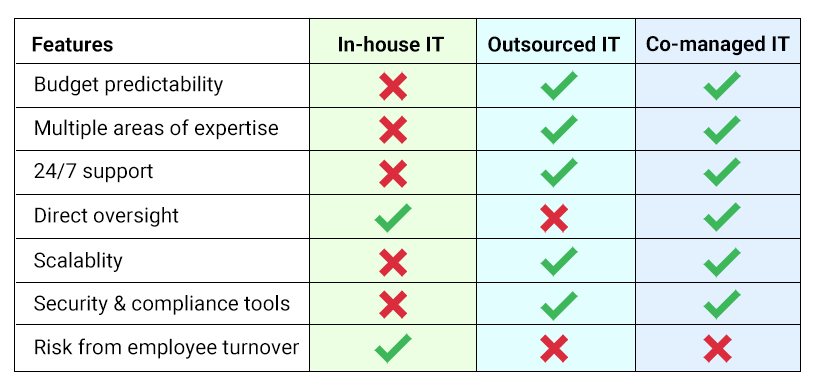
Want a Simple Comparison?
Here’s a side-by-side snapshot:
Final Thoughts
Whether you choose in-house, outsourced, or co-managed IT, the goal is the same: Make technology a strength, not a source of stress.
We help companies of all sizes figure out what makes the most sense for them. If you want to talk through your options or get an evaluation of your current setup, we’re happy to help.
Make your tech decision with confidence – so it’s one less thing to worry about. Start by:
- Shooting us a message to share your questions or obstacles
- Scheduling a consult