

Cyber insurance renewal can reveal problems that have been sitting unnoticed in your IT environment for months.
The renewal form may ask whether your business uses multi-factor authentication, protects employee devices, maintains secure backups, trains employees against phishing, and has a plan for responding to a cyber incident. If you answered those questions a year ago, you may assume the answers are still the same. That is worth checking.
Employees have changed. New software has been added. People may be working remotely. An old administrator account may still be active. A backup process may have changed without anyone updating the documentation. For businesses reviewing cyber insurance requirements for small businesses, the renewal period is a good time to compare what your policy asks for with what your IT environment actually does. Here are eight areas to review before submitting your renewal application.
What should a small business review before renewing cyber insurance?
Start with the controls that protect your business from common entry points and help limit the damage if an attacker gets through.
| IT control | What to check |
|---|---|
| Multi-factor authentication | Is MFA enabled for email, remote access, cloud applications, and administrator accounts? |
| Endpoint protection | Are company computers and servers protected and monitored? |
| Email security | Are phishing messages, malicious links, and suspicious attachments being filtered? |
| Patch management | Are security updates being installed consistently? |
| Backup and recovery | Are important files backed up, protected, and tested for recovery? |
| Privileged access | Do employees and vendors have only the access they need? |
| Security awareness training | Are employees trained and is completion documented? |
| Incident response | Does everyone know what to do if a cyber incident occurs? |
These are common IT controls for cyber insurance, although the exact requirements vary by insurer, policy, industry, and business risk. The important part is knowing what your business actually has in place.
1. Multi-Factor Authentication
A password alone should not be the only thing protecting access to business systems. Multi-factor authentication, or MFA, adds another verification step when someone signs in. That could mean approving a notification through an authentication app or entering a temporary code. Most business owners understand the value of MFA by now. The problem is that MFA is sometimes only enabled for part of the environment. For example, your employees may use MFA for Microsoft 365 while a remote access tool or an administrator account is still protected by a password alone.
During your cyber insurance renewal checklist, check MFA across:
- Business email
- Microsoft 365 or other cloud platforms
- Remote access and VPN
- Administrator accounts
- Backup systems
- Financial and payroll applications
- Other systems accessible from outside the office
Ask your IT provider for a list of systems where MFA is enabled and where it is not. That gives you a much more useful answer than simply saying, “Yes, we use MFA.”
2. Endpoint Detection and Protection
Your employees’ computers are connected to the systems your business depends on. If one device is infected with malware, an attacker may be able to use it as a starting point for a larger attack.
Endpoint protection helps identify and block suspicious activity on computers, laptops, and servers. Depending on the security platform, it can also alert your IT team when something unusual happens.
For an SMB, the practical questions are straightforward:
- Are all company devices protected?
- Are remote employees’ devices included?
- Are servers covered?
- Are security alerts being monitored?
- What happens when a device reports suspicious activity?
- Are old or unused devices still connected to the network?
This is particularly relevant when looking at the cybersecurity threats facing Anaheim small businesses. A local business does not need to be a major corporation to experience a security incident. A compromised employee account or laptop can provide access to business email, files, financial information, and other systems. If your endpoint security tool sends alerts that nobody reviews, you have a technology purchase, not a complete security process.
3. Email and Phishing Security
A phishing email can look remarkably ordinary. It might appear to come from a customer asking for an invoice. It could look like a Microsoft password notification. It might even appear to come from the company owner asking an employee to make a payment. The employee clicks the link, enters a password, or sends information to the wrong person.
Your email security controls should reduce the number of these messages that reach employees in the first place. Employees should also know what to do when something looks suspicious.
Review whether your business has:
- Email filtering
- Protection against malicious links
- Attachment scanning
- Spoofing protection
- A way for employees to report suspicious messages
- Regular phishing and security awareness training
These are important cybersecurity controls for small businesses because email attacks often involve both technology and employee decisions.
If your insurance application asks about phishing protection, make sure the answer describes your current setup. Do not copy last year’s answer simply because it was accepted last year.
4. Patch and Vulnerability Management
Software needs regular updates. Some updates add features. Others fix security problems. When an important security update sits uninstalled for weeks or months, the business may remain exposed to a problem that the software vendor has already identified and addressed.
A basic patch management process should answer three questions:
- What systems need updates?
- Who is responsible for installing them?
- How do we know the updates were completed?
This includes operating systems, browsers, business applications, network equipment, servers, and other technology used by the business. Patch management is easy to overlook because an outdated system can appear to work perfectly. Employees may have no idea that the software they use every day has a known security weakness. That makes patching one of the areas worth reviewing against your cybersecurity requirements for cyber insurance. Ask your IT provider for a current report showing devices or systems with outstanding security updates. If there are exceptions, find out why they exist and when they will be addressed.
5. Backup and Recovery
A backup is useful only if you can recover your data from it. That distinction matters when ransomware or another incident prevents employees from accessing important files and systems.
Before renewal, review:
- What data is backed up
- How frequently backups run
- Where backups are stored
- Who can access or delete them
- Whether backups are protected from ransomware
- Whether failed backups generate alerts
- When the last recovery test was performed
- How long critical systems would take to restore
A business may have daily backups and still discover during an incident that a key application was never included. That is why backup testing matters. For cyber insurance for Southern California businesses, recovery should also be viewed as a business issue. If your accounting system, shared files, customer records, or other important systems are unavailable for several days, the impact goes beyond the IT department. Your insurer may ask about backups because recovery capability affects the financial consequences of a ransomware incident.
6. Privileged Access and Account Controls
Take a look at who can access your most important systems. You may find that an employee who changed roles still has access they no longer need. A former employee’s account may still exist. A vendor may have an old login. Several people may share one administrator account because “that’s how we’ve always done it.” These are worth fixing.
Your review should include:
- Administrator accounts
- Former employee accounts
- Vendor accounts
- Shared accounts
- Unused accounts
- Employees with unnecessary administrator rights
- Accounts without MFA
- Access to financial, customer, and other sensitive systems
This is also where Zero Trust security controls can provide a useful framework. The basic principle is simple. A user should not receive broad access just because they are an employee or because they are connected to the company network. Access should match what that person actually needs to do their job. For a small business, that might mean removing administrator rights from ordinary employee accounts and reviewing access whenever someone joins, leaves, or changes roles.
7. Employee Security Awareness Training
Your employees are part of your security program whether you planned for that or not. They receive email. They use cloud applications. They approve MFA requests. They handle invoices and customer information. They may work from home or use company systems while traveling. That means they need to know what a suspicious request looks like and who to contact when something seems wrong.
Security awareness training should cover situations employees can realistically encounter, including:
- Phishing
- Fake Microsoft 365 login pages
- Suspicious attachments
- Business email compromise
- Social engineering
- Password security
- Unexpected MFA requests
- Reporting suspicious activity
Training records also matter. If an insurer asks whether employees receive security awareness training, you should be able to show when training took place, who completed it, and what was covered. This belongs on your cyber insurance compliance checklist because employee training is one of the areas insurers may ask about during the application or renewal process.
8. Incident Response and Business Continuity
Suppose an employee calls your office on Monday morning and says they clicked a suspicious link and entered their password. What happens next?
Who should they call? Who disables the account? Who checks whether the attacker accessed other systems? Who contacts your IT provider? Who handles communication with employees? Who contacts the insurance carrier? If those questions have never been discussed, your business is relying on people to figure things out during an incident.
A basic incident response plan should identify:
- Who handles the initial report
- Who has authority to make decisions
- IT and security contacts
- Insurance contacts
- Key internal contacts
- Steps for isolating affected systems
- Backup and recovery procedures
- How business operations continue during an outage
The plan does not need to be hundreds of pages long. It needs to be usable. This is one of the cybersecurity controls for cyber insurance renewal that is often overlooked because businesses focus heavily on prevention. Prevention matters, but so does knowing what to do when prevention fails.
How to Prepare for a Cyber Insurance Renewal
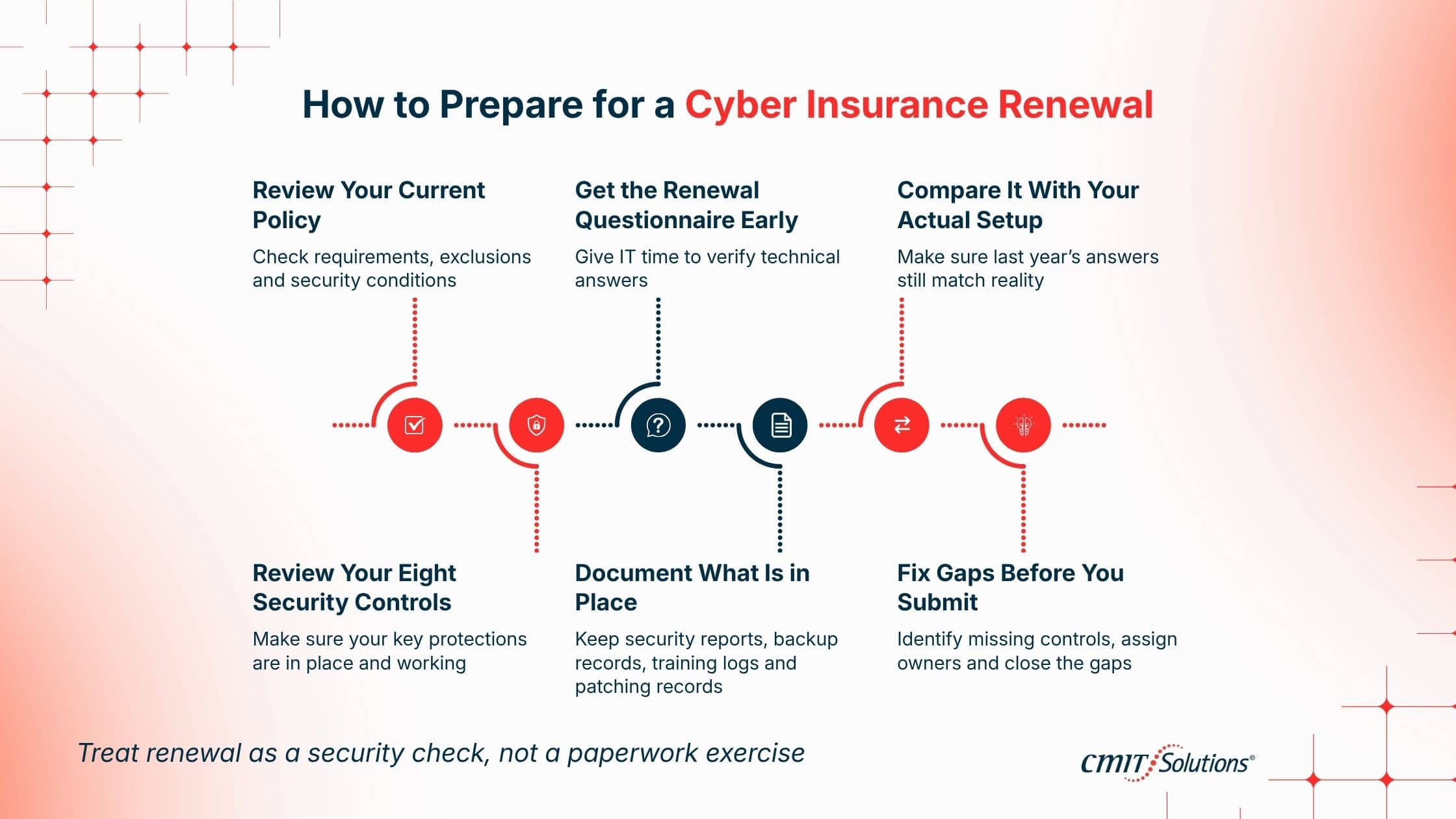
The easiest way to make renewal stressful is to start reviewing your security controls after the insurer sends the questionnaire. A better approach is to build the review into your normal IT planning and use the renewal as a formal check.
If you are looking for a cyber insurance renewal checklist for small businesses, work through these steps:
- Review your current policy. Look at the security requirements, conditions, exclusions, and questions attached to your coverage.
- Get the new renewal questionnaire early. Give your IT provider enough time to verify the technical answers.
- Compare the questionnaire with your actual environment. Do not assume last year’s answers still describe your business.
- Check the eight controls in this article. Review MFA, endpoint protection, email security, patching, backups, access controls, employee training, and incident response.
- Document what is in place. Keep relevant records such as backup reports, training completion, security reports, MFA settings, and patching information.
- Address gaps before submitting the application. If a required control is missing or incomplete, determine what needs to change and who is responsible.
This gives you a practical cyber insurance readiness checklist for SMBs without creating a separate process for every requirement on the renewal form. The exact cyber insurance requirements for Southern California SMBs will depend on the insurer, policy, industry, size, systems, and risk profile. A healthcare practice, construction company, property management business, and professional services firm may not receive the same questions. Your policy and renewal questionnaire should therefore be the final reference for what your insurer expects.
What Happens If a Business Does Not Meet Cyber Insurance Requirements?
If your business does not meet a requirement stated by your insurer, the consequences depend on the policy and the specific situation. A gap could affect eligibility, renewal terms, coverage, or other policy conditions. That is why a renewal questionnaire should not be completed as a paperwork exercise. Technical answers should be checked against the systems your business actually uses. If the application asks whether MFA is enabled, someone should verify it. If it asks about backups, someone should know what is being backed up and whether recovery has been tested. If the answer is no, or if nobody knows, investigate before submitting the application. A cyber insurance assessment for small businesses can help identify these gaps and give your business a practical list of what needs attention.
Ready for Your Anaheim Cyber Insurance Renewal?
If your renewal is coming up, do not wait until the application is sitting in your inbox to find out whether your security controls are actually in place.
CMIT Solutions Anaheim can help your business review the technology and security controls behind your renewal answers, including MFA, endpoint protection, email security, patching, backups, account access, employee security awareness, and incident response.
For an Anaheim or Orange County business, the review should reflect your actual environment, your employees, your systems, and the way your business operates. You should know where the gaps are before an insurer asks you to explain them. If your cyber insurance renewal is coming up, contact CMIT Solutions Anaheim to schedule a cybersecurity review of your current IT environment.
Schedule a Cybersecurity Review
Frequently Asked Questions
What cybersecurity controls do cyber insurance companies require?
Requirements vary by insurer and policy. Common areas include MFA, endpoint protection, email security, patch management, secure backups, access controls, employee training, and incident response. Your policy and renewal questionnaire should be treated as the source for your specific requirements.
What should a small business review before renewing cyber insurance?
Review MFA, endpoint protection, email security, patching, backups, account access, employee training, and incident response. Compare those controls with the answers provided on your previous insurance application.
What are the most important IT controls for cyber insurance renewal?
Start with MFA, endpoint protection, email security, patching, backups, access controls, employee training, and incident response. The importance of each control depends on your insurer, policy, industry, and business environment.
Does MFA affect cyber insurance eligibility or premiums?
It can. Some insurers may require MFA for certain systems or types of access, while others may consider it as part of their overall assessment of business risk. Review the requirements in your current policy and renewal application.
Why do cyber insurance companies require ransomware protection and secure backups?
Ransomware can prevent a business from accessing its files and systems. Secure backups and tested recovery procedures can help restore operations and reduce disruption caused by an attack.
How often should a small business review its cybersecurity controls for cyber insurance?
At minimum, review them before each renewal. It is also sensible to review them after major changes, such as a new IT provider, new cloud applications, office expansion, employee turnover, or changes to remote access.
How can Southern California SMBs prepare for a cyber insurance renewal?
Start early, review the policy and renewal questionnaire, verify your current security controls, collect supporting records, and address gaps before submitting the application. Your IT provider can help verify technical answers.
What happens if a small business does not meet cyber insurance requirements?
The consequences depend on the policy and insurer. A gap may affect eligibility, renewal terms, coverage, or other policy conditions. Businesses should review requirements with their insurer or broker and address security gaps before renewal whenever possible.


