
For decades, antivirus software was the first and often only line of defense for small and mid-sized businesses. Install it, let it scan files in the background, and trust that it would catch anything dangerous before damage occurred. That approach made sense when threats were simple, signature-based, and slow-moving. It does not make sense anymore.
Cybercriminals now use automated tools, AI-assisted attack kits, and techniques designed specifically to slip past traditional antivirus engines. A single infected file is no longer the main danger. Attackers move laterally through networks, hide inside legitimate processes, and wait patiently before triggering a breach. Static, signature-based antivirus simply was not built to catch this kind of behavior.
This is why more businesses in Greenville and across the country are shifting toward managed detection and response, commonly known as MDR. Rather than relying on a single tool that checks files against a known-threat database, MDR combines continuous monitoring, human analysis, and automated response to catch threats that older systems miss entirely.
This article breaks down why traditional antivirus is losing ground, what MDR actually does differently, and what growing businesses should expect when they make the switch.
Why Traditional Antivirus No Longer Holds Up
Traditional antivirus works by comparing files against a library of known malware signatures. If a file matches something already identified as malicious, it gets blocked or quarantined. This method worked reasonably well when malware variants were limited and slow to spread. Today, that model has three serious weaknesses.
It only catches what it already knows. New malware variants, zero-day exploits, and custom-built attack scripts do not match any existing signature, so they pass through undetected. Attackers routinely modify malicious code just enough to avoid triggering a match.
It cannot see behavior, only files. Many modern attacks do not rely on a malicious file at all. Credential theft, privilege escalation, and fileless malware operate through legitimate system tools like PowerShell, which antivirus software is not designed to flag as suspicious.
It reacts instead of watching. Traditional antivirus checks a file at the moment it is opened or downloaded. It does not track what happens across a network over hours, days, or weeks, which is exactly how modern intrusions unfold. Businesses that want a deeper look at how these gaps form should review these hidden IT risks that quietly build up inside growing companies.
What Managed Detection and Response Actually Does
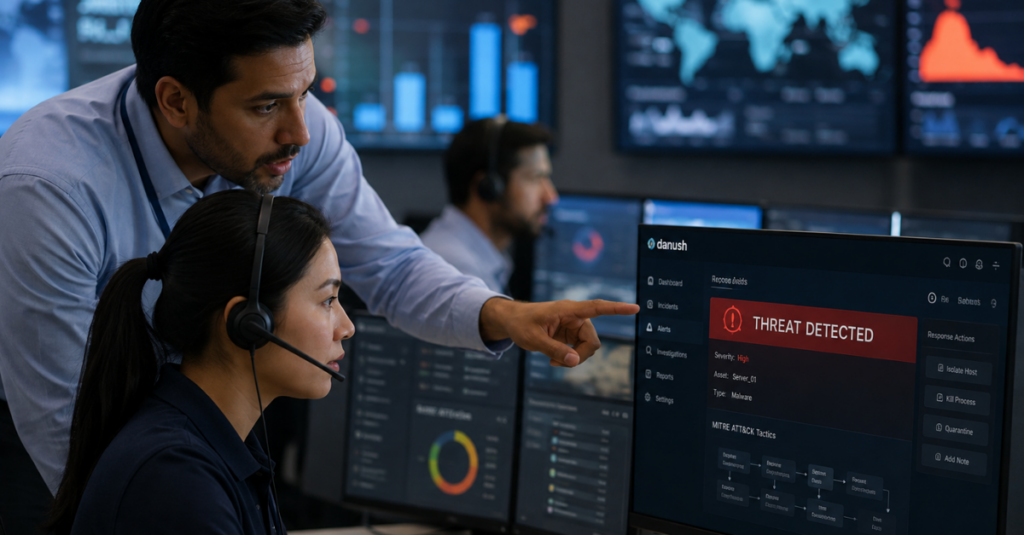
MDR is not a single piece of software. It is a service built around continuous monitoring, threat intelligence, and a team of security analysts who investigate and respond to suspicious activity in real time. Instead of asking “does this file match a known threat,” MDR asks “does this behavior look dangerous, regardless of what tool is being used.”
An MDR service typically includes:
- Continuous, around-the-clock monitoring of endpoints, servers, and network traffic
- Behavioral analysis that flags unusual activity even when no known malware signature exists
- Threat hunting performed by human analysts, not just automated rules
- Rapid containment and response when a threat is confirmed
- Detailed reporting so leadership understands what happened and why
This layered approach is a core part of modern cybersecurity solutions, and it reflects a broader shift happening across the industry. Attackers have become more sophisticated, so defense has to become more dynamic too.
Antivirus vs MDR: The Core Differences
It helps to compare the two side by side, since many business owners assume MDR is just “better antivirus.” It is a fundamentally different approach to security.
- Detection method: Antivirus relies on known signatures. MDR relies on behavior analysis, anomaly detection, and human judgment.
- Response speed: Antivirus flags a file after a scan. MDR analysts can isolate an infected device within minutes of detecting suspicious activity.
- Coverage: Antivirus protects individual devices. MDR monitors the entire environment, including network traffic, cloud applications, and user accounts.
- Human involvement: Antivirus runs automatically with no analyst reviewing alerts. MDR includes a security team actively investigating anomalies.
- Adaptability: Antivirus needs regular signature updates to stay current. MDR platforms use machine learning models that adjust as new attack patterns emerge.
This distinction matters more than it might seem. A growing number of breaches now start with legitimate-looking activity, such as a compromised login credential, rather than an obvious malicious file. Traditional antivirus was never designed to catch that kind of threat, which is one reason so many companies are reevaluating business IT management strategies that once treated antivirus as sufficient on its own.

Why the Threat Landscape Has Outgrown Antivirus
The type of attacks businesses face today looks very different from what antivirus was built to stop. A few shifts explain why MDR has become necessary rather than optional.
Ransomware has evolved into a multi-stage operation. Attackers no longer just encrypt files and demand payment. They quietly explore a network first, steal sensitive data, disable backups, and then trigger encryption once they have maximum leverage. Businesses that want to understand how these attacks progress should look at this breakdown of smarter ransomware defense strategies.
AI is being used on both sides. Attackers now use AI to generate convincing phishing emails, automate reconnaissance, and identify weak points in a network faster than ever before. This creates a category of threats explored in more detail in this look at AI-driven cyber threats.
Endpoints have multiplied. Remote work, mobile devices, and cloud applications mean there are far more entry points into a business network than there were a decade ago. Antivirus installed on a laptop does nothing to protect a cloud-based application or a personal phone connecting to company email. This shift is part of why remote team collaboration tools now require security considerations that did not exist when everyone worked from a single office.
Phishing has become far more targeted. Generic spam filters and antivirus scans do little against a carefully crafted email that impersonates a vendor or executive. These attacks are covered in depth in this guide to phishing and ransomware prevention.
What a Growing MDR Deployment Actually Looks Like
Businesses considering the move often want to know what actually changes day to day. Here is a general outline of what implementation involves.
Initial assessment. A thorough review of the current environment identifies gaps, including outdated software, unmonitored devices, and weak access controls. This step often overlaps with a broader security gap assessment that many companies skip until after an incident occurs.
Sensor and agent deployment. Lightweight monitoring agents are installed across endpoints, servers, and network devices. Unlike antivirus, these agents do not just scan files; they continuously feed behavioral data back to the monitoring platform.
Baseline behavior mapping. The MDR platform learns what normal activity looks like for a specific business, including typical login times, common file access patterns, and standard network traffic. This baseline makes it much easier to spot anomalies later.
24/7 monitoring begins. Once deployed, a security operations team watches for unusual behavior around the clock, not just during business hours. Since most attacks are timed to occur outside normal working hours, this continuous coverage closes a major gap left by traditional antivirus.
Incident response protocols. When a real threat is detected, the response team can isolate affected devices, block malicious traffic, and begin remediation immediately rather than waiting for someone to notice a flagged alert days later.
Industry-Specific Reasons MDR Matters
Different industries face different risks, and MDR adapts to those needs in ways antivirus cannot.
Law firms handle sensitive client information that is protected by strict confidentiality obligations. A single breach can trigger both legal and reputational consequences. Firms exploring stronger protections often start with law firm data protection strategies built around continuous monitoring rather than periodic scans.
Healthcare practices manage protected health information that is a frequent target for attackers, partly because medical records sell for a premium on the dark web. Practices working through new regulatory expectations should review current healthcare IT compliance requirements alongside their security posture.
Financial services firms are prime targets for fraud attempts, wire transfer scams, and credential theft. Continuous monitoring is especially valuable here, since these attacks often mimic legitimate transactions. A closer look at how these schemes operate is available in this piece on financial fraud detection.
Manufacturing companies increasingly rely on connected equipment and industrial control systems, which expands the attack surface well beyond office computers. Traditional antivirus offers almost no protection for operational technology environments.
Common Myths About MDR
A few misconceptions keep businesses from making the switch sooner than they should.
- “MDR is only for large enterprises.” In reality, small and mid-sized businesses are targeted just as often, partly because attackers assume they have weaker defenses.
- “We already have antivirus, so we’re covered.” Antivirus catches known threats on individual devices. It does nothing to monitor network-wide behavior or respond to an active intrusion.
- “MDR is too expensive to justify.” The average cost of a data breach far exceeds the cost of a monitoring service, especially once downtime, legal fees, and reputational damage are factored in.
- “Our IT team can handle threat detection manually.” Most internal IT teams are focused on daily operations and do not have the bandwidth or specialized training to hunt for threats around the clock.
- “MDR will slow down our systems.” Modern MDR agents are lightweight and designed to run in the background without affecting performance, unlike some older security tools known for consuming resources.
What MDR Means for Everyday Business Operations
Beyond stopping attacks, MDR changes how a business experiences technology day to day. Downtime becomes less frequent because threats are caught before they escalate into full-blown incidents. Leadership gains visibility into what is actually happening across the network instead of relying on assumptions. Compliance becomes easier to demonstrate, since MDR platforms generate detailed logs and reports that satisfy many regulatory requirements outlined in current data privacy compliance standards.
Insurance is another area where MDR has a direct impact. Many insurers now require proof of active threat monitoring before issuing or renewing a policy, a trend covered in this overview of cyber insurance requirements. Businesses without modern detection capabilities may find themselves paying higher premiums or facing denied claims after an incident.
The Role of Zero Trust and Endpoint Security Alongside MDR
MDR does not operate in isolation. It works best as part of a broader security framework that includes strong access controls and modern endpoint protection.
Zero trust principles assume no device or user should be automatically trusted, even inside the network perimeter. Every access request is verified continuously, which pairs naturally with the behavioral monitoring MDR provides. This approach is explained further in this breakdown of zero trust security adoption.
Modern endpoint protection goes beyond scanning files and instead uses AI to monitor process behavior on each device. Combined with MDR’s network-wide visibility, this creates layered coverage that catches threats missed by either tool alone. Recent developments in this area are covered in this look at endpoint security trends.
Together, these layers reduce the chances that a single compromised account or device leads to a company-wide breach.
Backup and Recovery: The Safety Net MDR Strengthens
Even with strong detection in place, no security approach is completely foolproof. That is why MDR works best alongside a solid backup and disaster recovery plan. If an incident does occur, having reliable, tested backups means a business can recover quickly rather than facing extended downtime or a ransom decision. These strategies are covered in more detail in this guide to backup and recovery planning.
Businesses that pair MDR with proactive backup strategies also tend to recover faster from cyberattacks overall, since detection and recovery work together rather than as separate, disconnected efforts.
Cost Considerations: Antivirus vs MDR
Antivirus software is inexpensive on paper, often bundled into a broader software license or charged as a low monthly fee per device. MDR services cost more upfront because they include continuous monitoring, human analysts, and incident response capabilities that antivirus simply does not provide.
The more useful comparison is not the sticker price but the cost of what each option fails to prevent. A single successful ransomware attack can cost a small business tens of thousands of dollars in downtime, recovery, and lost client trust, not counting potential regulatory fines. Viewed this way, MDR functions less like an added expense and more like an investment in avoiding much larger losses down the road.
Businesses budgeting for this shift should also weigh it against the cost of outdated infrastructure. Companies still relying on legacy system upgrades that have been delayed for years often face compounding risks that make a security incident more likely and more damaging when it happens.
Complementary Services That Round Out a Detection Strategy
MDR works best when it sits inside a wider technology foundation rather than standing alone as an isolated add-on. A few related services tend to matter most for businesses making this transition.
- Ongoing network management keeps the underlying infrastructure stable enough for monitoring tools to function properly
- Reliable 24/7 IT monitoring closes the gap between business hours and the times attackers most often strike
- Structured cloud services support extend visibility into applications that live outside the traditional office network
- A focused AI readiness assessment helps businesses adopt new tools without introducing unmanaged risk or leaving newly connected systems outside the monitoring plan
- Reliable cloud backup support provides an additional layer of protection if detection is ever bypassed
Industry Pages Worth a Closer Look
Because MDR needs differ by sector, it can help to review guidance built around a specific industry rather than generic advice. Manufacturing operations often benefit from reviewing manufacturing IT management practices tailored to connected production environments, since those environments carry risks that generic office-based plans rarely address. Businesses across other sectors, from legal and healthcare to hospitality and finance, face a similar reality: the right detection strategy depends heavily on the type of data being protected and how that data moves through daily operations.
Additional Context on Compliance and Growth
Ongoing business data compliance obligations often intersect directly with detection requirements, particularly for regulated industries handling sensitive client or patient information. As monitoring data accumulates, businesses also need a clear process for storing and reporting it in a way that satisfies auditors without creating unnecessary administrative burden.
Building a Long-Term Security Strategy
MDR should be viewed as one part of a broader, ongoing security strategy rather than a one-time fix. Businesses that treat security as a continuous process, not a checklist item, tend to fare far better over time. This includes regularly reviewing access permissions, training employees to recognize social engineering attempts, and revisiting strategic technology planning at least once a year as the business and threat landscape evolve.
It also means staying alert to new categories of risk. AI adoption inside the workplace, for example, introduces new vulnerabilities that did not exist a few years ago, a topic explored in this discussion of AI workplace adoption and the security questions it raises.
Signs Your Business Has Outgrown Traditional Antivirus
A few warning signs suggest a business needs to move beyond basic antivirus protection sooner rather than later:
- Frequent, unexplained slowdowns across company devices
- Employees working remotely or using personal devices for work tasks
- Sensitive client, patient, or financial data stored digitally
- No dedicated staff monitoring security alerts outside business hours
- A recent close call with phishing or a suspicious login attempt
- Compliance requirements that mandate active threat monitoring
If more than one of these applies, it is worth taking a closer look at current defenses before an incident forces the issue. Some of these warning patterns overlap with broader concerns covered in this piece on fragile IT systems that develop as companies scale without revisiting their infrastructure.
How CMIT Solutions of Greenville Approaches Detection and Response
CMIT Solutions of Greenville works with local businesses to move beyond outdated, reactive security tools and build monitoring systems that actually keep pace with modern threats. That means combining continuous detection, rapid response, and clear reporting so business owners always know where they stand, rather than hoping antivirus alerts catch problems in time.
Every business has a different risk profile, which is why a starting assessment matters so much. Many companies begin with an IT risk management review to understand exactly where their current setup falls short before deciding what level of monitoring makes sense.
From there, the goal is straightforward: reduce the time between a threat appearing and a threat being contained, while keeping day-to-day operations running smoothly in the background.
The Human Element Behind Automated Detection
Automation gets most of the attention when people talk about modern security, but the human side of MDR is just as important. Software can flag an anomaly, but deciding whether that anomaly is a false alarm or the early stage of a real attack still benefits enormously from trained judgment. Analysts bring context that a purely automated system cannot replicate on its own.
This matters because attackers increasingly design their techniques specifically to blend in with normal activity. A login from an unusual location might be a traveling employee or a stolen credential. A large file transfer might be a routine backup or the beginning of data exfiltration. Automated systems can flag both scenarios as unusual, but only a trained analyst can quickly tell the difference and decide whether action is needed.
This is also where response speed comes from. Once an analyst confirms a threat, containment can begin immediately rather than waiting for someone internally to notice an alert buried in a dashboard. For many small businesses, this kind of around-the-clock analyst coverage would be difficult to build and staff internally, which is exactly why MDR is typically delivered as a service rather than a product installed once and left alone.
There is also a training and awareness component that pairs naturally with MDR. Employees remain one of the most common entry points for attackers, whether through a convincing phishing email or a reused password. Detection tools catch what slips past human judgment, but ongoing employee awareness reduces how often that judgment gets tested in the first place. Businesses that combine strong detection with regular staff training tend to see far fewer successful attacks overall, since fewer threats ever reach the point where technical defenses need to intervene.
Measuring Whether MDR Is Working
Once MDR is in place, business owners often want a way to measure whether it is actually delivering value beyond a sense of general reassurance. A few practical indicators tend to matter most.
- Reduction in mean time to detect, meaning how quickly suspicious activity is identified after it begins
- Reduction in mean time to respond, meaning how quickly a confirmed threat is contained
- Fewer successful phishing or credential-based incidents over time
- Cleaner compliance audits with fewer gaps flagged by regulators or insurers
- Less unplanned downtime tied to security incidents specifically, as opposed to routine maintenance
Reviewing these metrics periodically, rather than assuming the service is working simply because nothing dramatic has happened, helps business owners stay engaged with their own security posture instead of treating it as something entirely handed off to a vendor.
Final Thoughts
Traditional antivirus was built for a threat landscape that no longer exists. Modern attackers move faster, hide better, and specifically target the gaps that signature-based tools cannot see. Managed detection and response fills those gaps with continuous monitoring, behavioral analysis, and a team of analysts ready to respond the moment something looks wrong.
For businesses handling sensitive data, operating around the clock, or simply trying to avoid costly downtime, MDR is quickly becoming less of an upgrade and more of a baseline expectation. Waiting for a breach to prove the point is rarely a strategy worth betting on.
Businesses ready to evaluate their current security setup can schedule a consultation to discuss what a modern detection and response strategy would look like for their specific environment.
Frequently Asked Questions



