
An employee gets an email that appears to come from the company president. There is an invoice attached and a request to process payment before the end of the day. The name is right, the signature looks familiar, and the request does not seem unusual. The problem is that the president never sent it.
For a small or mid-sized business, a cybersecurity incident can start with something this ordinary. A stolen Microsoft 365 password, an unpatched laptop, an old administrator account, or a convincing phishing email may be enough to give someone access they should not have.
That makes Cybersecurity Awareness Month 2026 a good time to check whether the security measures your business assumes are working actually are. A useful cybersecurity awareness month checklist should answer a practical question:
If someone tried to compromise your business this week, which controls would stop them?
What Should Southern California SMBs Review This October?
For many SMBs, cybersecurity has been added piece by piece.
MFA was enabled after a suspicious login. Endpoint protection came with an IT contract. Backups were configured years ago. Employees received phishing training once. Several cloud applications have been added since then. Each measure may exist, but that does not mean the overall setup is working as intended.
A Cybersecurity Awareness Month checklist for small businesses should cover the areas most likely to affect everyday operations:
| Area to review |
Question to ask |
|---|---|
| Accounts | Is MFA required on important accounts? |
| Can employees identify and report phishing? | |
| Devices | Are company devices updated and protected? |
| Access | Do users have only the permissions they need? |
| Backups | Can important data actually be restored? |
| Vendors | Who outside the company can access systems or data? |
| AI | What business information is being entered into AI tools? |
| Response | Does everyone know what happens after an incident? |
This gives SMB owners a more useful starting point than simply asking whether the company has antivirus software.
1. Check MFA on the Accounts That Matter
Start with identity. A stolen password becomes far more useful to an attacker when nothing else is required to sign in.
Review MFA across:
- Microsoft 365
- Email accounts
- Administrative accounts
- Cloud storage
- Remote access
- Accounting and financial applications
- Business software containing sensitive information
Do not stop at asking whether MFA is available. Check whether it is required, which users have it enabled, and whether any accounts have been excluded. This should be one of the first items on any small business cybersecurity checklist because so many business systems now sit behind an email address and password.
2. Find Out Whether Employees Can Spot a Convincing Phishing Email
Phishing training should reflect the messages employees actually receive. An email does not need spelling mistakes and an obviously fake sender to be suspicious. It may look like a Microsoft password notification. A vendor may appear to send new bank details. A manager may seem to request an urgent payment. Someone may impersonate a colleague and ask for a sensitive document. A cybersecurity checklist for small businesses should therefore include both email protection and employee training.
Employees should know how to handle:
- Unexpected password-reset requests
- Changes to vendor payment information
- Unusual invoice requests
- Unexpected attachments
- Requests for login credentials
- Messages creating unusual payment urgency
- Links to unfamiliar login pages
There should also be a simple reporting process. If an employee has to figure out who to contact after receiving a suspicious message, the process needs work.
3. Review Every Device Connecting to Company Data
Laptops are easy to overlook once they have been issued. They keep working, so everyone assumes they are fine. But a working laptop may still have missing security updates, unsupported applications, weak local permissions, or endpoint protection that is no longer functioning properly.
A cybersecurity risk assessment for small businesses should include an inventory of the devices accessing company systems.
For each device, check:
- Operating system updates
- Application updates
- Endpoint security
- Encryption
- Screen-lock settings
- Local administrator privileges
- Remote management
- Unsupported software
This becomes especially important when employees work remotely or use devices outside the office.
4. Test Whether Your Backups Can Actually Be Restored
Having backups and being able to recover from backups are different things. Pick several important files or systems and test the recovery process.
Ask:
- What is being backed up?
- How often does the backup run?
- Where is the backup stored?
- Who can delete or modify it?
- When was a restore last tested?
- How long would recovery take?
This matters for businesses evaluating ransomware protection Orange County because ransomware planning cannot end with malware prevention. If an important system becomes unavailable, the business needs a way to restore operations. That means knowing whether backups work before they are needed.
Request a Free Cybersecurity Assessment
5. Review Who Still Has Access
Open the user list for your main business systems. You may find former employees, old vendors, shared accounts, temporary users, or people with administrator privileges they no longer need. Access tends to accumulate.
Someone changes roles but keeps their previous permissions. A contractor finishes a project but their account remains active. An employee receives administrator access for one task and keeps it permanently.
As part of your cybersecurity checklist for SMBs, review:
- Former employees
- Administrator accounts
- Shared logins
- Vendor accounts
- Contractor access
- Remote access
- Sensitive folders
- Financial applications
Users should have enough access to do their jobs, not permanent access to everything they have ever needed.
6. Ask What Employees Are Putting Into AI Tools
This belongs on the 2026 checklist. Employees are using AI to summarize documents, write emails, analyze spreadsheets, prepare proposals, review meeting notes, and complete other everyday tasks. That creates a new set of questions. What information are employees entering?
Are customer records being copied into public tools? Are confidential documents being uploaded? Have employees connected AI applications to company accounts? Does anyone know which tools are approved?
The AI cybersecurity risks for Orange County SMBs are not limited to attackers using AI. Internal AI use can create security and privacy problems when there are no clear rules around company information.
Your business should know:
- Which AI tools employees use
- What information can be entered
- What information should never be entered
- Which tools can connect to company accounts
- Who approves new AI applications
The policy does not need to prevent AI use. It should make acceptable use clear.
7. Check Your Vendors Too
Your security review should not stop with employees. Payroll providers, accounting firms, software companies, contractors, cloud platforms, and IT providers may have access to company information or systems.
Review each third party with access and ask:
- What can they access?
- Do they still need access?
- Are individual accounts being used?
- Is MFA required?
- Can their access be removed quickly?
- Who owns the vendor relationship internally?
This is an important part of a cybersecurity checklist for small businesses in Orange County, particularly for companies that depend heavily on cloud software and outside service providers.
8. Write Down What Happens After an Incident
Suppose an employee realizes they entered their Microsoft 365 password into a fake login page. What happens next? They should not have to search through old emails for an IT contact or wait until the next morning to tell their manager.
An incident response process should state:
- Who employees contact
- Who disables or secures the account
- Who investigates affected systems
- Who handles internal communication
- How affected devices are isolated
- How backups are used if recovery is required
- Who handles outside notification when applicable
These are cybersecurity steps every small business should take before an incident occurs. The document does not need to cover every possible scenario. It needs to give people clear instructions when time matters.
9. Turn the October Review Into a Routine
One annual review will not keep permissions, devices, applications, and employees unchanged for the next 12 months.
Businesses hire people. Employees leave. New software gets installed. Vendors change. AI applications appear. Old devices remain in use longer than planned. That is why cybersecurity best practices for small businesses should include scheduled reviews throughout the year.
A simple structure could look like this:
- Monthly: Review major alerts, employee departures, new accounts, and security issues.
- Quarterly: Review user permissions, company devices, backups, and vendor access.
- Annually: Complete a broader security review, test incident procedures, update policies, and reassess business risks.
The exact schedule depends on the business, but ownership matters more than frequency. Someone needs to know who is responsible for each task.
What Should SMBs Fix First?
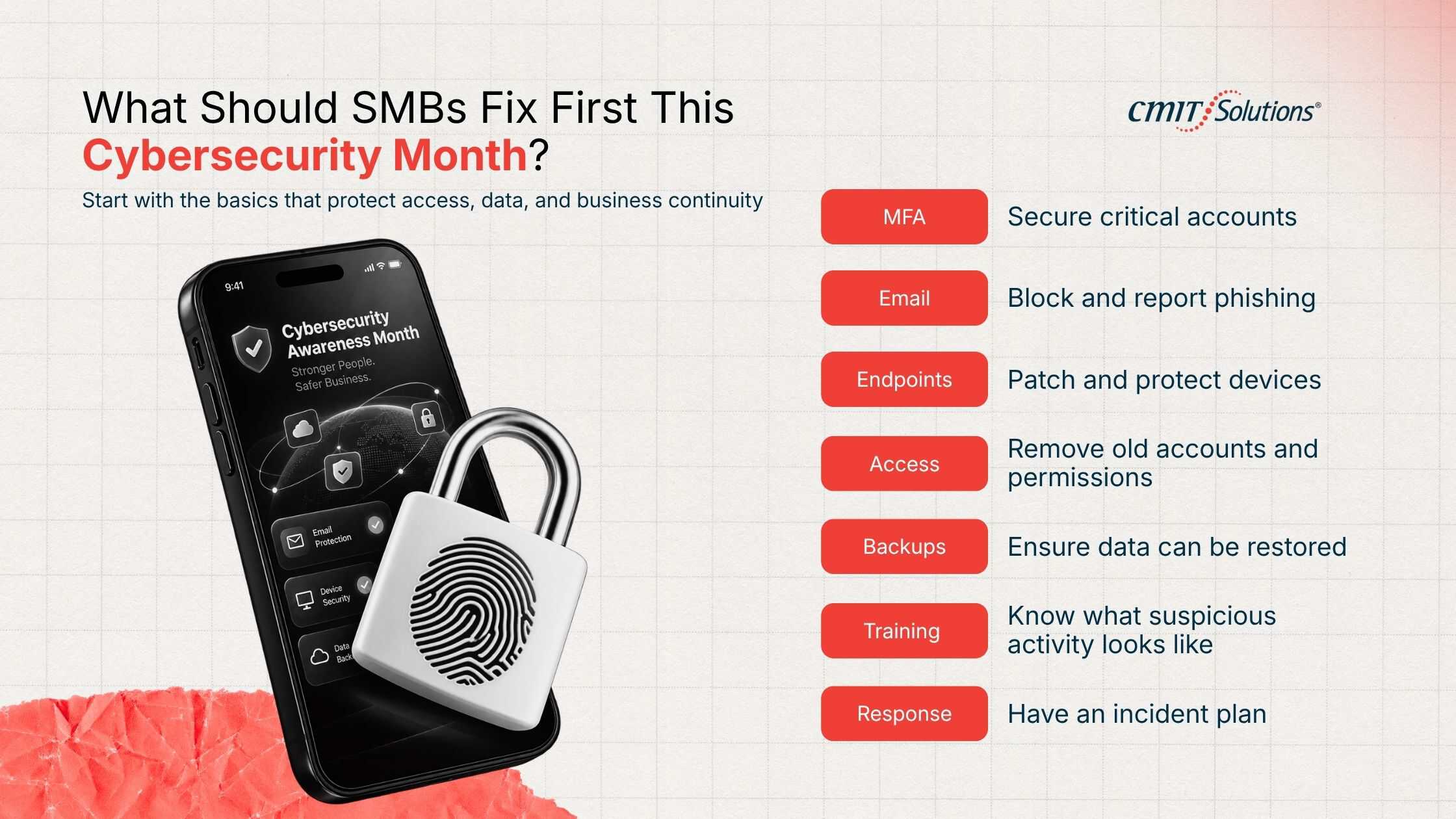
A cybersecurity checklist for small businesses in 2026 can become long very quickly. That does not mean everything needs to be fixed at once. Start with the weaknesses most likely to expose important systems or interrupt the business.
| Priority | Check |
|---|---|
| MFA | Important accounts require a second authentication factor |
| Phishing protection and reporting procedures are in place | |
| Endpoints | Devices are patched, managed, and protected |
| Access | Old accounts and unnecessary permissions are removed |
| Backups | Important data can be restored |
| Training | Employees know how to handle suspicious activity |
| Response | The company has documented incident procedures |
The cybersecurity risks facing Southern California small businesses will differ by company. A healthcare practice storing patient information does not have the same risk profile as a construction company or property management firm. The checklist is the starting point. The business environment decides what comes next.
How Can Southern California SMBs Manage Cybersecurity Throughout the Year?
For some companies, the October review will identify a few issues that can be fixed internally. Others may find that nobody owns the security process. Updates happen inconsistently. Access reviews are not documented. Backup testing gets postponed. Employees contact different people depending on the problem. This is where managed cybersecurity services Southern California businesses use can help establish ongoing responsibility for monitoring, maintenance, security controls, and response. The objective should be consistency. Security controls should continue working in November, February, and June, not only when Cybersecurity Awareness Month puts the subject back on the calendar.
How CMIT Solutions Anaheim Can Help
CMIT Solutions Anaheim works with small and midsized businesses that need ongoing IT and cybersecurity support without managing every part of the technology environment internally. For businesses evaluating Cybersecurity services Orange County, the first step should be understanding the current environment.
- What systems are being used?
- Where is sensitive information stored?
- Who has access?
- Which devices are unmanaged?
- Are backups recoverable?
- What happens after an incident?
A structured review gives the business something useful to work from instead of adding another security product without knowing which problem it is supposed to solve. For cybersecurity for Southern California small businesses, that is the point of this October exercise: know what is protected, know what is not, and decide what needs attention next.
Not sure where your business stands? CMIT Solutions Anaheim can help you review your IT and cybersecurity environment, identify areas that need attention, and determine the next steps.
Get a Clear Picture of Your Cybersecurity Gaps
Frequently Asked Questions
What is Cybersecurity Awareness Month 2026?
Cybersecurity Awareness Month takes place in October and encourages businesses and individuals to review safer cybersecurity practices. SMBs can use the month to check accounts, devices, employee training, backups, access controls, and incident procedures.
What are the most important cybersecurity steps for small businesses in 2026?
Start with MFA, email security, endpoint protection, software updates, access management, tested backups, employee training, and an incident response process. The order should reflect the company’s systems, data, and business risks.
How can small businesses protect themselves from phishing and ransomware attacks?
Use multiple layers of protection, including MFA, email filtering, endpoint security, software updates, employee phishing training, restricted access, and tested backups. Employees should also know how to report suspicious messages quickly.
Does every small business need a cybersecurity risk assessment?
A risk assessment helps a business identify which systems, accounts, data, devices, and processes are most exposed. The scope can vary depending on company size, industry, technology, and compliance requirements.
How often should a small business review its cybersecurity practices?
Review security throughout the year and after meaningful changes such as hiring employees, changing vendors, adding software, adopting AI tools, moving offices, or changing how company data is stored.
What cybersecurity controls should every SMB have in place?
Common controls include MFA, email security, endpoint protection, software updates, backups, access management, employee security training, and documented incident procedures. Specific requirements depend on the business.
How can Southern California small businesses prepare for a cyberattack?
Know which systems and data matter most, restrict access, require MFA, protect company devices, maintain recoverable backups, train employees, and document who handles an incident before one occurs.
Why is cybersecurity awareness important for small businesses?
Employees make security decisions every day through email, cloud applications, financial systems, AI tools, and company devices. Training helps them recognize suspicious activity and know what to do when something does not look right.


