
A new employee starts Monday morning.
Their laptop should be ready. Their Microsoft 365 account should work. They should have access to the applications and files required for their role. Multifactor authentication should already be enforced. Security policies should be applied before they begin handling company data.
Yet for many small and midsized businesses, Day 1 still starts with IT tickets.
The employee cannot access email. A software license was never assigned. Someone has to manually configure the laptop. The new hire receives permissions they do not need, while access to a critical application is missing.
In 2026, IT onboarding for new employees does not have to work this way.
With automated user provisioning, identity and access management, mobile device management (MDM), and zero-touch deployment, Orange County businesses can turn many repetitive onboarding tasks into a standardized process that starts before the employee’s first day.
What Is IT Onboarding for a New Employee?
IT onboarding is the process of preparing the technology, accounts, devices, access, and security controls a new employee needs to work.
A complete new hire IT setup checklist typically includes:
- Creating the employee’s user identity and company email
- Assigning Microsoft 365 and other software licenses
- Configuring a laptop or workstation
- Enrolling the device in MDM
- Providing role-appropriate application and file access
- Configuring MFA and other authentication requirements
- Applying endpoint security and company policies
- Setting up collaboration tools such as Microsoft Teams
- Providing cybersecurity guidance and training
- Confirming everything works before the employee starts
The problem is not that these individual tasks are especially unusual. The problem is that completing them manually for every employee creates opportunities for delays and inconsistent configurations.
That is where IT onboarding automation becomes valuable.
How Automated Employee IT Setup Works
An employee provisioning process connects a new employee’s identity, role, applications, permissions, and device configuration into a repeatable workflow.
Instead of IT manually rebuilding the setup for every person, standardized configurations can be created for different employee types.
For example, a new sales employee may automatically receive a Microsoft 365 license, CRM access, approved browser settings, Microsoft Teams, security software, shared sales resources, and the appropriate access permissions.
A finance employee may receive a different set of applications and more restrictive access policies.
This is the core idea behind automated user provisioning: access is assigned according to predefined rules rather than relying on someone to remember every setup task.
For Orange County SMBs hiring regularly or supporting hybrid teams, this can make onboarding easier to manage as the company grows.
Microsoft 365 New User Setup Can Be Standardized
For businesses operating in Microsoft environments, the Microsoft 365 new user setup is one of the most important parts of onboarding. Cloud services in Orange County can help businesses centralize applications, data, and collaboration tools while supporting secure access for new employees.
Every employee needs an account before accessing Microsoft 365 services. Microsoft also allows administrators to assign the appropriate product licenses and control which applications are available to each user.
Rather than giving every employee the same access, businesses can build provisioning around job requirements.
A secure setup may include:
Microsoft 365 account → Appropriate license → Required applications → Group membership → File access → MFA → Security policies
Microsoft recommends using administrator roles with the fewest permissions required instead of broadly assigning highly privileged roles. This same least-privilege principle should extend to employee access. New hires should receive what they need to perform their jobs, not unrestricted access to company systems.
For an SMB, a structured identity and access management process helps make this consistent across every new hire.
What Is Zero-Touch Device Provisioning?
Device setup is another area where businesses can remove significant manual work.
Zero-touch device provisioning allows a company-owned computer to configure itself according to predefined IT policies when the employee receives and activates it.
For Windows environments, Microsoft Windows Autopilot and Intune can automate much of this process. Devices can be enrolled into management, assigned configurations, and prepared with required applications and policies.
Instead of IT manually configuring every laptop, the workflow can look more like this:
Laptop ordered → Device registered → Employee receives device → Employee signs in → Device enrolls → Company policies and applications are applied
Microsoft also supports shipping compatible devices directly from vendors or OEMs to end users, making this particularly useful for remote employees.
For businesses hiring across Orange County and beyond, automated laptop setup for new employees can reduce the logistical work involved in preparing and shipping every computer through an internal office first.
MDM Makes New Employee Devices Easier to Control
MDM for new hires gives IT centralized control over company devices after they have been deployed.
Using a platform such as Microsoft Intune, organizations can apply device policies, configurations, and management controls after enrollment.
This matters because onboarding should not simply answer, “Does the laptop turn on?”
IT also needs to know:
- Is the device properly enrolled?
- Are required security configurations applied?
- Does the employee have approved applications?
- Can IT manage the device if something changes?
- Can access be removed when the employee leaves?
A standardized MDM process creates a more manageable device lifecycle from onboarding through IT offboarding.
Security Should Start Before the Employee Logs In
Fast onboarding is useful. Fast onboarding without appropriate security is not.
A strong IT security checklist for new hires should include identity protection, endpoint controls, software updates, appropriate access permissions, and employee security education.
CISA recommends several fundamental cybersecurity practices for small and midsized businesses, including multifactor authentication, employee phishing awareness, software updates, backups, logging, and data encryption.
MFA is particularly important for email, file storage, remote access, administrative accounts, and employees working with sensitive information.
Zero trust security can also strengthen employee onboarding by ensuring that users and devices are continuously verified before accessing company resources. Instead of automatically trusting a new employee or device once they are inside the network, businesses can apply role-based access, MFA, device security, and least-privilege policies from the beginning.
New employee cybersecurity training should also happen early. Employees should know how to recognize suspicious emails, protect credentials, report potential security incidents, and follow company policies before risky habits develop.
The goal is to give employees secure access on Day 1 rather than adding security controls weeks later.
A Practical New Employee IT Setup Checklist
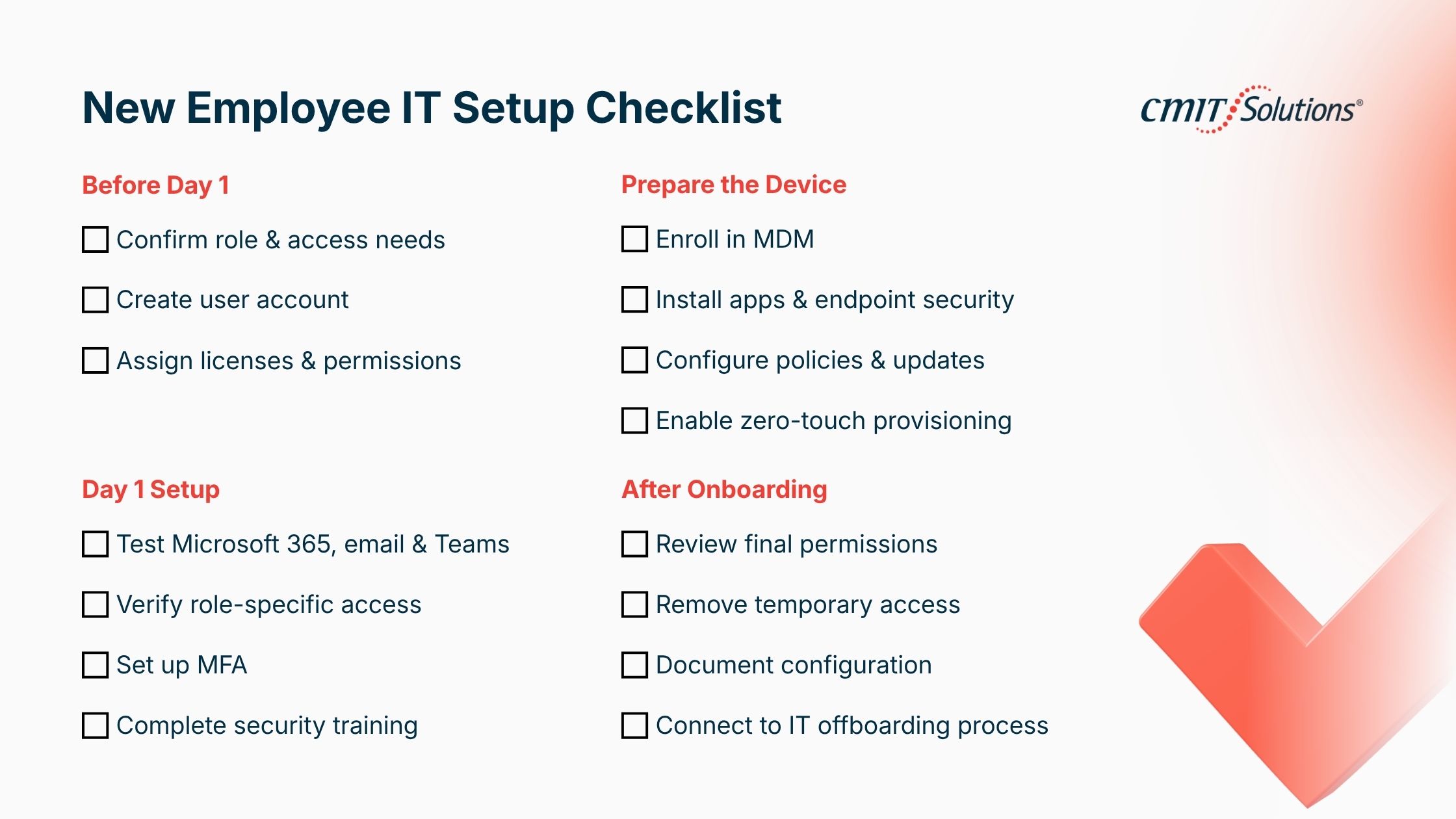
For most Orange County SMBs, a repeatable onboarding process can be organized into four stages.
Before the Start Date
Confirm the employee’s role, department, manager, location, start date, required hardware, software, and access requirements.
Create the employee identity and prepare the appropriate licenses and role-based permissions.
Device Preparation
Register the device with the company’s management environment. Configure MDM, endpoint protection, approved applications, security policies, and updates.
Where the environment supports it, use zero-touch device provisioning instead of manually preparing each laptop.
Day 1
Verify the employee can access Microsoft 365, email, Teams, required applications, shared resources, and other role-specific systems.
Complete MFA enrollment and required cybersecurity training.
After Onboarding
Confirm that permissions match the employee’s responsibilities, remove temporary access if applicable, and document the final configuration.
The same documented process should eventually connect to the IT offboarding process, so accounts and access can be disabled quickly when someone leaves the organization.
How Long Does IT Onboarding Take for a New Employee?
There is no universal onboarding time because the answer depends on the company’s environment, number of applications, hardware requirements, security policies, and whether the process is manual or automated.
The better metric is not simply how many minutes IT spends on an employee.
Ask instead:
How much of the process still requires manual intervention?
If every new employee requires IT to create accounts individually, install the same applications, configure security settings, assign permissions, and troubleshoot predictable setup issues, there is an opportunity to standardize the workflow.
Automation does not eliminate IT’s role. It moves IT away from repetitive configuration and toward managing the rules, policies, exceptions, and security behind the process.
How Managed IT Services Can Handle New Hire Onboarding
Not every SMB has an internal IT team with the time or expertise to build automated onboarding workflows.
A provider of managed IT services in Orange County can help businesses create a documented onboarding process, standardize user provisioning, configure Microsoft 365, establish device management, automate repeatable tasks, and maintain security policies.
For companies working with a managed IT provider, HR or a manager can submit the required new-hire information ahead of the start date. The IT provider can then coordinate the account, access, security, and device preparation before the employee arrives.
This is particularly useful for organizations where hiring happens regularly but not frequently enough to justify maintaining a large internal IT team.
The Goal: A New Hire Who Can Work on Day 1
The best IT onboarding process is one employees barely notice.
They receive the right device. They sign in securely. Their applications are available. Their permissions match their role. Their security controls are already active.
Behind that simple experience is a standardized system for identity, access, devices, applications, and security.
For Orange County businesses, automated employee IT setup in Anaheim can turn onboarding from a recurring IT scramble into a predictable business process.
CMIT Solutions Anaheim West helps local businesses evaluate and improve their employee IT onboarding, Microsoft 365 environments, device management, cybersecurity, and ongoing IT support.
If every new hire currently creates another list of manual IT tasks, it may be time to look at what can be standardized and automated before the next employee starts.
Simplify IT Onboarding for Your Next New Hire
Ready to make employee IT onboarding faster, more secure, and easier to manage? CMIT Solutions Anaheim West can help your business streamline Microsoft 365 setup, user provisioning, device management, cybersecurity controls, and ongoing IT support. Whether you’re onboarding employees in the office, remotely, or across Orange County, our IT experts can help build a standardized process that gets new hires productive from Day 1. Contact CMIT Solutions Anaheim West today to schedule a free IT assessment and discover where your onboarding process can be automated.
Frequently Asked Questions
1. What does IT onboarding for a new employee include?
IT onboarding typically includes account creation, Microsoft 365 setup, software licensing, laptop configuration, device enrollment, access permissions, MFA, security controls, collaboration tools, and cybersecurity training.
2. How long should IT onboarding take for a new hire?
It depends on the complexity of the company’s technology environment. Businesses with standardized provisioning and device-management workflows can complete much of the preparation before Day 1, while manual environments may require more IT intervention.
3. What should be on a new employee IT setup checklist?
Include the employee’s device, user account, email, Microsoft 365 license, required applications, role-based permissions, MFA, endpoint protection, MDM enrollment, software updates, file access, collaboration tools, and cybersecurity training.
4. How can I automate new employee IT setup?
Start by standardizing employee roles and their technology requirements. Automated user provisioning, identity and access policies, Microsoft 365 administration, MDM, and zero-touch device deployment can then automate repeatable portions of the process.
5. What is zero-touch device provisioning?
Zero-touch provisioning allows a device to receive company configurations, applications, and management policies with little or no manual IT setup. Technologies such as Windows Autopilot and Microsoft Intune can support this process for compatible Windows environments.
6. How much does IT onboarding cost per employee?
There is no standard cost. It depends on hardware, software licenses, IT labor, security requirements, number of applications, and the complexity of the employee’s role. Automation can reduce repetitive IT work, but the actual cost varies by organization.
7. Can a managed IT provider handle employee onboarding?
Yes. A managed IT provider can manage account creation, Microsoft 365 provisioning, device setup, access controls, security configuration, and ongoing support as part of a documented onboarding process.
8. How do I onboard a fully remote employee’s IT?
Prepare the employee’s identity and access before their start date, use centralized device management, ship a managed device directly to the employee when possible, require MFA, deploy applications remotely, and verify access through a structured Day 1 process.
9. What security controls should new employees get on Day 1?
At minimum, businesses should consider MFA, appropriate role-based access, endpoint protection, device management, software update policies, secure authentication, and cybersecurity awareness training. Controls should reflect the organization’s specific risks and compliance requirements.
10. What is the difference between IT onboarding and HR onboarding?
HR onboarding focuses on employment paperwork, policies, benefits, company orientation, and the employee experience. IT onboarding focuses on the technology required for the employee to work securely, including devices, accounts, applications, permissions, and cybersecurity controls.


