
Every business, no matter its size or industry, depends on data. Customer records, financial statements, employee files, contracts, and daily operational data all live on servers, laptops, and cloud platforms. When that data disappears, whether through a ransomware attack, a hardware failure, a natural disaster, or a simple human mistake, the business grinds to a halt. For companies across Greenville, the question is no longer whether a disruption will happen, but when. That is why CMIT Solutions of Greenville believes the conversation around backup and disaster recovery needs to change. It is time to move beyond outdated backup habits and build a true culture of cyber resilience.
This article explores what cyber resilience really means, why traditional backup strategies fall short, and how businesses can build a modern, layered approach to data protection and recovery. Whether your organization runs a small office or manages multiple locations, the principles below apply the same way: preparation determines how quickly and how completely a business bounces back from the unexpected.
Why Backup Alone Is No Longer Enough
For years, businesses treated backup as a checkbox item. Copy the files, store them somewhere safe, and move on. That approach worked when threats were simpler and data volumes were smaller. Today, it is dangerously outdated.
Modern cyberattacks are designed to target backups directly. Ransomware groups now specifically search for backup files and attempt to encrypt or delete them before locking the rest of the network. If a company relies on a single backup location or an infrequent backup schedule, it may find that its “safety net” was compromised right alongside its production systems.
Consider these realities facing small and mid-sized businesses:
- Attackers often sit inside a network for weeks before triggering an attack, quietly identifying and disabling backup systems
- A single daily backup can mean losing an entire day of transactions, communications, and customer interactions
- Backups stored on the same network as production data are vulnerable to the same attack
- Recovery time, not just data loss, determines how much an incident actually costs a business
This is why relying purely on backup software without a broader recovery strategy leaves gaps that attackers are increasingly skilled at exploiting. A well-structured plan built around cloud backup solutions and layered protection reduces the risk of a single point of failure taking down the entire organization.
What Cyber Resilience Actually Means
Cyber resilience is broader than backup and broader than cybersecurity alone. It is the ability of a business to anticipate, withstand, respond to, and recover from a disruptive event while continuing to operate, or returning to operation as quickly as possible.
Think of it in three parts:
- Prevention: Reducing the likelihood of an incident through proactive threat protection and strong security controls
- Continuity: Maintaining critical operations during a disruption, even in a degraded state
- Recovery: Restoring systems and data quickly and completely once the threat has been contained
A business that only backs up data is prepared for step three but has done little for steps one and two. True resilience requires all three working together, supported by round the clock monitoring, tested recovery procedures, and staff who understand their role during an incident.
The Business Cost of Downtime
Downtime is rarely just an IT problem. It touches every part of a business:
- Lost revenue from halted transactions or unavailable services
- Damaged customer trust when systems go dark unexpectedly
- Regulatory exposure for industries handling sensitive data
- Employee productivity losses while systems are restored
- Reputational harm that can follow a business for years
Small and mid-sized businesses are often hit hardest because they lack the redundancy that larger enterprises build into their infrastructure. A manufacturing plant that loses access to its production scheduling system, a medical office that cannot access patient records, or a law firm that loses access to case files all face the same core problem: the business cannot function without its data, and every hour of downtime compounds the damage.
This is precisely why organizations across Greenville are shifting their thinking. Instead of asking “do we have a backup,” the better question is “how quickly can we get back to normal operations, and how confident are we that our recovery plan actually works?”
Industry studies consistently show that the average cost of downtime climbs into the thousands of dollars per hour once lost sales, idle staff, and recovery labor are factored in, and that figure only grows for businesses in regulated industries facing potential fines or legal exposure. What often gets overlooked is the slower, quieter damage: customers who quietly move to a competitor after a service outage, vendors who lose confidence in a partner’s reliability, and employees who grow frustrated with repeated technology failures. These costs rarely show up on a single invoice, but they accumulate steadily and can weigh on a business for years after the initial incident has been resolved.
Core Components of a Cyber Resilient Backup Strategy
Building resilience requires more than swapping out one backup tool for another. It requires a layered strategy built around several key components.
1. The 3-2-1 Backup Rule, Modernized
The classic 3-2-1 approach, three copies of data, on two different media types, with one copy offsite, remains a solid foundation. Modern resilience adds a fourth layer: at least one copy that is immutable or air-gapped, meaning it cannot be altered or deleted even by someone with administrative access. This protects against ransomware specifically designed to hunt down and destroy offsite data storage copies.
2. Automated, Frequent Backups
Manual backup processes are prone to human error and inconsistency. Automated systems that run continuously or at short intervals dramatically reduce the amount of data a business could lose in an incident. Pairing this with continuous network monitoring means unusual backup failures or gaps are caught immediately rather than discovered during an actual emergency.
3. Regular Testing and Validation
A backup that has never been tested is a gamble, not a plan. Businesses should routinely run recovery drills to confirm that:
- Data actually restores correctly
- Recovery time meets business expectations
- Staff know their responsibilities during a recovery event
- Systems restore in the correct order to avoid conflicts
4. Clear Recovery Time and Recovery Point Objectives
Every business should define two numbers:
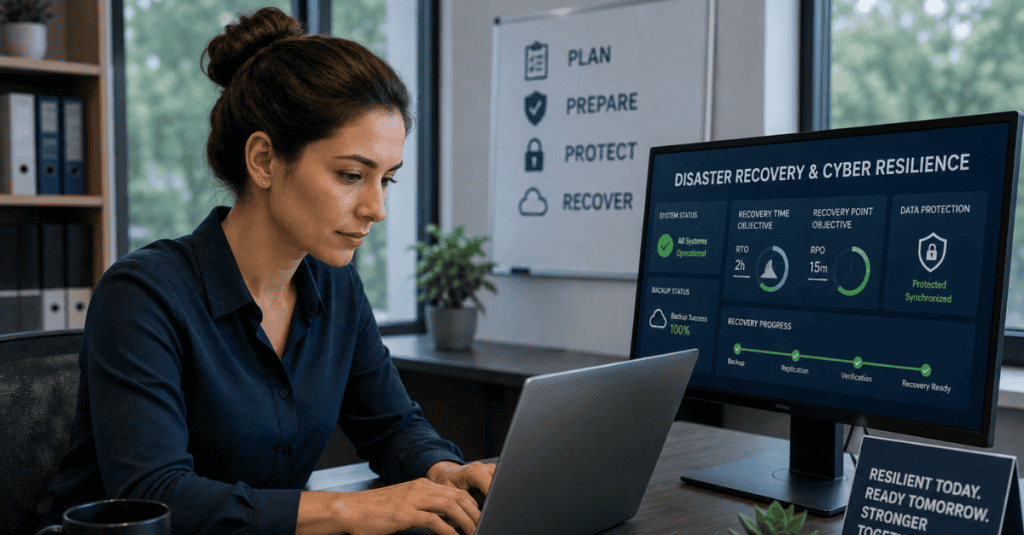
- Recovery Time Objective (RTO): how quickly systems must be restored
- Recovery Point Objective (RPO): how much data loss, measured in time, is acceptable
These numbers should drive technology decisions, not the other way around. A business with a four-hour RTO needs different infrastructure than one that can tolerate a full day of downtime.
5. Layered Cybersecurity Protection
Backup and recovery cannot be separated from a broader plan for advanced threat prevention. Firewalls, endpoint detection, email filtering, employee awareness training, and multi-factor authentication all reduce the chance that an attacker ever reaches the point of targeting backup systems in the first place.
6. Documentation and Communication Plans
When an incident occurs, confusion costs time. A written disaster recovery plan should include:
- Contact lists for internal staff and outside technology partners
- Step-by-step recovery procedures for each critical system
- Roles and responsibilities during an incident
- Communication templates for customers, employees, and vendors
The Growing Role of AI in Disaster Recovery
Artificial intelligence is reshaping how businesses detect threats and recover from disruptions. AI powered services can identify unusual patterns in network traffic long before a human analyst would notice, flagging potential ransomware activity or data exfiltration attempts in real time. This early detection window is often the difference between a contained incident and a full-scale outage.
AI also plays a role in recovery itself. Modern platforms can:
- Automatically prioritize which systems to restore first based on business impact
- Detect anomalies in backup data that might indicate corruption or tampering
- Streamline patching and updates to close vulnerabilities before they are exploited
- Support secure AI adoption practices that keep sensitive data protected even as automation increases
Businesses considering how to responsibly integrate these tools often start with an AI readiness evaluation to understand where automation can strengthen resilience without introducing new risk. Combined with a secure remote access framework, companies can maintain productivity even when a primary location is affected by an outage or disaster.
Industry-Specific Considerations
Cyber resilience is not one-size-fits-all. Different industries face different risks, regulations, and recovery priorities.
Manufacturing
Manufacturing businesses depend on uptime for production lines, inventory systems, and supply chain coordination. A single hour of downtime can ripple through an entire production schedule. Manufacturing sector solutions typically emphasize rapid recovery of scheduling and inventory systems alongside protection for plant floor technology on the production line. Many manufacturers also rely on dedicated management services to keep legacy equipment and modern IT systems working together securely.
Financial Services
Financial firms handle highly sensitive data and operate under strict regulatory requirements. Financial services support programs focus heavily on encryption, audit trails, and rapid recovery timelines to meet compliance obligations while protecting client trust.
Healthcare
Patient data protection is both a legal requirement and an ethical obligation. Healthcare practice support solutions prioritize HIPAA-aligned backup practices, ensuring that patient records remain both secure and quickly recoverable in the event of an outage.
Legal
Law firms manage privileged, confidential case information that cannot be lost or exposed. Legal practice IT services are built around strict access controls, detailed audit logs, and dependable recovery procedures that protect client confidentiality.
Hospitality
Hotels and hospitality businesses rely on constant system availability for reservations, guest services, and point-of-sale transactions. Hospitality technology support focuses on minimizing guest-facing disruptions while protecting payment data and guest information.
Common Backup and Recovery Mistakes Businesses Make
Even well-intentioned businesses often fall into the same traps:
- Assuming cloud storage equals backup. Syncing files to the cloud is not the same as maintaining versioned, recoverable backups.
- Backing up data but not applications. Restoring files means little if the software needed to run them is not also part of the recovery plan.
- Ignoring endpoint devices. Laptops and mobile devices often hold critical data that never makes it into the backup routine.
- Failing to update the recovery plan. Business systems change constantly, and a plan written two years ago may no longer reflect current infrastructure.
- Underestimating the human element. Employees who do not know how to respond during an incident can slow recovery significantly, even when the technology works perfectly.
- Skipping regular assessments. Without a periodic technology self assessment, businesses often do not realize gaps exist until an incident exposes them.
- Storing backups with the same credentials as production systems. If an attacker compromises an administrator account, shared credentials can give them a direct path to backup files as well, undermining the entire purpose of having a separate recovery layer.
- Treating disaster recovery as a purely technical issue. Recovery plans that leave out communication with customers, vendors, and regulators often create secondary problems that are just as damaging as the original outage.
Avoiding these mistakes takes discipline and regular review. A backup strategy that made sense two years ago may not account for new applications, new staff, or new compliance requirements the business has since taken on. Treating the recovery plan as a living part of the business, rather than a document written once and filed away, is one of the simplest ways to close these gaps before they are tested by a real incident.
Building a Disaster Recovery Plan, Step by Step
A disaster recovery plan should be a living document, not a one-time project. Here is a practical framework:
Step 1: Identify Critical Systems List every application, database, and system the business cannot operate without, ranked by priority.
Step 2: Set Recovery Objectives Define RTO and RPO for each critical system based on business impact.
Step 3: Choose the Right Backup Infrastructure Select a mix of local and cloud backup solutions that match the business’s recovery objectives and budget.
Step 4: Layer in Security Controls Implement layered protection so backups themselves are never the weak link during an attack.
Step 5: Document Roles and Procedures Write clear, step-by-step instructions that any authorized team member can follow during an emergency.
Step 6: Test the Plan Regularly Schedule recovery drills at least twice a year, adjusting the plan based on what the tests reveal.
Step 7: Review and Update Continuously Revisit the plan whenever new systems are added, staff changes occur, or business priorities shift.

How Managed IT Services Support Long-Term Resilience
Building and maintaining a resilient backup and recovery strategy takes ongoing attention that many internal teams simply do not have time for. This is where reliable IT support from a managed services provider becomes valuable. A dedicated partner can provide:
- Continuous oversight through 24/7 system monitoring, catching failures before they become disasters
- Strategic IT guidance to align technology investments with business goals
- Access to enterprise-grade productivity software tools without the burden of managing them internally
- Support for unified communication tools that keep teams connected during a disruption
- Assistance with technology procurement solutions to ensure hardware and software choices support long-term resilience
Rather than reacting to problems after they occur, a dependable technical support partner helps identify weaknesses before they are exploited, tests recovery procedures regularly, and keeps documentation current as the business evolves.
The Connection Between Cybersecurity and Backup
It is a mistake to think of backup and cybersecurity as separate initiatives. They are two sides of the same coin. Strong threat prevention reduces the chances that a business ever needs to rely on its backups in the first place. At the same time, a strong backup and recovery plan ensures that even if a security control fails, the business can still recover without paying a ransom or losing critical data permanently.
Consider a layered defense model:
- Perimeter security blocks most threats before they reach internal systems
- Endpoint protection catches threats that get past the perimeter
- Employee training reduces the human error that causes many breaches
- Backup and recovery serves as the final safety net if every other layer is bypassed
Businesses that treat these as one integrated strategy, rather than separate line items, build far stronger resilience than those addressing them in isolation. Reliable business communication platforms also play a role, keeping teams connected and informed the moment an incident is detected.
Cloud Backup: A Cornerstone of Modern Resilience
Cloud infrastructure has transformed what is possible in disaster recovery. Modern cloud platforms offer advantages that traditional on-premises systems struggle to match:
- Geographic redundancy, storing copies in multiple physical locations to protect against local disasters
- Scalability, growing storage capacity as the business grows without new hardware purchases
- Faster recovery, restoring systems from the cloud often takes a fraction of the time required for tape or physical media
- Reduced maintenance burden, shifting the responsibility of hardware upkeep to the provider
That said, cloud backup is not a silver bullet on its own. It works best as part of a broader strategy that includes immutable storage, regular testing, and strong access controls to prevent cloud accounts themselves from becoming a target. Businesses exploring automation should also look at business AI solutions that can flag unusual backup behavior before it becomes a larger issue.
When evaluating a cloud backup provider, businesses should look past storage price alone and consider a few practical factors:
- How quickly data can actually be restored during an emergency, not just how it is stored
- Whether encryption is applied both in transit and at rest
- How the provider handles version history, since ransomware damage is sometimes not discovered for days or weeks
- What level of support is available during an active recovery event, particularly outside normal business hours
- Whether the platform integrates cleanly with existing applications and security tools rather than operating as a disconnected silo
A provider that checks these boxes gives a business far more confidence than one chosen purely on storage cost per gigabyte.
Preparing for What Comes Next
The threat landscape will keep evolving, and so will the technology used to defend against it. Businesses that want to stay ahead should focus on a few forward-looking priorities:
- Expanding the use of automation and artificial intelligence for faster threat detection
- Moving toward immutable, ransomware-resistant backup architecture
- Regularly revisiting recovery objectives as the business grows and changes
- Investing in employee training so people remain a strength rather than a weakness
- Partnering with a provider that offers expert technology guidance and treats resilience as an ongoing relationship, not a one-time project
Choosing the Right Technology Partner in Greenville
Not every business has the internal resources to build and maintain a fully resilient backup and recovery strategy alone. Choosing an experienced partner can make the difference between a minor disruption and a business-ending event. When evaluating a partner, look for:
- A proven track record supporting businesses of similar size and industry
- Clear communication about recovery timelines and testing procedures
- Transparent pricing without hidden fees for recovery services
- A willingness to start with a free IT assessment to understand current gaps before recommending solutions
- Ongoing support rather than a one-time setup and disappearance
CMIT Solutions of Greenville works with local businesses across manufacturing, healthcare, financial services, legal, and hospitality industries to design backup and recovery strategies tailored to real operational needs, not generic templates. The goal is always the same: minimize downtime, protect data, and give business owners confidence that they can recover quickly no matter what happens.
If your business has not reviewed its backup and disaster recovery plan recently, now is the time. Threats are evolving faster than most internal IT teams can track alone, and the cost of being unprepared continues to rise every year.
Frequently Asked Questions



