
A server crashes on a Tuesday afternoon. Email stops working right before a client deadline. A point-of-sale system freezes during the lunch rush. For most businesses, these moments feel like bad luck, isolated incidents that just happen to occur at the worst possible time. In reality, the vast majority of downtime is predictable, and predictable problems are preventable ones.
The difference between businesses that experience frequent, disruptive outages and those that rarely think about their technology at all usually comes down to one thing: whether their IT support is reactive or proactive. Reactive support waits for something to break before addressing it. Proactive support identifies and resolves problems before they ever interrupt a workday.
This distinction matters more than it might seem, especially for growing businesses in Greenville that cannot afford to lose hours of productivity every time a system hiccups. Many companies still rely on managed IT support built around a break-fix mentality, responding only once something has already gone wrong. Others have shifted toward outsourced technology management that treats prevention as the primary goal rather than an afterthought. This article breaks down what downtime actually costs, why reactive IT support keeps failing businesses in the same predictable ways, and how proactive support changes the equation entirely.
What Downtime Actually Costs a Business
Business owners often underestimate the true cost of downtime because the damage extends well beyond the obvious lost hour or two of work. A single outage touches nearly every part of a business at once.
- Lost productivity across every employee unable to access the systems, files, or applications they need to do their job
- Missed revenue from transactions that cannot be processed, appointments that cannot be booked, or orders that cannot be fulfilled
- Client trust erosion, particularly when downtime affects client-facing systems or delays a promised deliverable
- Recovery costs, including emergency IT support fees that are almost always higher than the cost of ongoing prevention
- Compliance exposure, especially for businesses in regulated industries where downtime can affect data availability requirements
Industry estimates consistently show that even a few hours of unplanned downtime can cost a small or mid-sized business thousands of dollars once every factor is accounted for. For businesses that experience recurring outages, these costs compound quickly, often without leadership realizing just how much has been lost until they add it all up.
Why Reactive IT Support Keeps Failing Businesses
Reactive IT support operates on a simple, familiar model: something breaks, someone calls for help, and a technician responds as quickly as possible. This model feels intuitive, but it guarantees that businesses experience disruption before any resolution begins.
Problems are caught too late. By the time a system fails outright, the underlying issue has often been building for weeks or months, quietly degrading performance until it finally causes a full outage.
Response time always includes downtime. Even with a fast-responding IT provider, reactive support means waiting for someone to diagnose and fix a problem while the business sits idle, a pattern discussed further in this look at disruptive IT problems that tend to resurface again and again under a reactive model.
Costs are unpredictable. Emergency repairs, rush shipping for replacement hardware, and after-hours labor rates all add up fast, making reactive support far more expensive over time than a steady, predictable monthly investment in prevention.
Root causes rarely get addressed. Reactive support tends to fix the immediate symptom without investigating why the problem occurred in the first place, which means the same issue often resurfaces within weeks.
What Proactive IT Support Actually Includes
Proactive IT support flips this model entirely. Instead of waiting for something to fail, a proactive approach continuously monitors systems, applies updates before vulnerabilities can be exploited, and identifies warning signs long before they turn into outages.
Core components of proactive support typically include:
- Continuous monitoring of servers, networks, and endpoints to catch early warning signs of failure
- Scheduled patching and updates applied during planned maintenance windows rather than emergency fixes
- Regular hardware health checks that flag aging equipment before it fails unexpectedly
- Automated backups verified on a consistent schedule, not just configured once and forgotten
- Capacity planning that anticipates growth instead of scrambling to catch up after systems become overloaded
This kind of ongoing oversight is the foundation of comprehensive IT management built to prevent problems rather than simply respond to them once they occur.
The Role of 24/7 Monitoring in Preventing Outages
Many of the most damaging outages happen outside standard business hours, when nobody is watching systems closely enough to catch a developing problem before it escalates. Round-the-clock monitoring closes this gap entirely.
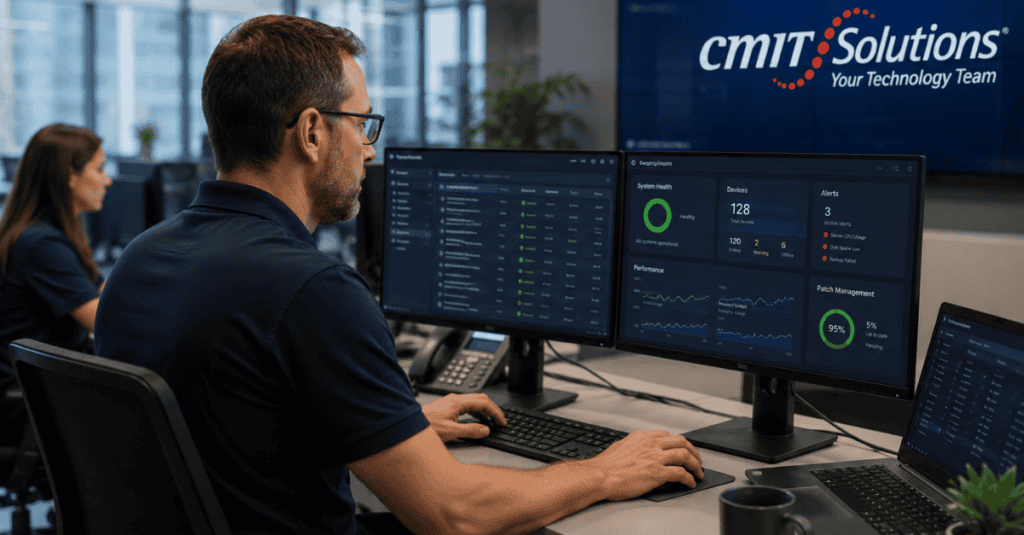
With 24/7 system monitoring in place, unusual activity, failing hardware, or performance degradation gets flagged the moment it starts, regardless of the time of day. This allows an IT team to intervene before an employee ever notices a slowdown, let alone a full outage.
Effective monitoring typically tracks:
- Server performance and resource usage trends over time
- Network traffic patterns that could indicate a developing bottleneck or security issue
- Storage capacity across critical systems before they run out of space unexpectedly
- Backup completion status to confirm data protection is functioning as intended
Patch Management Without the Disruption
Software vulnerabilities are discovered constantly, and delayed patching remains one of the most common reasons businesses experience both security incidents and unexpected downtime. Many business owners avoid updates because past experience taught them that patching can break something else in the process.
Proactive responsive IT support solves this by testing updates in a controlled environment before deploying them broadly, then scheduling installation during planned maintenance windows rather than during active business hours. This approach captures the security and performance benefits of staying current without the unpredictability that makes many businesses hesitant to update in the first place.
Backup and Disaster Recovery as Downtime Insurance
Even the best proactive monitoring cannot prevent every possible disruption. Hardware fails, natural events happen, and human error remains a factor no monitoring system can fully eliminate. This is why reliable data backup practices matter just as much as prevention itself.
A strong backup strategy focuses on more than simply storing copies of data. It includes regular testing to confirm backups actually restore properly, geographically separated storage to protect against site-wide incidents, and clear recovery time objectives that define exactly how quickly systems need to be restored after an incident. These principles are covered in more depth in this guide to backup recovery strategies built specifically around minimizing downtime.
Businesses that combine strong monitoring with tested recovery plans tend to see faster cyberattack recovery times overall, since backup and prevention work together rather than functioning as separate, disconnected efforts.
Network Stability and Infrastructure Health
A significant portion of downtime traces back to network issues rather than dramatic security incidents. Outdated routers, overloaded switches, and poorly configured networks create slowdowns that gradually worsen until they cause a full disruption.
Proactive network management addresses this by continuously monitoring network health, identifying bottlenecks before they affect performance, and planning capacity upgrades ahead of actual need rather than reacting once a network is already struggling. This kind of ongoing attention reflects the network visibility standards that growing businesses increasingly rely on to catch problems long before employees ever notice a slowdown.
Why Growing Businesses Are Especially Vulnerable to Downtime
Companies experiencing growth often accumulate technology gradually, adding systems, tools, and integrations as needs arise without a coordinated long-term plan. This pattern creates fragile environments where a single failure can ripple across multiple connected systems.
Businesses in this position frequently discover that what once worked fine at a smaller scale starts breaking down as demand increases, a pattern explored in this discussion of fragile business systems that develop quietly during periods of rapid expansion. Left unaddressed, this same pattern often leads to modern infrastructure demands outpacing what an aging, patchwork system can reliably support.
The Hidden Cost of Delaying IT Decisions
Many downtime incidents can be traced back to a decision that was postponed for months or even years. Replacing an aging server, upgrading outdated software, or investing in better backup infrastructure often gets pushed off because the current setup still technically works, even as warning signs accumulate in the background.
This pattern is covered in more detail in this look at delayed IT decisions that business owners frequently wish they had addressed sooner, usually after the delayed decision finally causes a costly outage. Systems still relying on legacy system signs of wear, such as frequent crashes or unsupported software versions, are especially prone to unplanned failures that could have been avoided with earlier action.
Cloud Infrastructure and Downtime Resilience
Moving critical systems to properly managed cloud infrastructure adds a layer of resilience that on-premises systems often struggle to match. Cloud providers maintain redundant infrastructure specifically designed to minimize outages, and scalable cloud services allow businesses to adjust capacity as needs change rather than being limited by physical hardware constraints.
This does not mean cloud systems are automatically immune to downtime. Proper configuration, access controls, and ongoing monitoring still matter significantly. Pairing cloud infrastructure with cloud backup solutions ensures data remains protected and recoverable even if a primary cloud service experiences an unexpected interruption.
Hardware Planning That Prevents Emergency Purchases
Unplanned hardware failures create some of the most disruptive downtime events, partly because replacing failed equipment on short notice often means paying premium prices for rush shipping and emergency installation. Proactive IT support avoids this scenario through strategic hardware procurement that tracks equipment age and performance trends, replacing aging hardware on a planned schedule before it fails unexpectedly.
This kind of planning also extends to software licensing and support contracts, ensuring critical systems remain covered under active vendor support rather than running on unsupported versions that leave a business without recourse if something goes wrong.
Employee Productivity Tools That Reduce Friction
Downtime is not always a dramatic system failure. Sometimes it takes the form of small, recurring frustrations that quietly drain productivity across an entire team. Slow applications, unreliable file access, and clunky communication tools all contribute to lost time that rarely gets tracked the way a full outage does.
Reliable workplace productivity tools reduce these smaller frictions, while unified communication systems consolidate scattered messaging and calling tools into a single, well-maintained platform. Together, these tools remove many of the daily inefficiencies that add up to significant lost productivity over the course of a year, even when no single incident feels severe enough to report as a problem.
Security’s Role in Preventing Downtime
Cybersecurity incidents remain one of the leading causes of significant, extended downtime. Ransomware in particular can take entire systems offline for days or weeks, far longer than most hardware failures. Proactive threat monitoring catches suspicious activity early, often before an attack has a chance to fully deploy and cause widespread disruption.
This connection between security and uptime is one reason proactive IT support and cybersecurity are increasingly treated as a single, integrated function rather than separate services. A business cannot achieve reliable uptime without strong security practices, and strong security practices depend heavily on the same continuous monitoring that prevents general system failures.
Industry-Specific Downtime Risks
Different industries face different downtime consequences, which shapes how proactive support should be prioritized.
Healthcare practices face significant risk when patient record systems go down, directly affecting patient care and appointment scheduling, which is why dedicated medical practice support often looks different from general office IT. Law firms risk missed deadlines and compromised client communication when email or document management systems fail, making legal practice technology a distinct priority of its own. Financial services firms face both operational and regulatory consequences when transaction systems experience interruptions, and financial firm solutions typically need to account for stricter uptime and compliance expectations than a typical small business. Manufacturing companies risk halted production lines, where even brief downtime can cascade into missed delivery deadlines. Hospitality businesses depend heavily on point-of-sale and reservation systems staying online during peak service hours, when an outage directly and immediately affects revenue.
Recognizing Warning Signs Before They Become Outages
A few patterns tend to show up before a major outage occurs, and businesses that know what to watch for can often intervene early.
- Recurring, unexplained slowdowns that seem to resolve on their own before returning again
- Employees regularly restarting systems or applications to fix minor glitches
- Backup completion reports that go unreviewed or unverified for extended periods
- Aging hardware that has not been replaced or evaluated in several years
- A pattern of “quick fixes” that address symptoms without ever identifying a root cause
Businesses experiencing several of these signs at once are often dealing with invisible tech dependencies that quietly connect multiple systems together, meaning a failure in one area can unexpectedly disrupt operations elsewhere.

Common Myths About Proactive IT Support
A few misconceptions keep businesses stuck with reactive support longer than necessary.
- “Proactive support costs more than we can justify.” The ongoing cost of prevention is almost always lower than the combined cost of repeated emergency repairs and lost productivity from downtime.
- “Our systems are fine because nothing has broken yet.” Many issues develop silently for months before causing a visible failure, meaning the absence of an obvious problem does not indicate a healthy system.
- “We already have IT support, so we’re covered.” Not all IT support includes proactive monitoring. Some providers still operate primarily on a reactive, break-fix model even while calling themselves a managed service.
- “Switching providers will cause more disruption than it’s worth.” A well-managed transition to a new provider is typically far less disruptive than continuing to absorb the cost of repeated, preventable outages.
- “Small businesses don’t need this level of oversight.” Smaller businesses often have less redundancy built into their operations, which makes downtime proportionally more damaging than it would be for a larger company with more resources to absorb disruption.
Recognizing an Unaddressed Technology Problem
Some of the most damaging downtime incidents stem from a problem everyone in the business already senses but nobody has formally addressed. A system that “always does that” or a workaround everyone has quietly adopted often signals a deeper issue building toward failure. This dynamic is covered in more detail in this discussion of unaddressed technology problems that businesses frequently avoid confronting until the cost of ignoring them becomes impossible to overlook.
Choosing the Right IT Partner for Proactive Support
Not every IT provider delivers genuinely proactive support, even when marketing suggests otherwise. Businesses evaluating a partner should ask specific questions about how issues get caught before they become outages, not just how quickly a technician responds once something breaks.
Helpful questions include:
- What specific monitoring tools are used, and what do they track continuously
- How often are backups tested, not just scheduled
- What does the maintenance and patching schedule actually look like
- How is capacity planning handled as the business grows
Firms comparing options should review this guide on choosing a provider before committing to a long-term contract, since switching providers frequently disrupts operations in ways that are worth avoiding through careful evaluation upfront.
Making the Shift From Reactive to Proactive
Transitioning from reactive to proactive support does not require an overnight overhaul. A structured approach tends to work best.
- Start with a free technology assessment to establish a clear picture of current system health and existing vulnerabilities
- Prioritize the systems where downtime would cause the most significant business impact
- Implement continuous monitoring before tackling larger infrastructure upgrades
- Build a maintenance schedule that fits around business operations rather than disrupting them
- Review progress regularly, adjusting priorities as new risks or growth needs emerge
Businesses replacing an outdated or underperforming provider often find this process reveals long-standing issues nobody had previously flagged, a pattern discussed in this overview of replacing outdated providers that have been quietly limiting a business without anyone realizing the full extent of the problem.
Measuring the Return on Proactive Support
Business owners often want a concrete way to judge whether proactive IT support is actually paying off, beyond a general sense that things feel more stable. A few practical measures help make that value visible.
- Tracking the number of unplanned outages over a rolling twelve-month period and comparing it to prior years
- Measuring average resolution time when issues do occur, since proactive environments typically catch and fix problems faster even when something unexpected happens
- Reviewing help desk ticket volume for recurring, low-level complaints, which tend to drop significantly once underlying issues are addressed rather than repeatedly patched over
- Comparing the total cost of IT support, including emergency repairs and lost productivity, against a fixed proactive support contract over the same period
Businesses that track these figures consistently often find that proactive support pays for itself well before the first major outage it prevents, simply through the elimination of smaller, recurring disruptions that had been quietly draining time and money for years without anyone connecting the dots.
Building a Culture That Supports Reliable Uptime
Technology alone cannot eliminate downtime if the people using it are not part of the plan. Employees who understand basic practices, such as reporting slow performance immediately rather than working around it, give an IT team far more opportunity to catch developing issues early. A culture where minor glitches get reported rather than silently tolerated turns every employee into an early warning system rather than leaving detection entirely up to automated monitoring tools.
Leadership plays a role here as well. Businesses that treat IT investment as a strategic priority, rather than a cost to minimize whenever possible, tend to experience far fewer disruptive surprises than those that repeatedly defer maintenance and upgrades until a failure forces the issue. This shift in mindset, from viewing technology spending as overhead to viewing it as insurance against much larger losses, often marks the real turning point where a business moves from constantly reacting to problems toward rarely thinking about its technology at all.
What This Looks Like Day to Day
Businesses operating under proactive IT support notice the shift most clearly in what does not happen anymore. Fewer emergency calls. Fewer mornings spent waiting for a system to come back online. Fewer conversations about lost work or missed deadlines caused by a technology failure.
Instead, maintenance happens quietly in the background, updates get applied on a predictable schedule, and potential issues get flagged and resolved before employees ever notice anything was wrong. This shift changes how a business relates to its own technology entirely, moving from a source of ongoing anxiety to something that simply works, day after day.
How CMIT Solutions of Greenville Supports Reliable Uptime
CMIT Solutions of Greenville works with local businesses to build IT environments where downtime becomes the exception rather than something teams have simply learned to expect. That starts with continuous monitoring across critical systems and extends through planned maintenance, tested backups, and hardware lifecycle management designed to catch problems long before they interrupt a workday.
For businesses tired of reacting to the same recurring issues, the shift to proactive support often reveals just how much time and money had been quietly lost to preventable disruptions.
Conclusion
Downtime rarely happens without warning. In almost every case, the signs were there long before the outage itself, buried in slow performance, ignored maintenance, or a backup nobody had tested in months. Proactive IT support exists specifically to catch those warning signs early, turning what would have been a costly disruption into a routine maintenance task nobody even notices.
For Greenville businesses ready to move away from a cycle of reactive fixes and unpredictable outages, the return on a proactive approach shows up quickly, both in fewer disruptions and in the peace of mind that comes from knowing systems are being watched continuously rather than left to fail quietly in the background.
Businesses ready to evaluate their current setup can talk to an expert about what a proactive IT strategy would look like for their specific systems and growth plans.
Frequently Asked Questions



