
Greenville businesses are moving fast on artificial intelligence. Tools that handle drafting, summarizing, research, and customer communication are showing up across teams whether leadership approves them or not. That speed creates a gap. And in 2026, that gap is where most small business data incidents start.
Securing AI for your business means building a framework that controls which tools employees use, what data those tools can access, and how that usage is monitored over time. At CMIT Solutions of Greenville, we help small and mid-sized businesses adopt artificial intelligence safely by building those guardrails into your IT environment from day one, so productivity gains never come at the cost of security or compliance.
With more than 30 years supporting SMBs and a nationwide network of 900 or more IT and cybersecurity professionals, our role is to make secure AI adoption practical for businesses without a dedicated AI security team. We help you decide which tools to approve, how to configure them, and how to monitor employee usage across your environment.
What Secure AI Actually Means for a Greenville SMB
For most small and mid-sized businesses, AI adoption has moved faster than the IT support behind it. Secure AI is the discipline that closes that gap.
Secure AI means adopting artificial intelligence tools, including generative AI, copilots, chatbots, and automation platforms, in a way that protects company data, satisfies regulatory expectations, and gives leadership visibility into how AI is being used. It sits between unrestricted AI access and a complete ban.
For an SMB in Greenville, secure AI is less about model architecture and more about three practical questions:
- Who is using AI?
- What data are they putting into it?
- Where is that data going once it leaves your network?
The answers shape every control you put in place. With strong IT guidance from the start, secure AI becomes part of how your business operates rather than a project you scramble to complete after an incident.
Why AI Security Matters More for Small Businesses Than They Realize
Many Greenville business owners assume their company is too small to be a target. AI is reshaping that risk profile in ways that are easy to miss without continuous monitoring across your environment. The risk is rarely a sophisticated attack. It is usually an everyday employee action that quietly exposes data.
Small businesses face two compounding risks:
- Employees can leak sensitive data through everyday AI tools without realizing it.
- Attackers are using AI to scale phishing, credential theft, and social engineering against businesses least likely to detect it.
A healthcare clinic that pastes patient notes into a consumer AI tool has likely violated HIPAA. A government contractor using AI to draft a proposal containing controlled unclassified information has likely violated CMMC requirements. A retailer using an AI assistant with real customer payment data has likely violated PCI-DSS.
In each case, no malicious actor was involved. The breach was an employee trying to be productive. Without an AI usage policy and layered cybersecurity protection, these incidents stay invisible until an audit, an insurance claim, or a regulatory inquiry surfaces them.
The CMIT Secure AI Adoption Framework for Greenville SMBs
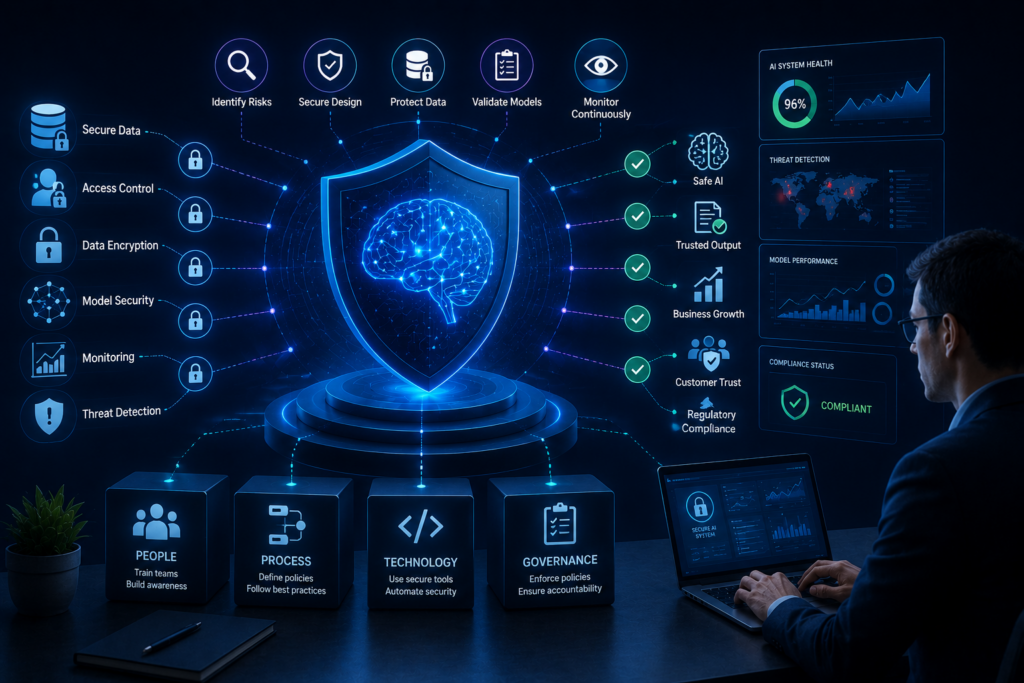
Most AI security guidance was written for large enterprises with dedicated security teams. The framework below is built for SMBs with limited IT staff and modest budgets. It moves through five stages, and each stage produces a tangible artifact you can show an auditor, an insurer, or a board.
| Stage | Focus | What You Produce |
|---|---|---|
| 1. Inventory | Identify all AI tools in use, including shadow AI | A documented list of sanctioned and unsanctioned AI usage |
| 2. Classify | Decide what business data can and cannot go into AI tools | A data classification policy mapped to AI inputs |
| 3. Approve | Vet AI vendors and build an approved tool list | A vendor evaluation record and approved AI tool catalog |
| 4. Govern | Build the AI acceptable use policy and training program | A signed AUP and a training completion record |
| 5. Monitor | Log AI tool usage and review for policy violations | A monitoring report and incident response procedure |
Each stage builds on the last. Skipping inventory means you cannot classify data correctly. Skipping classification means your approval process has no criteria. Our team at CMIT Solutions Greenville walks businesses through this sequentially as a strategic plan, not a one-time project.
Step 1: Discover Shadow AI in Your Environment
Shadow AI, the use of unsanctioned AI tools by employees through personal accounts on company devices, is the single biggest blind spot in most SMB environments. The risk compounds quickly when leadership has no visibility into which tools are touching sensitive data.
A practical shadow AI discovery process looks like this:
- Review browser and SaaS activity: Pull logs from your endpoint protection, DNS filtering, or identity platform to identify traffic to known AI domains. ChatGPT, Claude, Gemini, Perplexity, Copilot, and dozens of niche tools all show up here.
- Survey employees directly: Ask, in writing, what AI tools they currently use for work. Anonymity often produces more honest answers.
- Audit browser extensions: AI browser extensions frequently request broad permissions, including the ability to read the contents of every page a user visits.
- Check Microsoft 365 and Google Workspace: Look at which AI features have been enabled at the tenant level, especially Copilot, Gemini for Workspace, and any third-party add-ons connected to your environment. Our productivity applications team helps businesses configure these platforms securely.
The output is a single document listing every AI tool in use, who uses it, what data it can access, and whether you have any contractual relationship with the vendor. Our network management services surface shadow AI activity before it becomes an incident.
Step 2: Classify the Data Your Business Cannot Put Into AI
Once you know what AI tools are in use, the next question is what data should never reach them. Most AI security incidents are about the data the tool was fed, not the tool itself. Classification has to happen before approval.
A workable three-tier classification model for Greenville SMBs:
- Public: Published marketing copy, public pricing, website content. Safe for any approved AI tool.
- Internal: Memos, draft proposals, meeting notes. Safe only for AI tools with a business agreement and no training on customer data.
- Restricted: Patient records, payment data, controlled unclassified information, financial reporting data, personal data covered by GDPR or CPRA. Not permitted in any AI tool unless the vendor has been formally evaluated and contracted for that data type.
Mapping your data tiers to AI tools is the document that protects you in an audit. Our compliance services team builds this classification model with you as part of a layered protection approach.
Step 3: Evaluate AI Vendors Before Approving Them
Vendor evaluation for AI tools follows the same logic as any other vendor due diligence, but with additional questions about how AI handles data. Multiple AI vendors operating without consistent evaluation create the kind of accountability gap that surfaces the first time you face an audit.
Use this checklist before approving any AI tool for business use:
| Evaluation Area | Questions to Ask the Vendor |
|---|---|
| Data handling | Is customer data used to train models? Can training be disabled? Where is data stored geographically? |
| Retention | How long is prompt and output data retained? Can retention be set to zero? |
| Access controls | Does the tool support SSO, MFA, and role-based access? |
| Compliance | Does the vendor hold SOC 2 Type II, ISO 27001, HIPAA BAA, or other relevant certifications? |
| Audit logging | Can administrators access logs of who used the tool, when, and what data was submitted? |
| Subprocessors | Which third parties does the vendor share data with, and under what terms? |
| Incident response | What is the vendor’s notification timeline if a breach affects customer data? |
| Contract terms | Does the agreement contain indemnification and data protection clauses appropriate to your industry? |
Consumer AI tools rarely pass this checklist. Business and enterprise tiers of the same products usually do. Our team helps with IT procurement decisions so you pick the right tier for the data involved.
Step 4: Build an AI Acceptable Use Policy
An AI acceptable use policy (AUP) translates your data classification model into rules employees can actually follow. Most SMB AI incidents happen because no policy exists, not because a policy was violated.
A workable SMB AI AUP covers eight sections:
- Purpose and scope: What the policy applies to, including company devices, personal devices used for work, and contractor access.
- Approved tools: The current list of sanctioned AI tools and the business cases they cover.
- Prohibited tools: Tools explicitly not permitted, including free or personal-account versions of approved business tools.
- Approved data inputs: What employees may put into AI tools, mapped to the public and internal tiers from your classification model.
- Prohibited data inputs: What employees may never put into AI tools, including any restricted data or anything they would not share with an outside vendor.
- Review and approval workflow: How an employee requests a new AI tool, who reviews it, and how long approval takes.
- Training requirement: Mandatory AI security training on hire and annually, with completion tracked.
- Enforcement: Consequences for policy violations, including disciplinary action and tool access revocation.
The policy should be one document, signed by every employee, and reviewed at least annually. Our team drafts and maintains these policies for clients as part of managed IT services aligned with how the business actually operates.

Step 5: Monitor AI Usage and Respond to Incidents
A policy without monitoring is a policy in name only. Many Greenville SMBs treat AI policy as a one-time document rather than an ongoing governance process. That gap creates a false sense of security while AI usage continues to evolve.
For most SMBs, AI monitoring lives inside tools already deployed:
- Endpoint protection platforms increasingly flag AI tool usage
- DNS filtering can block unsanctioned AI domains
- Microsoft 365 and Google Workspace provide audit logs for Copilot and Gemini activity
- Identity providers log SSO events into approved AI platforms
When a policy violation is detected, the response process should follow the same pattern as any other security incident: contain the exposure, assess what data was involved, document the event, notify the appropriate stakeholders, and update policy or training if the incident points to a systemic gap.
Our IT support team provides the continuous monitoring and threat response that helps you answer regulators and insurers with confidence when an AI incident occurs.
Approved vs. Prohibited AI Use Cases by Industry
Different industries have different acceptable use boundaries because their data is governed by different frameworks. Inconsistent rules across departments, locations, or remote teams create the kind of compliance drift that surfaces during an audit rather than before one.
| Industry | Approved Use Case | Prohibited Use Case |
|---|---|---|
| Healthcare | Drafting general patient education content with no PHI | Summarizing patient notes containing PHI in a consumer AI tool |
| Government contracting | Researching public regulations and policy guidance | Drafting proposals containing CUI in any non-FedRAMP AI tool |
| Finance | Generating market commentary from public data | Pasting client account data into an AI assistant for analysis |
| Retail | Writing product descriptions and marketing copy | Inputting cardholder data or full customer PII into an AI tool |
| Hospitality | Drafting guest communications using general booking context | Inputting guest payment information or full reservation records |
These boundaries are not theoretical. The HIPAA Security Rule, CMMC framework, and PCI Data Security Standard each define what counts as restricted data. Our cloud services team helps set the rules consistently across every location and team you operate.
How AI Security Overlaps With the Compliance Work You Already Do
For Greenville businesses already operating under a compliance framework, secure AI is not a separate project. It is an extension of the controls you already maintain.
- Under HIPAA, an AI tool processing PHI is a business associate and requires a Business Associate Agreement.
- Under CMMC, an AI tool handling controlled unclassified information must meet the same access control, logging, and incident response requirements as any other system in scope.
- Under PCI-DSS, an AI tool that touches cardholder data sits inside your cardholder data environment.
- Under GDPR and CPRA, an AI tool processing personal data is a processor and must be governed by a data processing agreement.
Explore our full service packages to see how compliance, security, and AI governance are built in by default.
A Realistic AI Incident Scenario
A 40-person specialty medical practice rolls out a free consumer AI assistant to help clinical staff summarize visit notes. No policy is in place. Over six months, staff paste portions of dozens of patient charts into the tool. The data is retained by the AI vendor and used to train future models.
A patient files a complaint. The Office for Civil Rights opens an inquiry. The practice has no business associate agreement, no audit log, and no acceptable use policy on file.
What the practice needed, in order:
- A discovery process that would have surfaced the shadow AI in week one
- A data classification policy that would have flagged PHI as restricted
- A vendor evaluation that would have rejected a consumer-tier AI tool for clinical use
- An AUP that would have prohibited the practice that occurred
- Monitoring that would have caught the policy violation before it became an incident
Our unified communications and collaboration platform reviews can also surface risky third-party integrations before they become incidents.
What a Healthy AI Program Looks Like
- Leadership knows which AI tools are in use.
- There is a current acceptable use policy on file.
- Employees have completed AI security training in the last twelve months.
- The approved tool list has been reviewed in the last quarter.
- Audit logs exist for the AI tools that handle sensitive data.
- There is a documented process for what happens when an employee wants to use a new AI tool.
Businesses that get this right treat AI like any other vendor category rather than a special case. That is exactly how our managed IT services team approaches it for every Greenville client we support.
Partner With CMIT Solutions of Greenville to Adopt AI With Confidence
Secure AI adoption is rarely about a single tool or a single policy. It is about putting the right framework, the right controls, and the right oversight in place so your business can use AI productively without inheriting risks you cannot see until it is too late.
CMIT Solutions of Greenville builds that foundation by design, combining security-first managed IT services, layered cybersecurity protection, and strategic IT guidance aligned with your business goals.
Ready to secure AI for your Greenville business?
Call us at (800) 399-2648
Frequently Asked Questions
1. What is secure AI?
Secure AI means adopting artificial intelligence tools in a way that protects company data, meets compliance requirements, and gives leadership visibility into how AI is being used across the business.
2. What is shadow AI?
Shadow AI is any AI tool an employee uses for work without IT or management approval. It creates data exposure risks because the business has no visibility into what information is being submitted or how it is stored.
3. Do small businesses really need an AI policy?
Yes. Without a written policy, there is no baseline to enforce. A simple AI acceptable use policy sets clear expectations for employees and protects the business if a compliance issue arises.
4. Can my business use ChatGPT safely?
Yes, but only the business or enterprise tier. Paid versions can be configured to disable model training and enable audit logging. The free consumer version cannot be controlled and should typically be blocked for work use.
5. Is Microsoft Copilot safe for business use?
Generally yes, when configured correctly. Sensitivity labels, access controls, and tenant-level audit logging should all be reviewed before rollout. Our productivity applications team handles this configuration for Greenville businesses.
6. What data should never go into an AI tool?
Any restricted data, including patient records, payment information, controlled unclassified information, and personal data covered by privacy regulations, should never be entered into an AI tool unless the vendor has been formally evaluated and contracted for that data type.
7. How do I know if an AI vendor is trustworthy?
Look for SOC 2 Type II or ISO 27001 certifications, a contract with data protection clauses, the ability to disable model training on your data, and admin-level audit logs. Our IT procurement team evaluates vendors before you commit.
8. Does HIPAA apply to AI tools?
Yes. Any AI tool that processes protected health information is considered a business associate under HIPAA and requires a signed Business Associate Agreement. Consumer AI tools almost never qualify.
9. Does PCI-DSS apply to AI tools?
Yes. If an AI tool touches cardholder data, it falls inside your cardholder data environment and must meet the same security standards as any other system in that scope.
10. What does CMMC say about AI tools?
Under CMMC, any AI tool that handles controlled unclassified information must meet the same access control, logging, and incident response requirements as every other system in scope. Non-FedRAMP AI tools should not be used for CUI-related work.
11. Does cyber insurance cover AI data breaches?
It depends on the carrier. Many policies now ask at renewal whether an AI acceptable use policy is in place. Having documented controls can affect both coverage eligibility and premium cost.
12. How often should we review our approved AI tool list?
At least quarterly. AI vendors update their features and data handling practices frequently. A tool that met your standards six months ago may have changed since then.
13. How often should employees complete AI security training?
Annually at minimum, with a refresher any time the approved tool list changes. New hires should complete training within their first 30 days as part of standard onboarding.
14. What happens if an employee uses an unapproved AI tool?
Determine what data was submitted and whether the vendor retains it. Document the incident, assess any notification obligations, and update training and policy to close the gap. Our IT support team can help you work through the response process.
15. Can AI tools be used on personal devices?
Only if your BYOD policy explicitly permits it and the tool is on the approved list accessed through a business account. Personal-account AI usage on personal devices is one of the most common sources of data exposure.
16. How does AI security relate to data backup?
AI-generated and AI-processed data still needs to be backed up. If an AI tool causes a data loss event, your recovery depends entirely on your backup infrastructure. Our data backup solutions cover AI-related data the same as any other business content.
17. Should AI tools be part of our cloud security strategy?
Yes. Most AI tools are cloud-based SaaS products and carry the same risks as any other cloud vendor. Our cloud services team helps integrate AI tools into your existing cloud security posture.
18. How long does it take to build a secure AI program?
For most Greenville SMBs with 20 to 100 employees, a solid foundation takes four to eight weeks. Businesses already using managed IT services move through the process faster.
19. What is the NIST AI Risk Management Framework?
It is a voluntary federal guidance document providing a structured approach to identifying and managing AI risk. Insurers, regulators, and auditors increasingly reference it as a benchmark. Our IT guidance team can help align your program with this framework.
20. Where do we start if we have no AI program in place?
Start with a shadow AI audit to find out what tools are already in use. Our team at CMIT Solutions Greenville runs this process with you and turns the findings into a clear action plan. Contact us to get started.



